
This firmware is for M8S TV Box with Amlogic S812 CPU
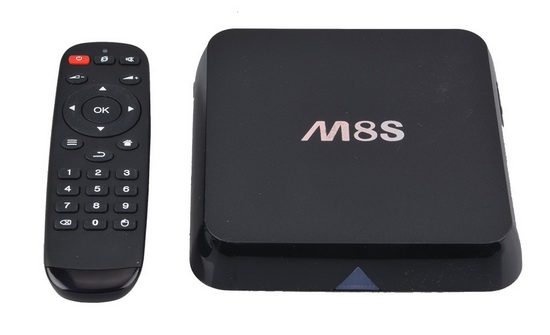
Download latest Android KitKat 4.4.2 stock firmware for M8S TV Box from here or here. Download previous firmware from here.
Firmware details
Archive: M8S 4K KODI Amlogic S812 latest 4.4 fw
Model: M8S TV Box
Image file size: 1.23 GB
Platform: Amlogic S812
Image: M8S_aml_upgrade_package_16.0_20160229.img / n200C-ota-20160229.zip
Build number: n200C-user 4.4.2 KOT49H 20160229 test-keys
Caution: Please do not update firmware unless you know what you are doing, you really want it or it is absolutely necessary. Firmware updates may occasionally have bad results, like bricking your device, temporarily or permanently. The firmware update process is done entirely at your own risk. Before attempting to update the firmware, back up your data.
Did this article help you? If so, please tell me in a comment what do you think about it.


Does anyone know if this update still works with the Google Tv Remote?
The January update for the M8S+ doesn’t work with Google Tv Remote
I’m having a problem when you put the Arabic language and the device is running the top menu disappear and also tape the bottom disappears
Please Help
Please can someone explain how to upgrade this tvbox?
my tvbox is stuck on logo m8s , i need to flash firmware from recovery or something else. please provide relevant steps to do it.
Max I have solved my amlogix box recently u need amlogic tool to do that. or write in google “amlogic-how-tos” you gonna find everything u need on the first pages
Max you need to install TWRP then you can get this firmware running
Try this: https://drive.google.com/folderview?id=0B2IOnnsyBQWceVNMWDNCenpYMmM&usp=sharing
Put it on an sd card and use the AV port method to boot into TWRP
I have noticed with this firmware it only recognises 782mb ram in CPUZ/Kodi
So, I downloaded the files but I don’t know what to do next. Do I copy the files to a SD card and use system update? Please help me
anyone knows if this one can be put on a m8s+
Hi guys, do wewe have root acces after updating firmware ? I have a OTT m8s s812
Regards
Hi guys….
When I extracted I get 2 files…
a .zip and a .img…
What is the img file used for and is it a duplicate of the .zip just in a diff format for say… burning to a USB?
Both file sizes are very similar.
Please help thanks!
The .img file is usually used to be flashed from PC, the .zip file is flashed from SD card or internal storage.
dont download this to your m8s. wifi does not work after flashing.
hi Gary.
can you share for me twrp recovery for m8s.
model n200c.
your link on top was die.
please help me.
thank.
can you share for me twrp recovery for m8s.
model n200c.
I have error [0x10105002]Romcode/Initialize DDR/Read initialize status/USB Control setup error ,…
M8S ott tv box
Hey Dave, I had the same problem using USB Burning Tool where firmware loading failed at 3%. What worked for me was to keep the reset button pressed while uploading the firmware, at least past the 6% mark. Give this a shot.
ION, I am looking for the original firmware and ROM for my M8S (Armlogic S812 AP6330 2GB RAM Mali 450 GPU Quadcore. The versions I have found keep freezing while running Kodi 🙁
Hi, I need firmware for M8S with Allwinner H3 SoC. I can’t find firmware. More informations about that box:
Allwinner H3
ARM Quad-Core Cortex-A7 at 1.2GHz
1GB RAM
8GB NAND FLASH
Mali-400 MP
Android 4.4.2
dolphin-p1
I tried firmwares for Zidoo X1 and Beelink X2, it will boot from SD, but when I try to flash with Phoenix Suite it gives error and not start to flash it. Please help.
vandal savage u are a noob
can it be that u have another chipset
this is for kot49h chipset
it can be that ur m8s have this chipset (bcm 4335)
try this firmware then your wifi will work again
http://chinagadgetsreviews.com/download-android-kitkat-4-4-2-stock-firmware-m8s-tv-box.html
por favor firmiware m8s allwinner h3
kernel 3.4.39
nand flash biwin
firmware v1.0.1
olaaa me puden ayudar porfabor USB_Burning_Tool mesale error [0x10103003]Romcode/Initialize DDR/Download buffer/USB transfer error
Max I have solved my amlogix box recently u need amlogic tool to do that. or write in google “amlogic-how-tos” you gonna find everything u need on the first pages
looking for a 5.1 for ro.build.display.id=M8S.BCM4335.201604071732
any help please
Archive: M8S 4K KODI Amlogic S812 latest 4.4 fw