
You can use Amlogic USB Burning Tool to flash firmwares from a Windows PC to Android devices powered by Amlogic processors.
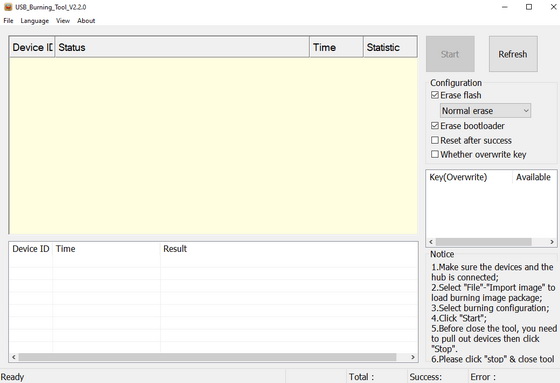
Download Amlogic USB Burning Tool v2.2.0 from here, here or here. Download Amlogic USB Burning Tool v2.1.710 from here. Download Amlogic USB Burning Tool v2.1.7.0 from here. Download previous version 2.1.6 from here. Download Amlogic USB Burning Tool v2.0.5.15 from here.
How to use Amlogic USB Burning Tool
1. Download Amlogic_USB_Burning_Tool_v2.2.0 (8.02 MB).
2. Extract the archive and run Amlogic USB Burning Tool v2.2.0.exe file to install the tool.
3. Start the USB_Burning_Tool.
4. Click on File->Import image and select your specific .img firmware for your Amlogic device.
5. Make sure that your Amlogic device is powered off, with the USB OTG port connected to your PC. Use a toothpick to press the recovery button, and power the device. The USB burning tool should automatically detect your device.
6. Now click on the ‘Start’ button button to proceed with the firmware update which should last several minutes.
Follow this video tutorial for more help.
Main
“Device ID” shows the related ports connected to hub. HUBx-4 means port #4. X shows the scanned hub number in sequence when scanning the USB devices. It is not a fixed value.
Connect Device
Before start burning, the devices need to be well connected. First power on SSK HUB, connect HUB to USB port of PC and enable the HUB ports which has platform connected. If it shows devices is successfully connected, the corresponding LED of the port will turn green and in the main interface, the status of the related port under device ID will show “Connect success”.
Load the Image
Select and load the image file to be burned from the menu “File” – “Import Image”. It is also possible to choose the recent used image files through “Recent files”,default verify the import image(you can choose not check).
Burn
Click “Start” button to start the image burning. During the process, column “status” will show the percentage of the progress and column “time” shows the time burning has used.
Finish Burning
After finish burning, column “Status” shows light green when successfully. Otherwise it shows red. Column “Statistic” represents “number of failure/Total burning number” of the current port”.
At the bottom-right corner, it shows the statistics of all the ports. “Total“ shows the total number of burned devices , “Success” shows the number of success and “Error” shows the number of failure. If re-burning is needed, please re-plug the device and the tool will start to burn automatically.
Changelog
V2.1.6
1. Improve the number of bytes read at a time
2. Improve the processing of Secureboot
V2.1.5
1. Support chip 905D2 new process
2. Increase the DDR Size in the Platform.conf configuration and determine the size of the downloaded data according to the size, compatible with the old chip.
V2.1.3
1. Change the MAC display problem when burning, and increase the support for BT, Wifi display
V2.1.2
1. Removed the underlying multi-usb_reap_async_nocancel try read, multiple asynchronous read process initiated
2. Update the library
3. The language of the version is saved, and the default tool version is selected according to the user’s default installation language
V2.1.1
Increase the bottom layer read reads when writing a partition
2. Resolve bugs that show success after some commands fail
V2.1.0
1.Key optimization version, burning tool and KeysProvider linkage modification, increase the reporting mechanism of burning Key results, reduce the rollback interface
2. The tool does not save the key independently, and the number of keys is managed by the KeysProvider.
3. Update KeysProvider.dll, add configuration file, user can specify Key path, configurable Key type, convenient to increase support for custom Key
4 tools can be individually configured to overwrite each key
5. Optional image verification configuration, setting whether to check the import image
V2.0.10
1 increase the new process of GXL platform, compatible with the old process
2 increase BurnCfgUI.ini used to control the programming of the UI
3. Increase Uboot stage crypto chip judgment
4. Update KeysProvider.dll
5. Update the language library
V2.0.9
1 support encryption dtb burning
V2.0.8
1.keysprovider.dll update
2 increase Font.ini used to adjust the font of the grid
Did this article help you? If so, please tell me in a comment what do you think about it.
Don’t miss any of our future video tutorials, follow us on Youtube. Like us on Facebook. Add us in your circles on Google+. Watch our photo albums on Flickr. Subscribe now to our newsletter.




Please guide me on how to reactivate my gtcombo box that has corrupt memory.
Thanks
plase
Help me Mqpro softwear lodear tool