Download Android KitKat 4.4.2 stock firmware for Acemax M8S TV Box


This firmware is for Acemax M8S TV Box with Amlogic S812 CPU
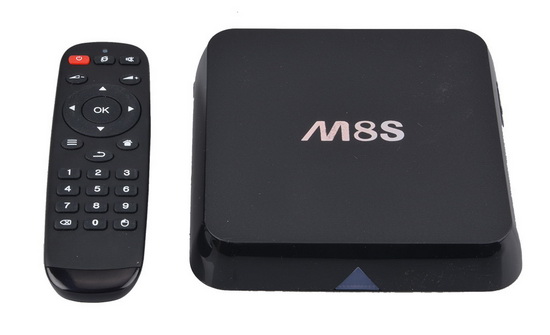
Acema-M8S


Download latest Android KitKat 4.4.2 stock firmware for Acemax M8S TV Box from here or here.

Firmware details
Archive: M8S_0313_0602 kodi 14.2
Model: Acemax M8S TV Box
Image file size: 374 MB
Platform: Amlogic S812
Image: M8S-ota-20150602.zip
Build number: M8S-user 4.4.2 KOT49H 20150602 test-keys

Caution: Please do not update firmware unless you know what you are doing, you really want it or it is absolutely necessary. Firmware updates may occasionally have bad results, like bricking your device, temporarily or permanently. The firmware update process is done entirely at your own risk. Before attempting to update the firmware, back up your data.

Did this article help you? If so, please tell me in a comment what do you think about it.


  1. Atra says:

    all ok but internet off automatically every 10-15 minutes

  2. Arda says:

    how can i find image rom for m8s? thanks.

  3. FLDS says:

    Hello, M8S android Amlogic S812 Quad Core is totally bricked. The unit will not power up.
    Is there any solution to this, I would like to revive the unit.
    Thanks
    FLDS

Post a comment


Let’s be honest — the so-called entry-level smartphone market has gotten ridiculously competitive. High refresh-rate screens, massive batteries, ultra-thin designs — it …

Nov 11, 2025

We’ve been overwhelmed by the excitement surrounding the launch of our new flagship rugged tablet, the Armor Pad 5 Series, which includes …

Nov 11, 2025

In a world where technology evolves faster each year, innovation becomes essential to stay ahead. The mobile gaming industry has been through …

Nov 11, 2025

ASUS IoT announced its strategic partnership with Algorized, a US-based software innovator specializing in advanced sensing and perception technologies that enhance safety and …

Nov 11, 2025

DUNU has officially revealed its latest project, introducing the DUNU DN242. It’s the latest high-fidelity in-ear monitor inspired by the fearless Chinese …

Nov 11, 2025

Shanling EH3 New Firmware Update v1.8, download it from Google Drive.   Changes and fixes on EH3 – Added Playback memory function …

Nov 11, 2025

Best Deal Alert! You can buy BENFEI 6-in-1 USB C Hub with M.2 NVMe SSD Enclosure from Amazon.com for only $25.99.  Hurry up, …

Nov 11, 2025

In a world where cables are becoming relics of the past, the EZCast Ultra U2 stands out as a sleek, high-performance wireless …

Nov 11, 2025

Are you ready to own a smartphone that defies limits? The Oukitel WP60 isn’t just another rugged phone — it’s a cyberpunk …

Nov 11, 2025

We’ve achieved our Indiegogo goal — all thanks to your support! Here’s a quick update, plus the early-bird gift, our new video, …

Nov 11, 2025

UGOOS officially unveils the long-awaited SK4 TV Box, an affordable yet powerful Android 14 device that brings premium performance and cinematic visuals …

Nov 11, 2025

MINISFORUM, known for pushing the limits of compact computing, has just unveiled its latest innovation — the MS-R1, the world’s first ARM-based …

Nov 11, 2025

Fatal error: Uncaught wfWAFStorageFileException: Unable to save temporary file for atomic writing. in /home/r33217chin/public_html/wp-content/plugins/wordfence/vendor/wordfence/wf-waf/src/lib/storage/file.php:34 Stack trace: #0 /home/r33217chin/public_html/wp-content/plugins/wordfence/vendor/wordfence/wf-waf/src/lib/storage/file.php(658): wfWAFStorageFile::atomicFilePutContents() #1 [internal function]: wfWAFStorageFile->saveConfig() #2 {main} thrown in /home/r33217chin/public_html/wp-content/plugins/wordfence/vendor/wordfence/wf-waf/src/lib/storage/file.php on line 34