
Ugoos Launcher, an amazing way to control your Android TV Box
Soon our team will show a brand new solution for android environment. Next month we will announce Ugoos launcher. Product built basically for TV Boxes, so main purpose of a new launcher is to offer new way in performing TV boxes’ content, raise up usability to a new level.

We try to find a balance between most useful android features, and advantages that remote controllers offer.Parameters and buttons, which located out of remote controller focus can be used only with air mouse pointer, so one of the tasks for our launcher is make this features more available and user-friendly.
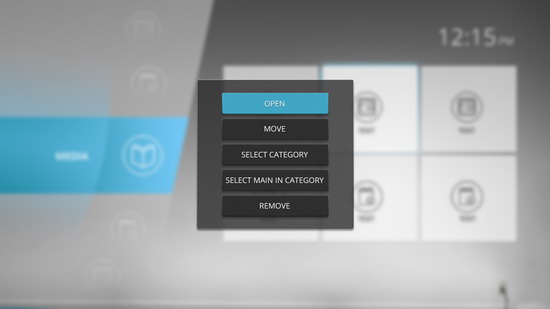
For example some obvious things such as changing wallpaper cannot be done using RC without air mouse mode turned on or just without mouse-type additional controller. Moving, changing creating and deleting app icons is a hard task for RC too. So launcher let customize these features in more convenient way.
On the top of the start menu we have time indication, charge percentage (if use it for tablets), external devices indicator and Wi-Fi icon. Standard bars on the top and bottom are hidden.
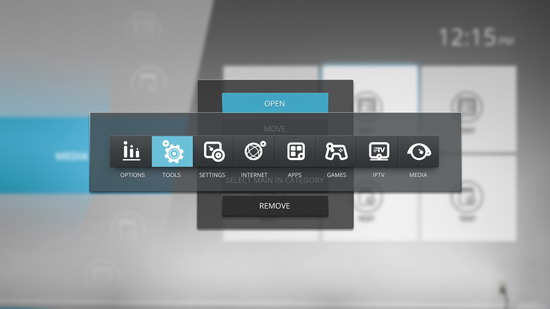
Start menu shows us a category slider from the left and app icons in the category from the right. Slider moves up and down and has 8 categories which has their own original icons: Internet, Iptv, Media, Apps, Games, Tools, Settings & Options. In every category can be chosen one default app. This app can be activated by one click on slider menu with focus staying on slider.
At first start all the pre-installed apps already divided on their categories. Besides, launcher has information about more than one hundred most frequently used apps, so when user will install one of them, it will appear in appropriate category. If launcher doesn’t have any information about app, then puts it in “apps” category, so user can move it to another category as well as every installed app before. All this manipulations will be able to activate with RC navigation buttons.
Our launcher using own tile type scheme and let you customize not only position of icons but size and amount of separate tiles on one screen view. All these parameters can be found in a slider options menu.
So you can change amount of rows and columns in app icons net. These parameters are limited by 5 elements in a row and column as well. Next parameter can change transparency rate for tiles in menu. 255 is a maximum level and tiles become totally transparent. Another parameter control screensaver appearing time. One more parameter allows you to change interval between two neighbor tiles. Last parameter allows you easily to change background wallpaper or get back to system wallpaper if you want to use you own picture.
Working process is almost finished so we will release first version of launcher in next few weeks. If you have some suggestions feel free to tell us!

Did this article help you? If so, please tell me in a comment what do you think about it.
Don’t miss any of our future video tutorials, follow us on Youtube. Like us on Facebook. Add us in your circles on Google+. Watch our photo albums on Flickr. Subscribe now to our newsletter. Biggest firmware download center.















