
You can now buy NO.1 S3 smartwatch from Gearbest.com for only $56.99 with free shipping. Visit product page here.
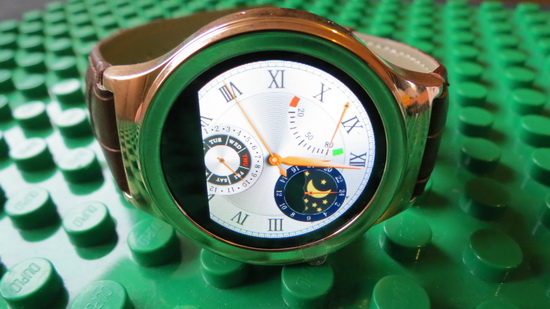
The watch features an Anti-sweat matte surface treatment, ergonomic convex design, Metal plating frame, luxury and elegant design. The smartwatch phone is strong and durable and wearing is more comfortable. It comes in three different colours, which includes; black, brown and white. Each comes with an elegant leather band as well. The smart watch features a nanometer tempered glass screen. This help ensure that the screen doesn’t get scratched. The case is made out of corrosion-resistant stainless steel. Inside the watch, there’s a slot for a micro SIM card so that you can make phone calls, as well as a microSD card slot for memory. More details about No.1 S3 smartwatch you’ll find here.
FunDo SmartDevice app
Attention:
1. The application needs to work with Mediatek (MTK) wearable device (e.g. based MTK2502 chip wearable products).
2. The application can connect with wearable product through SPP mode or GATT (BLE) mode. (depends on your wearable device HW capability)
3. The GATT mode can work normally need below two conditions and BLE is connected.
1) The Android platform is equal or higher Android 4.3 (API 18).
2) The hardware of smart phone need support BLE.
The application can support below functions:
1. The application can scan wearable devices in SPP or GATT mode.
2. The application can install or uninstall Linkit app to watch through “My Applications” item.
E.g. Yahoo Weather/Digit clock/Codoon app
3. The application can listen and push Smart Phone notification to watch.
The application can parse the notification attributes : action/group/big text view/page.
And watch and sync operation with phone.
4. The application can edit contact(name and number) or other attributes for making SOS call in wearable device.
5. The application can find the wearable device through “Find device”.
6. The application will notify alert when the distance between phone and wearable device is unmatched the set value.
7. The application can push smart phone inbox message to wearable device through MAP feature.
8. The application integrate with Google fit and can view fitness data in Google fit application after login in Google account.
E.g. step/calorie/distance/heart rate
9. The application can show the battery captivity of wearable device.
10. The application can send firmware data to wearable device to do upgrade action.
11. The application can push incoming call to wearable device when Hands-Free Profile(HFP) is disable.
12. The application can sync time/zone/time format(12/24 hour format) to wearable device.
13. The application support auto connect.
14. The application can modify the connected device’s name through “Change Name” item.
15. The application can show the information of the connected device through “Device info” item.
Below functions need start operation on watch port:
1. Remote capture
The watch can preview and capture a picture through open Smart Phone camera simultaneously.
2. BT music
You can control the smart phone music media player to play/pause/pre/next/adjust volume.
Release time: 2015/09/16 17:56
7. Magic Voice: None, Men, Women, Child.


About Gearbest
GearBest is more than just a shopping site, it’s designed for gadget lovers by gadget lovers. We have a passion for all kinds of tech from retro style to the absolute cutting edge. At GearBest, our company vision is simple: to become the premier online electronics seller by providing an unparalleled selection of the very best gadgets, an unbeatable shopping experience, prompt shipping and exceptional customer service that exceeds expectations. For us, the customer is always king. Our total commitment to customers empowers us to work closely together with every customer. When you buy from us, the sale is not complete when we ship your order, it is complete when you are totally satisfied.
Did this article help you? If so, please tell me in a comment what do you think about it.
Don’t miss any of our future video tutorials, follow us on Youtube. Like us on Facebook. Add us in your circles on Google+. Watch our photo albums on Flickr. Subscribe now to our newsletter.


i can not connected with Samsung headset blouthooth,,,,why its not connected with headset ?