
How to Update? Long – press the “turbo” button to open the OneXConsole. Click the settings button in the upper – right corner. Select “check update” to automatically detect updates.
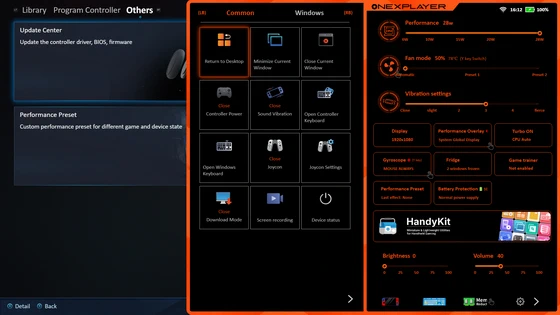
🚀 New Features & Improvements
– HandyKit now supports screen recording.
– HandyKit adds a touch screen toggle.
– HandyKit includes quick access options for shutdown, sleep, and hibernation.
– CPU max state setting has been changed to CPU max frequency setting (synchronized with performance preset configurations).
– Simplified CPU core locking settings (synchronized with performance preset configurations).
– Updated RyzenAdj version.
– Intel-based 258v models now use a new power management method.
🐛 Bug Fixes
– Fixed an issue where the minimize and close window functions in HandyKit occasionally failed.
– Fixed incorrect memory usage display in Freezer.
– Resolved an issue where macro programming loop execution behaved abnormally.
⚙️ Updates & Adjustments
– Adjusted permissions for launching third-party applications.
Did this article help you? If so, please tell me in a comment what do you think about it.
Don’t miss any of our future video tutorials, follow us on Youtube. Like us on Facebook. Join our Best Deals Telegram Channel. Join our Android TV Box Firmware Updates Telegram Channel. Subscribe now to our newsletter. If you need Tech Reviewer or Youtube Influencer read this. Donate now here to support CGR Team!


