Be(a)st Deal Alert! The powerful Beelink ME Pro 4-Bay NAS Mini PC is gearing up for launch! Get ready to upgrade your storage setup with an innovative modular design and smart features. Sign up now for early access and an exclusive 30% launch discount! Don’t miss out! Grab Your Early Access Deal Here!
Meet Beelink ME Pro 4-Bay NAS Mini PC with FygoOS
The Beelink ME Pro 4-Bay represents an interesting change of direction for a company best known for compact mini PCs. Instead of simply placing conventional computer hardware inside another small enclosure, Beelink has designed a hybrid system that combines the flexibility of a mini PC with the storage capacity and continuous availability expected from a dedicated NAS. My review unit arrived with an Intel Pentium Silver J5005 processor, 8GB of DDR4 memory and a 128GB SSD dedicated to FygoOS. This is not the most powerful configuration in the ME Pro family, but it is arguably one of the most logical for everyday network storage. The J5005 is a low-power quad-core processor designed for efficient, always-on operation rather than demanding desktop computing. It provides enough performance for file management, backups, media access, downloads, private cloud services and other typical home NAS workloads without unnecessarily increasing power consumption. The defining feature is the four-bay storage design. The removable trays support both 3.5-inch and 2.5-inch SATA drives, allowing the ME Pro to accommodate high-capacity mechanical hard drives, quieter SATA SSDs or a mixture of both. Additional M.2 storage gives the platform even more flexibility, while the two 2.5GbE network ports provide significantly more bandwidth than standard Gigabit Ethernet. FygoOS brings all these components together through a modern browser-based interface and a companion Android application. The result is a compact private-cloud platform designed for photo backup, media storage, family file sharing, remote access and more advanced services such as Docker and virtual machines.
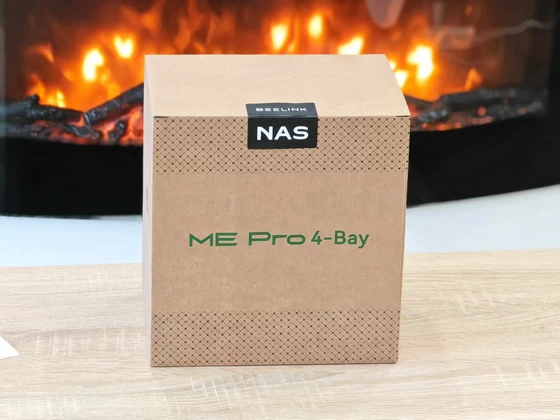
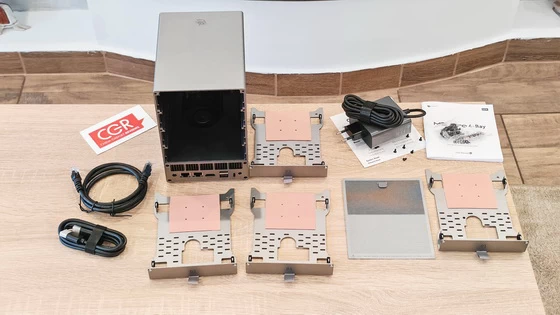
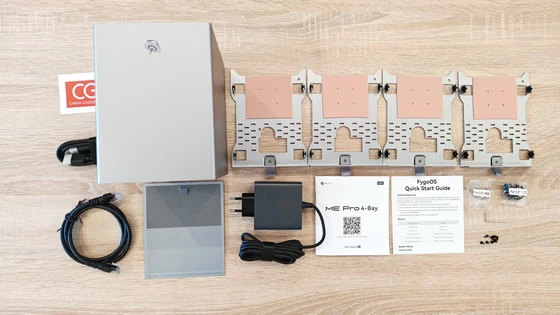
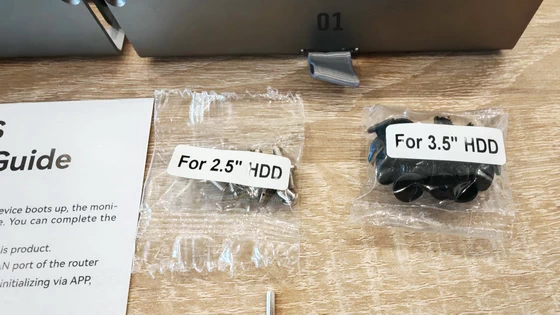
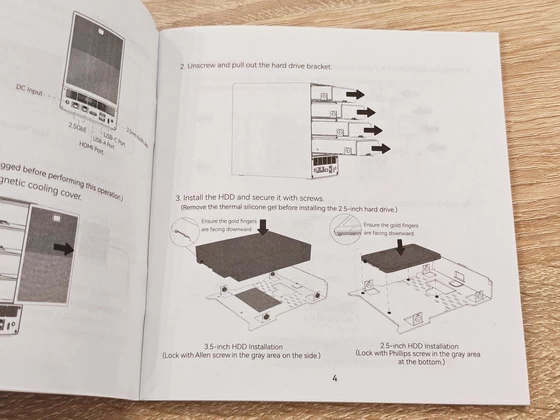
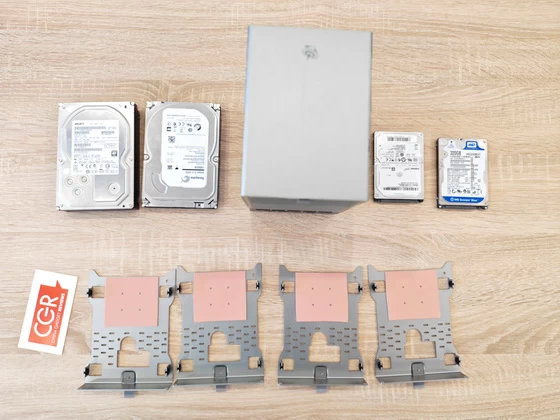
The Beelink ME Pro arrived in a large, protective package, with every major component securely positioned to prevent movement during transport. The presentation is functional and professional, which is particularly important for a product containing removable drive mechanisms and a relatively substantial metal enclosure. Inside the package, I found the Beelink ME Pro itself, its external power adapter, an HDMI cable, an Ethernet cable, printed documentation, the FygoOS Quick Start Guide, a screwdriver and the screws required for installing different types of storage drives. Beelink also includes four removable metal drive trays. These trays support conventional 3.5-inch hard drives as well as smaller 2.5-inch drives. The necessary mounting points are clearly marked, while the manual explains which screws should be used for each drive format. Soft contact areas on the trays help isolate the drives from the metal frame and should reduce the transmission of vibration through the enclosure. The inclusion of an HDMI cable is useful during the initial setup or troubleshooting. FygoOS can display the device’s assigned IP address on a connected monitor, although users who perform the initialization through the mobile application may not need to connect a display at all. Overall, the package provides everything required to begin the installation apart from the storage drives themselves. I particularly appreciate the inclusion of the screwdriver and mounting hardware because it makes the system genuinely ready for configuration straight out of the box.
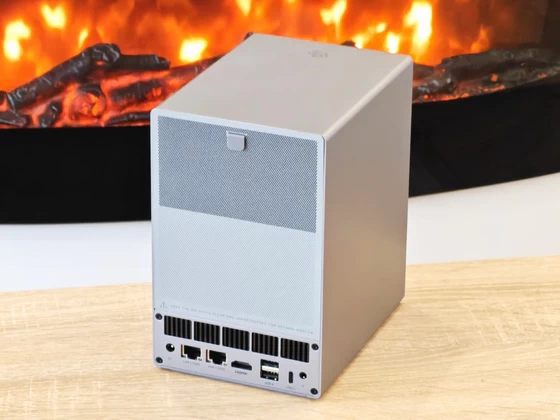
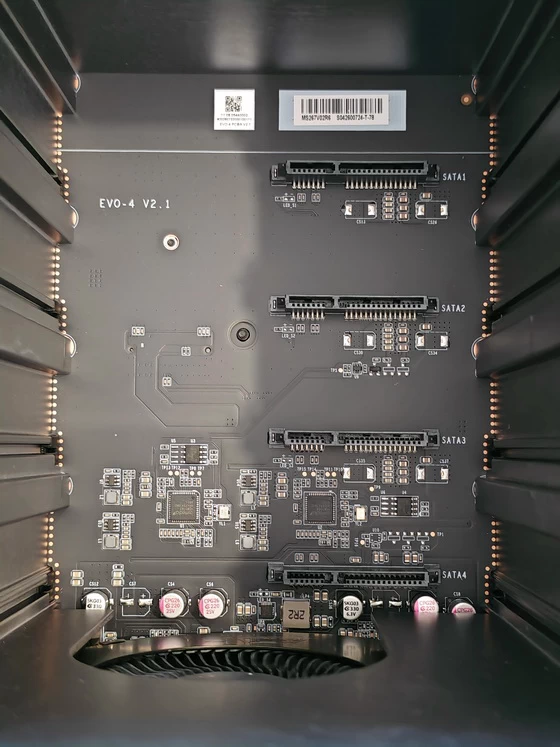
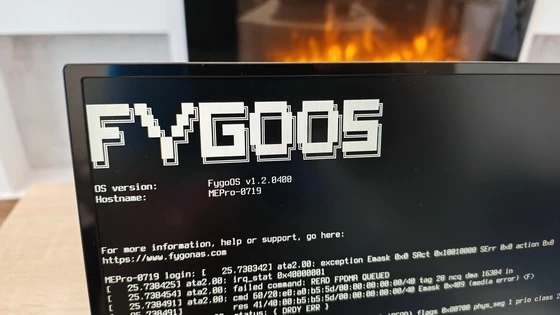
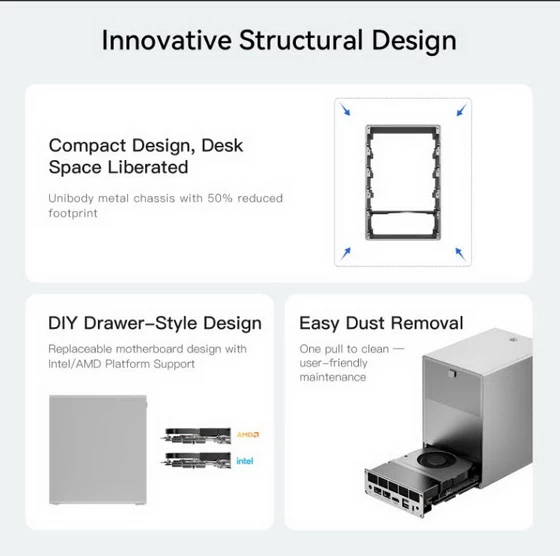
Installing the drives is a straightforward process, although it should always be completed while the device is powered off and disconnected from the mains. The rear magnetic cooling cover can be removed using its silicone handle, revealing the four individual storage trays. Each tray is secured independently and slides out of the chassis once released. I tested the mechanism with both large 3.5-inch hard drives and compact 2.5-inch drives. The trays feel much more substantial than lightweight plastic caddies, and their open metal design allows air to circulate around the installed storage. Drives are secured with screws rather than relying on a completely tool-free mechanism, but this provides a firmer installation and reduces unwanted movement. Once the drives are installed and the trays returned to the enclosure, the magnetic rear panel hides the mounting system and restores the clean appearance of the NAS. It can also be removed quickly when the cooling area needs to be cleaned. Initial setup is simple. I connected the ME Pro to my router using the supplied Ethernet cable and then applied power. FygoOS booted from the internal 128GB SSD and displayed the IP address required to access its web interface. The same initialization can be completed from the Fygo mobile application, making a monitor optional rather than essential. The Intel J5005 is not intended for heavy workstation workloads, but its four cores are well suited to normal NAS duties. During navigation, file management and system configuration, the interface felt responsive. The supplied 8GB of memory also provides reasonable headroom for background services and several lightweight applications. The dual 2.5GbE interfaces are a major advantage over entry-level NAS products limited to Gigabit networking. Reaching their full potential naturally requires a compatible router, switch and client computer, but the additional bandwidth is valuable when moving large video files, backing up multiple computers or serving several devices simultaneously.
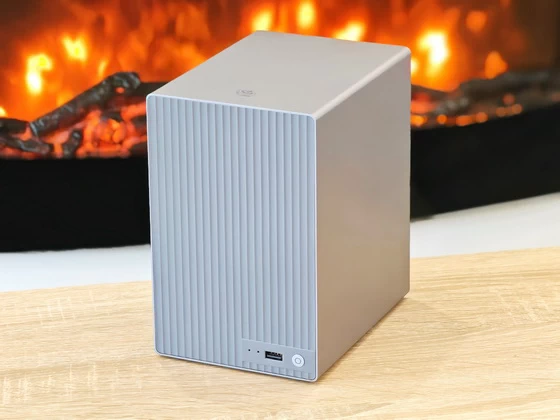
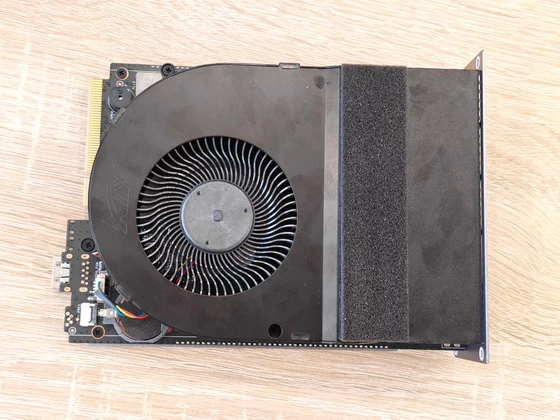
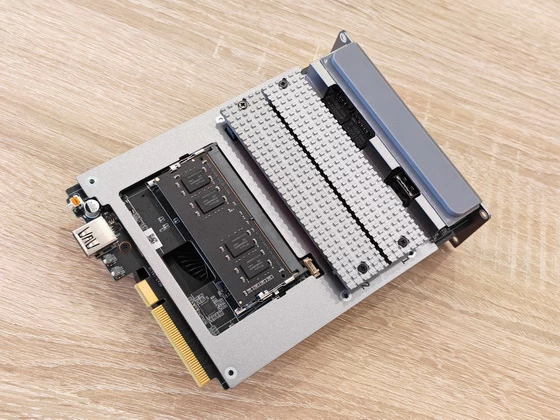
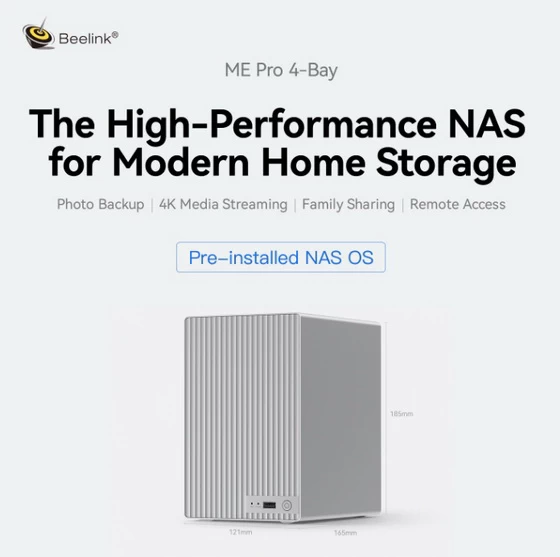
The ME Pro feels reassuringly solid. Its tall, rectangular enclosure uses a metal construction that gives the product a more premium and durable character than a typical plastic NAS. Vertical grooves dominate the exterior, giving the unit a clean industrial appearance while increasing the surface area available for heat dissipation. Despite supporting four physical storage drives, the enclosure occupies relatively little desk space. Beelink has used the available vertical space intelligently, arranging the drive bays above the removable motherboard module instead of spreading the hardware across a wide desktop footprint. Cooling is handled through a combination of the metal enclosure, ventilation openings and an active internal fan. The drive trays remain separated sufficiently for airflow to pass around them, while the removable rear cover makes routine dust removal more convenient. Mechanical hard drives will inevitably introduce some noise and vibration, especially when several are active simultaneously, but the sturdy chassis and firmly secured trays help prevent the enclosure from feeling hollow or excessively resonant. Another particularly interesting feature is the drawer-style motherboard design. The computer section can be removed separately from the main storage enclosure, providing easier access to the memory, M.2 storage and internal components. It also creates the possibility of future motherboard upgrades without discarding the entire chassis and drive system. This modular approach makes the ME Pro feel less disposable than many compact NAS appliances with permanently integrated processing hardware.
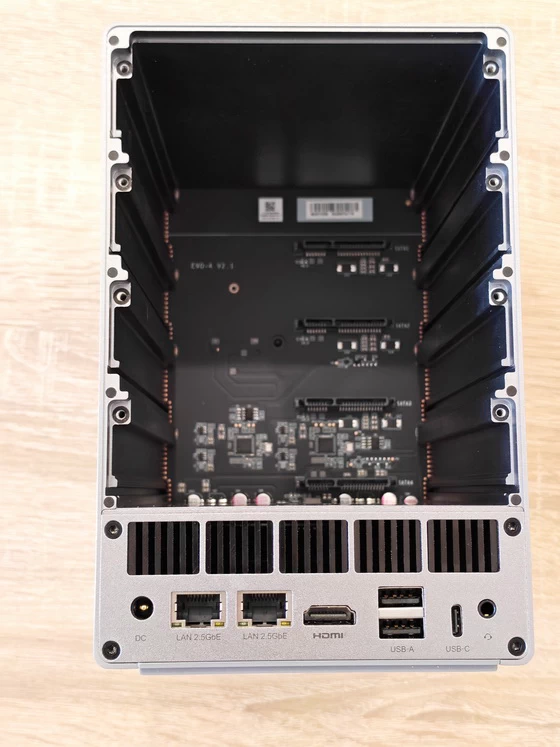
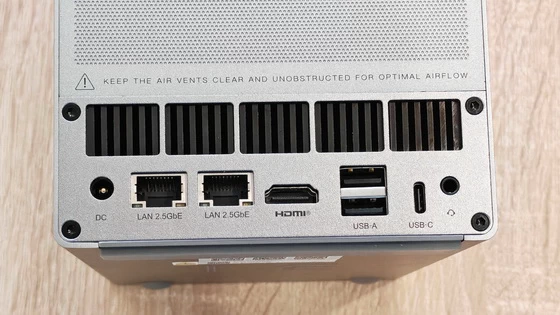
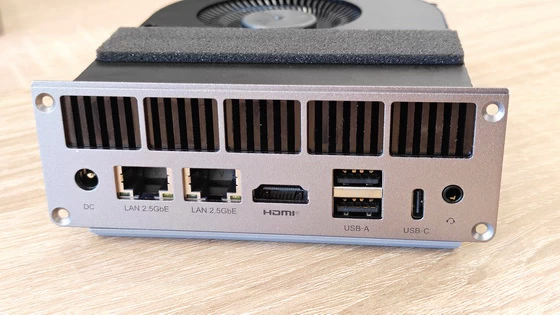
Visually, the Beelink ME Pro avoids the overly technical appearance of conventional business NAS hardware. The silver-grey finish, rounded corners and vertically textured panels allow it to fit naturally into a modern office or home entertainment environment. The power button is discreetly positioned near the lower edge of the enclosure. The ports and network connections are concentrated on the motherboard module, keeping cables organised around the lower section of the device. The review configuration includes two 2.5GbE LAN ports, providing both high-speed networking and useful flexibility. The second connection could be employed for separate network segments, redundancy or other advanced configurations supported by the operating environment. HDMI output is available for installation, diagnostics or direct system access, while USB ports allow external drives and accessories to be connected. A small reset opening provides access to FygoOS recovery functions. Holding the reset button briefly resets the network configuration, while a longer press initiates a factory system reset. Importantly, the reset process clears system settings, users and installed applications but is designed to retain data stored outside the system partition. Nevertheless, a separate backup should always exist before performing any recovery operation. The four-bay arrangement is the centrepiece of the design. Supporting both 3.5-inch and 2.5-inch drives gives owners considerable freedom when planning capacity, noise levels and cost. Large hard drives remain the most economical option for extensive photo, video and backup libraries, whereas SATA SSDs can provide silent operation and faster access for frequently used data.
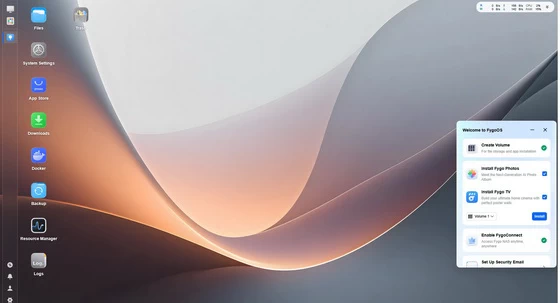
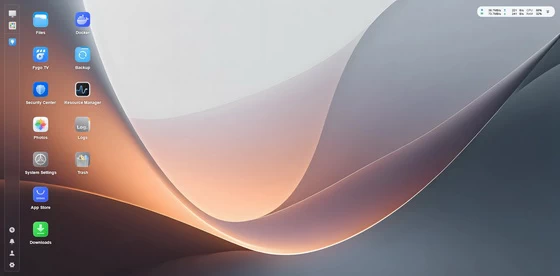
FygoOS transforms the ME Pro from a compact storage computer into a complete NAS platform. The operating system runs on Intel x86, AMD x86 and several ARM-based platforms, while supporting ext4, Btrfs and ZFS file systems. It also offers simplified RAID creation, allowing storage redundancy to be configured without requiring extensive server administration experience. The browser interface immediately feels familiar. Instead of presenting users with a collection of dense administration pages, FygoOS uses a desktop-style environment with recognisable application icons and a persistent navigation panel. The interface is bright, clean and logically organised, making the system approachable even for someone configuring a NAS for the first time. The homepage provides quick access to Files, Downloads, Backup, System Settings, Resource Manager, Logs, App Center, Docker, Transfer Tasks and additional installed services. This layout reduces the number of steps required to reach common functions and makes FygoOS feel closer to a desktop operating system than a traditional router-style control panel. The storage management section provides a visual overview of installed drives, available capacity, storage pools and system health. Drives can be identified and prepared before creating the required storage configuration. FygoOS officially supports RAID creation through a simplified process, alongside Btrfs functionality such as snapshots and data-integrity protection. RAID improves availability when a drive fails, although it should never be treated as a replacement for an independent backup.
Resource Manager offers a clear view of CPU, memory, disk and network activity. This is especially useful with the J5005 configuration because it allows users to see how additional applications affect the available resources. The processor is perfectly adequate for file services and lightweight containers, but the monitoring tools make it easier to avoid overloading it with too many simultaneous tasks. User accounts, shared folders, network services and access permissions are grouped into logical menus. Windows ACL support is particularly useful in homes and small offices where different users require separate permissions for private and shared data. Fygo Photos is one of the platform’s most attractive features. It creates a private alternative to public photo-cloud services, with automatic phone backups, timeline browsing, albums and locally processed AI functions. FygoOS advertises text-based photo searches, smart categories and facial recognition, with the analysis performed on the NAS rather than sending the entire library to an external cloud. It also supports Live Photos, Motion Photos, 360-degree media and RAW files. Fygo Photos and local AI features
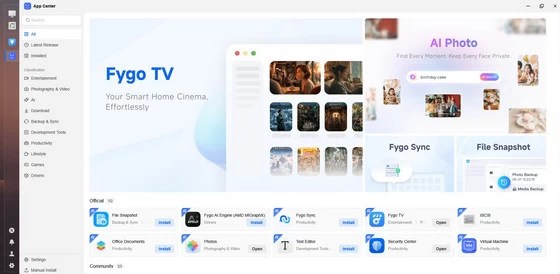
The platform extends beyond basic storage. Fygo Sync keeps files synchronized between devices, while the Backup application supports multiple backup destinations. Docker opens the door to self-hosted services, and virtual-machine support is available for users with sufficiently powerful hardware. Downloads can be managed directly from the NAS, iSCSI can expose storage to a computer as a local disk, and compatible Office documents can be viewed through the browser. Remote access can be handled through Fygo Connect, DDNS or accelerated peer-to-peer connectivity. The objective is to make personal files available away from home without requiring every user to understand complex networking. As with any remotely accessible NAS, strong passwords, current software and carefully managed user permissions remain essential.
The Fygo mobile application successfully condenses the most important elements of the desktop interface into a practical smartphone dashboard. After connecting the application to the ME Pro, I could see the device name and operational status directly from the home screen. The Android interface provides shortcuts for Files, Downloads, Backup, System Settings, Resource Manager, Logs, App Center, Docker and Transfer Tasks. It also displays live resource information, including CPU use, memory consumption, network activity, drive status and temperature information. This makes it possible to perform a quick health check without opening a browser on a PC. A dedicated device-information page identifies the NAS as a Beelink ME Pro 4 and displays the device name, identifier, serial number and FygoOS licence information. Restart and shutdown controls are available remotely, which is convenient when performing maintenance or changing installed hardware. File browsing works well on the smaller display, and the bottom navigation provides immediate access to the home dashboard, stored files and download management. The interface retains the dark visual style expected from a modern mobile utility and remains readable without overwhelming the screen with technical information. For everyday use, the mobile photo-backup function may be even more important than system administration. The application can move photos and videos from the phone to personal storage on the ME Pro, reducing dependence on paid cloud capacity. Remote access also means that previously backed-up files remain available when away from the local network. The app does not completely replace the larger web interface when creating storage pools, managing detailed permissions or configuring advanced services. However, for uploads, downloads, file access, photo protection and basic monitoring, it provides a convenient and surprisingly complete companion experience.
The Beelink ME Pro 4-Bay is a compelling combination of compact PC engineering and practical network storage. Its strongest qualities are not based on raw processing performance but on flexibility: four removable SATA bays, support for 3.5-inch and 2.5-inch drives, M.2 storage, dual 2.5GbE networking and an unusually serviceable modular motherboard design. The Intel J5005, 8GB RAM and 128GB SSD configuration is best suited to users who want an efficient home or small-office NAS rather than a high-performance virtualisation server. It is sufficiently responsive for centralized file storage, computer and phone backups, shared photo libraries, media access, download management and a sensible selection of lightweight services. Users planning extensive virtual machines, multiple demanding Docker workloads or intensive real-time media processing should consider one of the more powerful ME Pro configurations. FygoOS is central to the overall experience. Its desktop-style web interface makes the system accessible to newcomers, while Btrfs, ZFS, RAID, snapshots, Windows ACL, Docker, virtual machines, iSCSI and remote-access options provide room for more advanced use. The Android application complements it effectively by placing file access, mobile backup, system monitoring and power controls within easy reach.
I particularly appreciate that Beelink has not designed the ME Pro as another sealed appliance. The removable drive system, accessible internal hardware and drawer-style motherboard suggest a product intended to remain useful as storage requirements evolve. FygoOS is still a younger platform than the operating systems offered by the longest-established NAS manufacturers, so continued software development, long-term updates and expansion of the application ecosystem will be important. Even so, the current interface already offers a strong selection of core features and an impressively approachable user experience. For families, content creators and small offices looking for a compact private cloud with considerable storage flexibility, the Beelink ME Pro 4-Bay is an innovative and highly promising solution. It succeeds in making local storage feel less intimidating while retaining the modularity and freedom that experienced users expect from a proper storage server.
Beelink ME Pro 4-Bay NAS Mini PC Ports
1 x Power On / Off button
1 x USB Type-A port – convenient for connecting a flash drive, portable storage device or other USB accessory
1 x System and drive-status LED indicators
1 x DC power input
2 × 2.5GbE RJ45 LAN ports – for high-speed networking, network separation or redundancy
1 x HDMI output – for initial setup, diagnostics or direct connection to a monitor
2 × USB Type-A ports
1 x USB Type-C port
1 x 3.5mm audio jack
1 x Recessed reset button/pinhole – for network or system recovery procedures
4 × SATA drive connections – compatible with 3.5-inch HDDs and 2.5-inch HDDs or SSDs
2 × M.2 SSD slots
The reviewed configuration includes a 128GB SSD for FygoOS
Beelink ME Pro 4-Bay NAS Mini PC Specs
Brand: Beelink
Model: ME Pro 4-Bay
Product type: Four-bay NAS and Mini PC hybrid
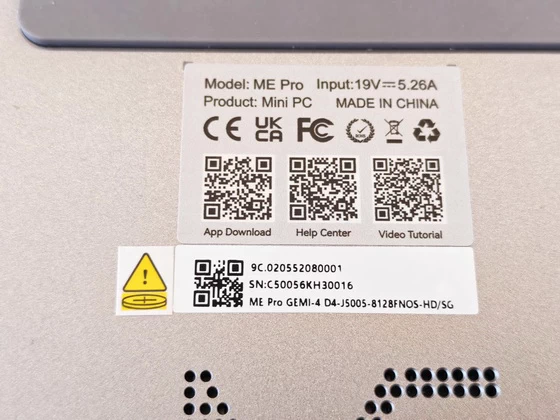
Reviewed configuration: Intel Pentium Silver J5005, 8GB RAM and 128GB system SSD
Operating system: FygoOS
Architecture: Intel x86
Primary applications: Private cloud, centralized storage, backups, photo management, media access, downloads, Docker and lightweight virtual machines
CPU: Intel Pentium Silver J5005
Architecture: Gemini Lake
Manufacturing process: 14nm
Cores: 4
Threads: 4
Base frequency: 1.50GHz
Maximum burst frequency: 2.80GHz
Cache: 4MB
TDP: 10W
Integrated graphics: Intel UHD Graphics 605
Installed memory: 8GB DDR4
Memory location: Removable drawer-style motherboard module
Upgrade access: Internal access through the removable motherboard section
Maximum supported capacity: 2 x drawer-style motherboard module
Installed system drive: 128GB SSD
Purpose: FygoOS installation and system applications
Additional SSD expansion: 2 × M.2 SSD slots
M.2 interface and supported sizes: Not confirmed in the supplied documentation
Main Storage
Drive bays: 4
Drive interface: SATA
Supported drive sizes: 3.5-inch and 2.5-inch
Supported drive types: SATA HDDs and SATA SSDs
Drive trays: Four removable metal trays
Installation method: Drives secured with screws
Mixed-drive support: HDD and SSD combinations supported
Advertised storage capacity: Up to 128TB in the documentation supplied for this configuration
Hot-swap support: Not confirmed; drives should be installed or removed while the system is powered off
Package Content
1 x Beelink ME Pro 4-Bay NAS Mini PC
4 × Removable HDD/SSD trays
1 x Magnetic rear ventilation cover
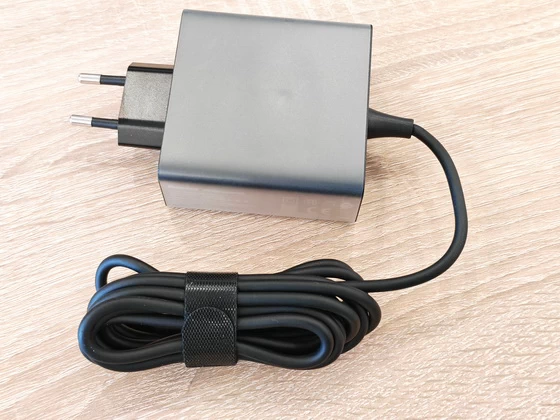
1 x Power adapter with EU plug
1 x Ethernet cable
1 x USB-C cable
1 x User manual
1 x FygoOS Quick Start Guide
1 x Set of mounting screws for 2.5-inch drives
1 x Set of mounting screws for 3.5-inch drives
1 x Allen key
1 x Retail packaging box
Storage drives are not included.
About Beelink. Beelink was established in 2014 in Shenzhen, China Futian, specializing in home entertainment equipment (DONGLE, BOX, remote control, game consoles, home cloud, one machine, MINI PC) product definition,development, production and sales. Our company own brand as “Beelink”. R & D The company has more than 20 front-line researchers, from the hardware circuitry, wiring, commissioning. into the upper layer driver and software application functionality implemented. BeeLink Brand philosophy: through management innovation, technological innovation and market innovation, and worldwide partners and customers to establish long-term stable cooperative relations, Andrews micro and you win the future.
For those unfamiliar with Beelink products, you can visit the Beelink website to view detail information:
Beelink official website: www.bee-link.com
Beelink order: azw.en.alibaba.com
Did this article help you? If so, please tell me in a comment what do you think about it.
Don’t miss any of our future video tutorials, follow us on Youtube. Like us on Facebook. Join our Best Deals Telegram Channel. Join our Android TV Box Firmware Updates Telegram Channel. Subscribe now to our newsletter. If you need Tech Reviewer or Youtube Influencer read this. Donate now here to support CGR Team!