
Download Amlogic Burn_Card_Maker v2.0.2
You can use Amlogic Burn Card Maker to flash firmwares from a micro SD card to Android devices powered by Amlogic processors.
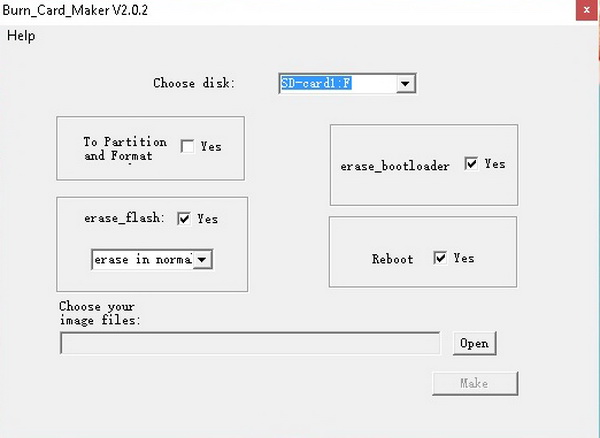
Download Amlogic Burn_Card_Maker v2.0.2 from here or here. You can also download Amlogic BootcardMaker from this article.
How to use Amlogic USB Burning Tool
1. Download Burn_Card_Maker工具 v2.0.2 (3.96 MB).
2. Extract the archive and run Burn_Card_Maker.exe file to run the tool.
3. Click on upper left chinese menu and choose second option, check ‘English Version’ and restart the application.
4. Choose disk then ‘Choose your image files’ to open image and select your specific .img firmware for your Amlogic device.
5. Press ‘Make’ button and wait to finish. Now insert the micro SD card in your Amlogic device and power on. You will be able to enter into recovery and the firmware will be flashed automatically. When the TV BOX reboots, remove the micro SD Card, this step is very important, wait 4-5 minutes and the update will completed.
Tool Options:
– To Partition and Format
– Erase Flash
– Erase Bootloader
– Reboot
Follow the below video tutorial for more help.


Did this article help you? If so, please tell me in a comment what do you think about it.
Don’t miss any of our future video tutorials, follow us on Youtube. Like us on Facebook. Join our Best Deals Telegram Channel. Join our Android TV Box Firmware Updates Telegram Channel. Subscribe now to our newsletter. If you need Tech Reviewer or Youtube Influencer read this. Donate now here to support CGR Team!


hi guys i ve jst tried the card methos with lolipop and now my mini ms8 is not even turning on what should i do?
ho scaricato il firmware e inserito la micro sd.pero non si avvia nulla da solo.il tv box resta in bootloop..debo tenre pemtu il tasto per avviarlo in recovery.se si per qundo tempo
my x96 tv box not work
muy buena aplicacion
muy bien
After so long time on searching or the good firmware i have found it here, and for this i have stop here to let the comment, i appreciate your’re work to make this video and all the step, i have folow the step with SD card and work perfect, im so happy, my box is now like a new.
For other people i have done this with MXq PRO 4K 64bit Amlogic S905
Thank you very very much’re time.
Greetings Danyel from Netherland.
I am glad to hear this, enjoy it, share is love!
after burning the SDcard, my mxq pro box does not upgrade automatically. It just enters the recovery and wait for something
update from sdcard can’t find any file
what am I doing wrong?
tutto ok
burn card maker stooped,not working
i realy need this
다운
i use this methode to flash my X92 2gb with atvxperience v2f but untick “ERASE BOOTLOADER” as describe on site, and work ,thanks
no comment
I have a X96s, after i install SuperSU, my device cannot boot up already, i have try all the method above, but non of them working, it seem like is a dead end for me. Any other suggestion how to restore everything again?
Hello guys, can help me, I have a problem with Amlogic USB Burning Tool, when try to recovery Always error (Romcode/Initialize DDR/Download buffer/Read item data failed). Where, I can have article about this?
Log :
[03:36:19 478][Global][Inf]–USB_Burning_Tool soft Version: V2.1.6.8
[03:36:19 478][Global][Inf]–Windows Version: Microsoft Windows 10, Bit: 64
[03:36:19 557][Global][Inf]–Scan usb device
[03:36:19 557][Global][Inf]–Aml scan WorldCup Device
[03:36:19 650][Global][Inf]–Host: USB xHCI Compliant Host Controller
[03:36:19 650][Global][Inf]–DevPath:\\?\pci#ven_1022&dev_7814&subsys_397c17aa&rev_09#3&2411e6fe&0&80#{3abf6f2d-71c4-462a-8a92-1e6861e6af27}
[03:36:19 650][Global][Inf]—->Roothub:USB#ROOT_HUB30#4&1cfeae7e&1&0#{f18a0e88-c30c-11d0-8815-00a0c906bed8}
[03:36:19 650][Global][Inf]——–>[Port0]NoDeviceConnected
[03:36:19 650][Global][Inf]——–>[Port1]NoDeviceConnected
[03:36:19 650][Global][Inf]——–>[Port2]Other device
[03:36:19 650][Global][Inf]——–>[Port3]NoDeviceConnected
[03:36:19 713][Global][Inf]–Host: Standard Enhanced PCI to USB Host Controller
[03:36:19 713][Global][Inf]–DevPath:\\?\pci#ven_1022&dev_7808&subsys_397c17aa&rev_11#3&2411e6fe&0&92#{3abf6f2d-71c4-462a-8a92-1e6861e6af27}
[03:36:19 713][Global][Inf]—->Roothub:USB#ROOT_HUB20#4&2ec8d6e8&0#{f18a0e88-c30c-11d0-8815-00a0c906bed8}
[03:36:19 795][Global][Inf]——–>[Port0]NoDeviceConnected
[03:36:19 795][Global][Inf]——–>[Port1]NoDeviceConnected
[03:36:19 795][Global][Inf]——–>[Port2]NoDeviceConnected
[03:36:19 795][Global][Inf]——–>[Port3]Other device
[03:36:19 795][Global][Inf]——–>[Port4]NoDeviceConnected
[03:36:19 795][Global][Inf]–Host: Standard OpenHCD USB Host Controller
[03:36:19 795][Global][Inf]–DevPath:\\?\pci#ven_1022&dev_7807&subsys_397c17aa&rev_11#3&2411e6fe&0&90#{3abf6f2d-71c4-462a-8a92-1e6861e6af27}
[03:36:19 795][Global][Inf]—->Roothub:USB#ROOT_HUB#4&f878aed&0#{f18a0e88-c30c-11d0-8815-00a0c906bed8}
[03:36:19 832][Global][Inf]——–>[Port0]NoDeviceConnected
[03:36:19 832][Global][Inf]——–>[Port1]NoDeviceConnected
[03:36:19 832][Global][Inf]——–>[Port2]Other device
[03:36:19 832][Global][Inf]——–>[Port3]NoDeviceConnected
[03:36:19 832][Global][Inf]——–>[Port4]NoDeviceConnected
[03:36:19 832][Global][Inf]–Host: Standard OpenHCD USB Host Controller
[03:36:19 832][Global][Inf]–DevPath:\\?\pci#ven_1022&dev_7807&subsys_397c17aa&rev_11#3&2411e6fe&0&98#{3abf6f2d-71c4-462a-8a92-1e6861e6af27}
[03:36:19 832][Global][Inf]—->Roothub:USB#ROOT_HUB#4&1f1025e4&0#{f18a0e88-c30c-11d0-8815-00a0c906bed8}
[03:36:19 832][Global][Inf]——–>[Port0]NoDeviceConnected
[03:36:19 832][Global][Inf]——–>[Port1]NoDeviceConnected
[03:36:19 832][Global][Inf]——–>[Port2]NoDeviceConnected
[03:36:19 832][Global][Inf]——–>[Port3]NoDeviceConnected
[03:36:19 832][Global][Inf]——–>[Port4]NoDeviceConnected
[03:36:19 832][Global][Inf]–Host: Standard Enhanced PCI to USB Host Controller
[03:36:19 832][Global][Inf]–DevPath:\\?\pci#ven_1022&dev_7808&subsys_397c17aa&rev_11#3&2411e6fe&0&9a#{3abf6f2d-71c4-462a-8a92-1e6861e6af27}
[03:36:19 832][Global][Inf]—->Roothub:USB#ROOT_HUB20#4&15e77d3d&0#{f18a0e88-c30c-11d0-8815-00a0c906bed8}
[03:36:19 832][Global][Inf]——–>[Port0]NoDeviceConnected
[03:36:19 832][Global][Inf]——–>[Port1]NoDeviceConnected
[03:36:19 832][Global][Inf]——–>[Port2]NoDeviceConnected
[03:36:19 832][Global][Inf]——–>[Port3]NoDeviceConnected
[03:36:19 832][Global][Inf]——–>[Port4]NoDeviceConnected
[03:36:19 832][Global][Inf]–Scan USB host controller complete
[03:36:19 832][Global][Inf]–Update data center with HubMap
[03:36:19 832][Global][Inf]–Scan end
[03:37:02 968][Global][Inf]–OpenImg D:\My Indiehome\hg680p-ori.img
[03:37:14 750][Global][Inf]–Catch DBT_DEVICEARRIVAL
[03:37:14 750][Global][Inf]–Scan usb device
[03:37:14 750][Global][Inf]–Aml scan WorldCup Device
[03:37:14 750][Global][Inf]–Host: USB xHCI Compliant Host Controller
[03:37:14 750][Global][Inf]–DevPath:\\?\pci#ven_1022&dev_7814&subsys_397c17aa&rev_09#3&2411e6fe&0&80#{3abf6f2d-71c4-462a-8a92-1e6861e6af27}
[03:37:14 750][Global][Inf]—->Roothub:USB#ROOT_HUB30#4&1cfeae7e&1&0#{f18a0e88-c30c-11d0-8815-00a0c906bed8}
[03:37:14 750][Global][Inf]——–>[Port0]NoDeviceConnected
[03:37:14 750][Global][Inf]——–>[Port1]NoDeviceConnected
[03:37:14 750][Global][Inf]——–>[Port2]Other device
[03:37:14 766][Global][Inf]——–>[Port3]\\?\usb#vid_1b8e&pid_c003#5&4d133b3&0&4#{a5dcbf10-6530-11d2-901f-00c04fb951ed}
[03:37:14 766][Global][Inf]–Host: Standard Enhanced PCI to USB Host Controller
[03:37:14 766][Global][Inf]–DevPath:\\?\pci#ven_1022&dev_7808&subsys_397c17aa&rev_11#3&2411e6fe&0&92#{3abf6f2d-71c4-462a-8a92-1e6861e6af27}
[03:37:14 766][Global][Inf]—->Roothub:USB#ROOT_HUB20#4&2ec8d6e8&0#{f18a0e88-c30c-11d0-8815-00a0c906bed8}
[03:37:14 841][Global][Inf]——–>[Port0]NoDeviceConnected
[03:37:14 841][Global][Inf]——–>[Port1]NoDeviceConnected
[03:37:14 841][Global][Inf]——–>[Port2]NoDeviceConnected
[03:37:14 841][Global][Inf]——–>[Port3]Other device
[03:37:14 841][Global][Inf]——–>[Port4]NoDeviceConnected
[03:37:14 841][Global][Inf]–Host: Standard OpenHCD USB Host Controller
[03:37:14 841][Global][Inf]–DevPath:\\?\pci#ven_1022&dev_7807&subsys_397c17aa&rev_11#3&2411e6fe&0&90#{3abf6f2d-71c4-462a-8a92-1e6861e6af27}
[03:37:14 841][Global][Inf]—->Roothub:USB#ROOT_HUB#4&f878aed&0#{f18a0e88-c30c-11d0-8815-00a0c906bed8}
[03:37:14 880][Global][Inf]——–>[Port0]NoDeviceConnected
[03:37:14 880][Global][Inf]——–>[Port1]NoDeviceConnected
[03:37:14 880][Global][Inf]——–>[Port2]Other device
[03:37:14 880][Global][Inf]——–>[Port3]NoDeviceConnected
[03:37:14 880][Global][Inf]——–>[Port4]NoDeviceConnected
[03:37:14 880][Global][Inf]–Host: Standard OpenHCD USB Host Controller
[03:37:14 880][Global][Inf]–DevPath:\\?\pci#ven_1022&dev_7807&subsys_397c17aa&rev_11#3&2411e6fe&0&98#{3abf6f2d-71c4-462a-8a92-1e6861e6af27}
[03:37:14 880][Global][Inf]—->Roothub:USB#ROOT_HUB#4&1f1025e4&0#{f18a0e88-c30c-11d0-8815-00a0c906bed8}
[03:37:14 880][Global][Inf]——–>[Port0]NoDeviceConnected
[03:37:14 880][Global][Inf]——–>[Port1]NoDeviceConnected
[03:37:14 880][Global][Inf]——–>[Port2]NoDeviceConnected
[03:37:14 880][Global][Inf]——–>[Port3]NoDeviceConnected
[03:37:14 880][Global][Inf]——–>[Port4]NoDeviceConnected
[03:37:14 880][Global][Inf]–Host: Standard Enhanced PCI to USB Host Controller
[03:37:14 880][Global][Inf]–DevPath:\\?\pci#ven_1022&dev_7808&subsys_397c17aa&rev_11#3&2411e6fe&0&9a#{3abf6f2d-71c4-462a-8a92-1e6861e6af27}
[03:37:14 880][Global][Inf]—->Roothub:USB#ROOT_HUB20#4&15e77d3d&0#{f18a0e88-c30c-11d0-8815-00a0c906bed8}
[03:37:14 880][Global][Inf]——–>[Port0]NoDeviceConnected
[03:37:14 880][Global][Inf]——–>[Port1]NoDeviceConnected
[03:37:14 880][Global][Inf]——–>[Port2]NoDeviceConnected
[03:37:14 880][Global][Inf]——–>[Port3]NoDeviceConnected
[03:37:14 880][Global][Inf]——–>[Port4]NoDeviceConnected
[03:37:14 880][Global][Inf]–Scan USB host controller complete
[03:37:14 880][Global][Inf]–Update data center with HubMap
[03:37:14 880][Global][Inf]–Insert new hub1
[03:37:14 880][Global][Inf]–Update hub1 device data
[03:37:14 880][Global][Inf]–Update HUB1-1
[03:37:14 880][HUB1-1][Inf]–Update device path
[03:37:14 880][Global][Inf]–Update HUB1-2
[03:37:14 880][HUB1-2][Inf]–Update device path
[03:37:14 880][Global][Inf]–Update HUB1-3
[03:37:14 880][HUB1-3][Inf]–Update device path
[03:37:14 880][Global][Inf]–Update HUB1-4 \\?\usb#vid_1b8e&pid_c003#5&4d133b3&0&4#{a5dcbf10-6530-11d2-901f-00c04fb951ed}
[03:37:14 880][HUB1-4][Inf]–Update device path
[03:37:14 943][Global][Inf]–Begin thread for HUB1-4
[03:37:14 943][Global][Inf]–Burning thread HUB1-4 start
[03:37:14 943][Global][Inf]–Add Hub1: \\.\USB#ROOT_HUB30#4&1cfeae7e&1&0#{f18a0e88-c30c-11d0-8815-00a0c906bed8} to m_HubDeviceDataVector
[03:37:14 943][Global][Inf]–Burning thread HUB1-4 begin run
[03:37:14 943][Global][Inf]–Scan end
[03:37:55 220][Global][Inf]–check img crc success!
[03:37:55 298]Parse platform.conf
[03:37:55 376][Global][Inf]–Parsing burning package
[03:37:55 376][Global][Inf]–Load configuration file C:\Program Files (x86)\Amlogic\USB_Burning_Tool\temp
[03:37:55 392][Global][Inf]–Parse burning configuration file C:\Program Files (x86)\Amlogic\USB_Burning_Tool\temp\burn_config.xml
[03:37:55 407][Global][Inf]–Get burning key
[03:38:03 110][Global][Inf]–User click start button
[03:38:03 110][Global][Inf]–SetErase
[03:38:03 110][Global][Inf]–Enable burning 1
[03:38:03 110][Global][Inf]–Scan usb device
[03:38:03 110][Global][Inf]–Aml scan WorldCup Device
[03:38:03 126][Global][Inf]–Host: USB xHCI Compliant Host Controller
[03:38:03 126][Global][Inf]–DevPath:\\?\pci#ven_1022&dev_7814&subsys_397c17aa&rev_09#3&2411e6fe&0&80#{3abf6f2d-71c4-462a-8a92-1e6861e6af27}
[03:38:03 126][Global][Inf]—->Roothub:USB#ROOT_HUB30#4&1cfeae7e&1&0#{f18a0e88-c30c-11d0-8815-00a0c906bed8}
[03:38:03 126][Global][Inf]——–>[Port0]NoDeviceConnected
[03:38:03 126][Global][Inf]——–>[Port1]NoDeviceConnected
[03:38:03 126][Global][Inf]——–>[Port2]Other device
[03:38:03 126][Global][Inf]——–>[Port3]\\?\usb#vid_1b8e&pid_c003#5&4d133b3&0&4#{a5dcbf10-6530-11d2-901f-00c04fb951ed}
[03:38:03 142][Global][Inf]–Host: Standard Enhanced PCI to USB Host Controller
[03:38:03 142][Global][Inf]–DevPath:\\?\pci#ven_1022&dev_7808&subsys_397c17aa&rev_11#3&2411e6fe&0&92#{3abf6f2d-71c4-462a-8a92-1e6861e6af27}
[03:38:03 142][Global][Inf]—->Roothub:USB#ROOT_HUB20#4&2ec8d6e8&0#{f18a0e88-c30c-11d0-8815-00a0c906bed8}
[03:38:03 142][HUB1-4][Inf]–Open device handle \\?\usb#vid_1b8e&pid_c003#5&4d133b3&0&4#{a5dcbf10-6530-11d2-901f-00c04fb951ed} 0x000003d4
[03:38:03 214][Global][Inf]——–>[Port0]NoDeviceConnected
[03:38:03 214][Global][Inf]——–>[Port1]NoDeviceConnected
[03:38:03 214][Global][Inf]——–>[Port2]NoDeviceConnected
[03:38:03 214][Global][Inf]——–>[Port3]Other device
[03:38:03 214][Global][Inf]——–>[Port4]NoDeviceConnected
[03:38:03 214][Global][Inf]–Host: Standard OpenHCD USB Host Controller
[03:38:03 214][Global][Inf]–DevPath:\\?\pci#ven_1022&dev_7807&subsys_397c17aa&rev_11#3&2411e6fe&0&90#{3abf6f2d-71c4-462a-8a92-1e6861e6af27}
[03:38:03 214][Global][Inf]—->Roothub:USB#ROOT_HUB#4&f878aed&0#{f18a0e88-c30c-11d0-8815-00a0c906bed8}
[03:38:03 230][HUB1-4][Inf]–CloneImageProxy
[03:38:03 230][Global][Inf]–OpenImg D:\My Indiehome\hg680p-ori.img
[03:38:03 251][Global][Inf]——–>[Port0]NoDeviceConnected
[03:38:03 251][Global][Inf]——–>[Port1]NoDeviceConnected
[03:38:03 251][Global][Inf]——–>[Port2]Other device
[03:38:03 251][Global][Inf]——–>[Port3]NoDeviceConnected
[03:38:03 251][Global][Inf]——–>[Port4]NoDeviceConnected
[03:38:03 251][Global][Inf]–Host: Standard OpenHCD USB Host Controller
[03:38:03 251][Global][Inf]–DevPath:\\?\pci#ven_1022&dev_7807&subsys_397c17aa&rev_11#3&2411e6fe&0&98#{3abf6f2d-71c4-462a-8a92-1e6861e6af27}
[03:38:03 251][Global][Inf]—->Roothub:USB#ROOT_HUB#4&1f1025e4&0#{f18a0e88-c30c-11d0-8815-00a0c906bed8}
[03:38:03 251][Global][Inf]——–>[Port0]NoDeviceConnected
[03:38:03 251][Global][Inf]——–>[Port1]NoDeviceConnected
[03:38:03 251][Global][Inf]——–>[Port2]NoDeviceConnected
[03:38:03 251][Global][Inf]——–>[Port3]NoDeviceConnected
[03:38:03 251][Global][Inf]——–>[Port4]NoDeviceConnected
[03:38:03 251][HUB1-4][Inf]–Connect path=USB xHCI Compliant Host Controller/P0/P3
[03:38:03 251][HUB1-4][Inf]–Start burning…
[03:38:03 251][Global][Inf]–Host: Standard Enhanced PCI to USB Host Controller
[03:38:03 251][Global][Inf]–DevPath:\\?\pci#ven_1022&dev_7808&subsys_397c17aa&rev_11#3&2411e6fe&0&9a#{3abf6f2d-71c4-462a-8a92-1e6861e6af27}
[03:38:03 251][Global][Inf]—->Roothub:USB#ROOT_HUB20#4&15e77d3d&0#{f18a0e88-c30c-11d0-8815-00a0c906bed8}
[03:38:03 251][Global][Inf]——–>[Port0]NoDeviceConnected
[03:38:03 251][Global][Inf]——–>[Port1]NoDeviceConnected
[03:38:03 251][Global][Inf]——–>[Port2]NoDeviceConnected
[03:38:03 251][Global][Inf]——–>[Port3]NoDeviceConnected
[03:38:03 251][Global][Inf]——–>[Port4]NoDeviceConnected
[03:38:03 251][Global][Inf]–Scan USB host controller complete
[03:38:03 251][Global][Inf]–Update data center with HubMap
[03:38:03 251][Global][Inf]–Update hub1 device data
[03:38:03 251][Global][Inf]–Update HUB1-1
[03:38:03 251][HUB1-1][Inf]–Update device path
[03:38:03 251][Global][Inf]–Update HUB1-2
[03:38:03 251][HUB1-2][Inf]–Update device path
[03:38:03 251][Global][Inf]–Update HUB1-3
[03:38:03 251][HUB1-3][Inf]–Update device path
[03:38:03 251][Global][Inf]–Update HUB1-4 \\?\usb#vid_1b8e&pid_c003#5&4d133b3&0&4#{a5dcbf10-6530-11d2-901f-00c04fb951ed}
[03:38:03 251][HUB1-4][Inf]–Update device path
[03:38:03 251][Global][Inf]–Scan end
[03:38:03 346][HUB1-4][Inf]————–ERASE BOOTLOADER————
[03:38:03 348][HUB1-4][Inf]————-Download DDR.USB———–
[03:38:03 348][HUB1-4][Inf]–Download DDR.USB,size: 49152!
[03:38:03 348][HUB1-4][Inf]–Close device handle 0x000003d4
[03:38:03 405][HUB1-4][Inf]–Open device handle \\?\usb#vid_1b8e&pid_c003#5&4d133b3&0&4#{a5dcbf10-6530-11d2-901f-00c04fb951ed} 0x000003d4
[03:38:03 483][HUB1-4][Inf]–2-2-0-0
[03:38:03 483][HUB1-4][Inf]–Control write pll reg1 0xd9000000:0x000000b1
[03:38:03 999][HUB1-4][Inf]–Control write pll reg1 0xd9000000:0x00005183
[03:38:04 514][HUB1-4][Inf]–Control write pll reg1 0xd9000000:0x000000b1
[03:38:05 030][HUB1-4][Inf]–Control write pll reg1 0xd9000000:0x00005183
[03:38:05 544][HUB1-4][Inf]–Write initial succeed
[03:38:05 544][HUB1-4][Inf]–Upload encrypt at 0xc8100228
[03:38:05 544][HUB1-4][Inf]–ulValue = 0xbdfd21bc
[03:38:05 544][HUB1-4][Inf]–File change to DDR_ENC.USB
[03:38:05 544][HUB1-4][Inf]–Read encrypt value succeed
[03:38:05 544][Global][Err]–DDR_ENC.USB
[03:38:05 544][Global][Err]–DDR_ENC.USB
[03:38:05 544][HUB1-4][Err]–Read item data error, code -1
[03:38:05 544][Global][Err]–DDR_ENC.USB
[03:38:05 654][HUB1-4][Err]–[0x10103005]Romcode/Initialize DDR/Download buffer/Read item data failed
[03:38:05 654][HUB1-4][Inf]–Close device handle 0x000003d4
good
I want app
I made the sd-card, but when i boot the beelink gt1-a it’s just boot into his normal os.
Do i have to press a button of something?
hi,guy,i try used it burn sd card,run mxq pro 4k tv board,mazing , it’s run ,thank you share
Enjoy, glad to hear it…
ok.verh good
ok.very good
important to know…
1. Do normal Erase of the old firmware (Do not choose Enforced Erase, it can also delete important DRM information)
2. When Power up the TV box (installing power cable), remember to ALSO press and keep on pressing the RESET button on the TV box for about 5-10 seconds (usually there is a small hole somewhere in the box). This is not mentioned above and I spent 2 hours extra before I figured out this extra step.
Preciso de ajuda
I update to android 9 but i want back to 8.1 because on old version i install all apps from phone and this works very well
up date apps opening late