Best Deal Alert! You can now buy iVANKY Fusion Dock 3 for Mac mini M4 & M4 Pro from Amazon.com / Amazon.de / ivanky.com for a very good price. Hurry up, limited time offer!
Meet iVANKY Fusion Dock 3 – Premium 13-in-1 Expansion with Integrated NVMe Storage
Apple’s latest Mac mini generation continues the company’s tradition of delivering exceptional desktop performance inside an incredibly compact enclosure. While the minimalist design is undeniably elegant, limited I/O remains one of the few compromises users inevitably encounter when building a more demanding desktop workspace. This is precisely where the iVANKY FusionDock 3 enters the picture—a thoughtfully engineered docking station that combines premium aesthetics, extensive connectivity, integrated NVMe storage expansion, and practical desktop organization into a single aluminum platform specifically designed for the Mac mini M4 and M4 Pro. Although this review focuses primarily on the product itself through an unboxing experience and detailed hands-on examination, the FusionDock 3 immediately leaves the impression of being far more than a traditional USB hub. Instead, it feels like a natural extension of Apple’s own industrial design philosophy.
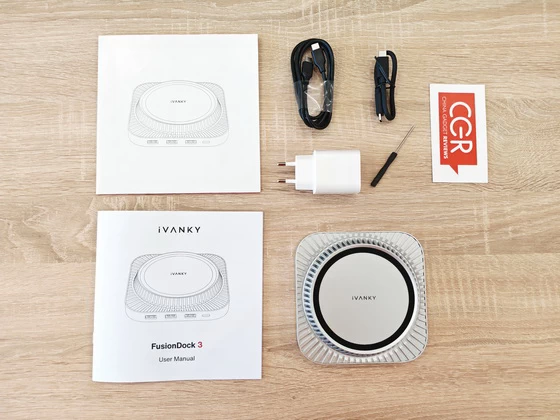
The FusionDock 3 arrives inside a clean, premium-looking retail package that immediately reflects iVANKY’s attention to presentation. Rather than overwhelming the customer with excessive marketing graphics, the packaging focuses on product imagery and clearly communicates the dock’s primary functionality. Opening the box reveals an exceptionally organized interior where every accessory has its own dedicated compartment. The dock itself is carefully protected, while the included accessories demonstrate that iVANKY intends the FusionDock 3 to be ready for immediate deployment without requiring additional purchases. The package includes the FusionDock 3 docking station, two USB-C cables, a 20W Power Delivery adapter, a precision screwdriver, a user manual, and an FAQ card. The inclusion of the screwdriver is particularly welcome since it simplifies future installation of an M.2 SSD inside the integrated enclosure. Likewise, providing both a short and a longer USB-C cable offers additional flexibility depending on individual desktop layouts. Overall, the unboxing experience feels polished, complete, and appropriately premium.
The iVANKY FusionDock 3 immediately impresses with its premium construction and outstanding attention to detail. Manufactured almost entirely from aluminum and finished in an elegant silver tone that closely complements Apple’s hardware, the dock feels exceptionally solid and well engineered. The precision-machined chassis features clean edges, accurately cut openings, and excellent structural rigidity, with every connector securely mounted to inspire long-term confidence. Throughout my hands-on experience, the overall fit and finish consistently reflected the level of craftsmanship expected from a high-end desktop accessory.
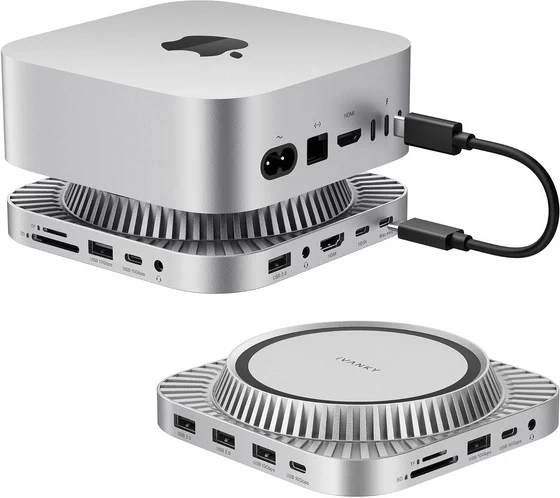
From a design perspective, the FusionDock 3 embraces a minimalist aesthetic that integrates naturally into a modern Mac mini workspace. The raised circular platform is more than a visual highlight—it positions the computer slightly above the dock to promote improved airflow beneath the system while maintaining a seamless, integrated appearance. Surrounding the platform, the distinctive radial ventilation fins add both visual character and practical thermal benefits by encouraging passive heat dissipation. The intelligently distributed ports remain easily accessible without compromising the dock’s clean profile, resulting in a sophisticated design that successfully balances elegance, functionality, and efficient cooling in a remarkably compact form factor.
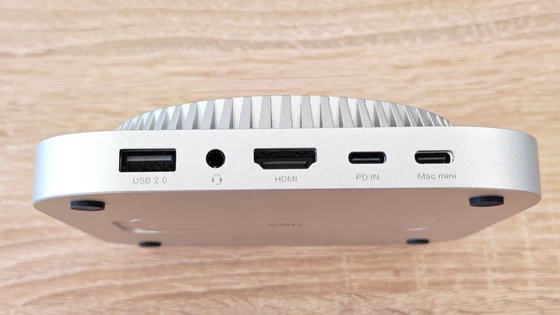
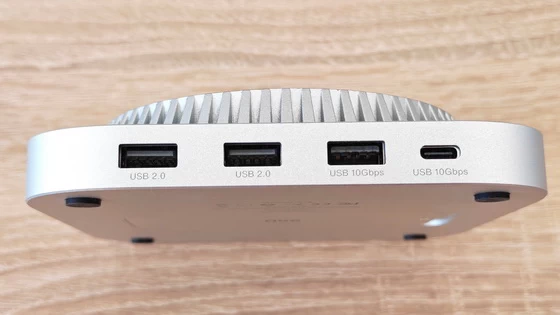
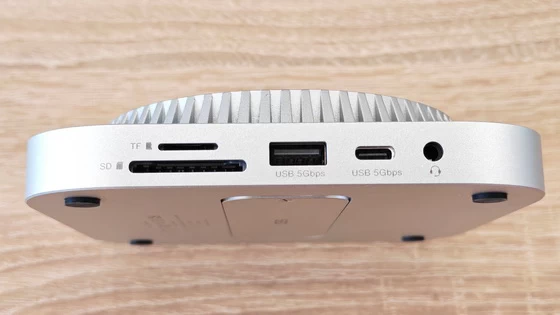
Handling the FusionDock 3 quickly reinforces the impression of a carefully engineered desktop accessory. Every port feels securely mounted, connector tolerances are excellent, and nothing exhibits unwanted flex or movement during cable insertion. The overall weight provides sufficient stability to keep the dock firmly positioned while connecting multiple peripherals. What immediately stands out is the exceptionally clean port arrangement. The frequently accessed USB ports and SD card slots remain easily reachable, while video output, host connection, power input, and audio ports are logically distributed around the enclosure. This layout minimizes cable clutter while preserving the minimalist aesthetic expected from a premium desktop environment. Even without connecting every possible peripheral, it becomes immediately apparent that considerable attention has been given to everyday usability.
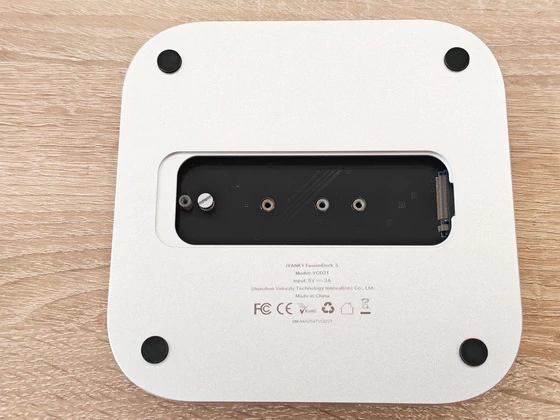
The iVANKY FusionDock 3 is considerably more capable than its compact dimensions might initially suggest. Designed as a true desktop expansion platform rather than a conventional USB hub, its 13-in-1 architecture transforms a single USB-C connection into a comprehensive workstation solution. It integrates an HDMI output supporting resolutions up to 4K at 144Hz, two high-speed 10Gbps USB-A ports, two 10Gbps USB-C ports, three additional USB-A ports for everyday peripherals such as keyboards and mice, SD 4.0 and microSD 4.0 card readers, dual 3.5 mm audio jacks, a dedicated 20W Power Delivery input, and an integrated M.2 NVMe/SATA SSD enclosure, effectively covering nearly every connectivity requirement of a modern desktop environment. Among its most attractive features is undoubtedly the integrated M.2 SSD enclosure, which supports both NVMe and SATA solid-state drives in the widely adopted 2230, 2242, 2260, and 2280 form factors, with storage capacities of up to 8TB. Installation is straightforward thanks to the included precision screwdriver and thermal interface materials, allowing users to expand storage quickly while maintaining a clean, uncluttered workspace. For photographers, videographers, designers, developers, and other creative professionals working with large media libraries, incorporating high-capacity storage directly into the docking station offers a particularly elegant solution. It eliminates the need for separate external SSD enclosures, reduces cable clutter, and creates a far more organized desktop environment without sacrificing flexibility or high-speed data access.
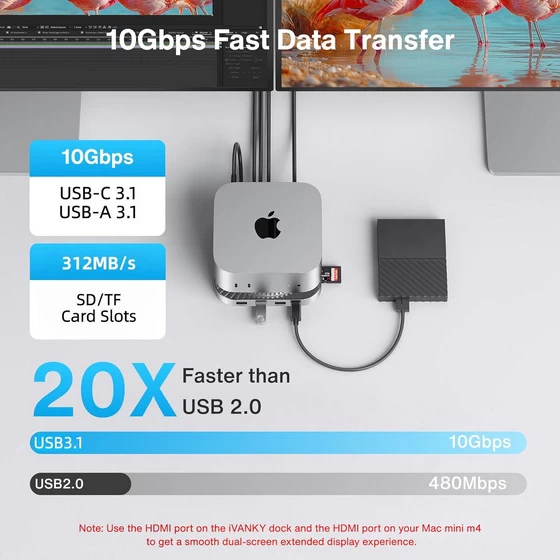
One of the FusionDock 3’s strongest advantages is its emphasis on modern high-speed connectivity. The upgraded 10Gbps USB-A and USB-C ports provide ample bandwidth for fast external SSDs, large project transfers, media libraries and demanding professional workflows, while the SD 4.0 card readers significantly improve import performance compared to older USB hubs. The HDMI output supports resolutions up to 4K at 144Hz, making the dock suitable for high-refresh professional monitors, creative workstations and fluid desktop navigation. Meanwhile, the dedicated Power Delivery input supplies additional stability whenever multiple high-power peripherals are connected simultaneously, helping maintain consistent operation even under heavier workloads. Rather than simply multiplying available ports, the FusionDock 3 feels designed to reduce compromises in everyday desktop use.
Unlike many compact USB hubs that simply prioritize port count, the FusionDock 3 also pays attention to thermal efficiency. Its elevated platform leaves breathing room beneath the Mac mini while the ventilated aluminum construction promotes continuous passive airflow throughout the dock itself. Although passive cooling often receives less attention than transfer speeds or connectivity, maintaining unrestricted airflow is particularly beneficial during prolonged multitasking sessions involving external storage, multiple connected peripherals and sustained system workloads. The cooling-oriented mechanical design therefore complements the dock’s premium construction rather than serving as a purely cosmetic feature.
After spending time examining the iVANKY FusionDock 3, I came away impressed by how successfully it combines elegant industrial design with genuinely practical functionality. Rather than functioning as a conventional USB hub, the FusionDock 3 presents itself as a complete desktop expansion platform. Its premium aluminum construction, integrated NVMe storage enclosure, comprehensive 13-port connectivity, thoughtfully organized layout, efficient passive cooling design, and modern 10Gbps interfaces create a product that feels purpose-built from the ground up. The seamless visual integration with the Mac mini, together with features such as high-speed USB connectivity, SD 4.0 card readers, 4K high-refresh HDMI output, integrated SSD expansion up to 8TB, and included installation accessories, demonstrate a level of refinement that extends well beyond simple port expansion. For users looking to maximize the capabilities of their Mac mini workspace while maintaining a clean, elegant, and highly organized desktop environment, the iVANKY FusionDock 3 represents a sophisticated all-in-one solution that successfully balances aesthetics, practicality, and professional-grade expandability
iVANKY Fusion Dock 3 Highlights
13-in-1 Ports. Built for Mac Mini M4.
High-Resolution Display. Ultra-Sharp Detail.
Every Port You Need. Zero Hassle.
10 Gbps Transfer Speeds. Across the Board.
Up to 8TB SSD Expansion. No Compromise.
Ready When You Are. Visuals Load Instantly.
Easy SSD Installation. Done in Minutes.
Everything Included. No Extras Needed.
iVANKY Fusion Dock 3 Main Features
– Enhanced Transfer Efficiency. Compared to the base model, we have upgraded the original 5 Gbps USB-A and USB-C ports to 10 Gbps, and boosted the SD/TF card readers from version 3.0 to the latest 4.0, delivering faster data transfer speeds for enhanced productivity.
– Ultra 13-in-1. The iVANKY Docking Station for Mac Mini M4 features 13 functional ports to maximize your work efficiency, including: 4K@144Hz HDMI, 10 Gbps USB-A×2 & 10 Gbps USB-C×2, USB-A 2.0×3, SD/TF4.0×1, Dual Audio Ports, and an M.2 NVMe SSD Enclosure (10 Gbps) supporting both NVMe and SATA M.2 SSDs.
– Enhanced Storage Capacity. The iVANKY Docking Station supports drives up to 8TB in capacity and fits virtually all standard M.2 SSD form factors (2230/2242/2260/2280), delivering lightning-fast data transfer speeds of up to 10Gbps. Please note: SSD is not included. Making it an exceptional choice for your home office setup and creative content production.
– Smooth 4K@144Hz Visual Experience. Engineered for professionals and creators alike, this docking station delivers crisp 4K @144Hz refresh rate via its HDMI interface. Whether you’re editing high-resolution footage, designing graphics, hosting client presentations, or diving into fast-paced gaming sessions, enjoy buttery-smooth motion and razor-sharp detail. Perfect for multitaskers—split your workflow across dual displays by connecting the dock’s HDMI port to your Mac’s Thunderbolt port, transforming your setup into a productivity powerhouse.
– 10Gbps Data Fast-transfer. Unleash lightning speeds with dedicated 10Gbps USB-A and 10Gbps USB-C ports—perfect for high-performance drives, rapid HDD access, and demanding peripherals . Simultaneously connect daily accessories (keyboards, mice) through three reliable 5Gbps USB-A ports. Work faster, wait less.
– Sufficient Power Supply. iVANKY 13-in-1 Dock comes equipped with a 20W PD power adapter. When connecting multiple high-power devices—such as external hard drives or charging peripherals—using this external power adapter ensures significantly improved power stability. It completely eliminates issues caused by insufficient power supply, keeping your devices running worry-free.
– Upgraded Cooling System. The iVANKY M4 Mac Mini Dock boasts a top-vent design complementing the Mac’s aesthetic. Its slight elevation creates space for cooling airflow, safeguarding the Mac Mini’s bottom fan. Enjoy reliable performance even when multitasking. Note: iVANKY offers a 24-month warranty along with responsive customer service. Should you experience any issues with your product, we provide free returns or replacements to ensure your complete satisfaction.
iVANKY Fusion Dock 3 best-use scenarios
– Mac mini M4/M4 Pro Desktop Expansion — Turn the compact Mac mini into a fully equipped desktop workstation with 13 essential connectivity options.
– Creative Content Production — Ideal for photographers, videographers, graphic designers, and content creators working with large media files and demanding applications.
– High-Speed External Storage — Connect 10Gbps external SSDs and other high-performance storage devices for fast project transfers and media-library access.
– Built-In SSD Expansion — Install an M.2 NVMe or SATA SSD directly into the dock, with support for capacities up to 8TB and common 2230/2242/2260/2280 formats.
– Photo & Video Import — The SD 4.0 and microSD 4.0 card readers make the dock particularly useful for quickly transferring footage and photos from cameras, drones, and action cameras.
– 4K High-Refresh Workstations — Connect a 4K display at up to 144Hz for smooth desktop navigation, professional applications, visual design, and high-resolution content work.
– Home Office & Productivity — Create a cleaner workstation by connecting keyboards, mice, storage, displays, audio devices, and other peripherals through a single desktop expansion platform.
– Multitasking & Multi-Display Workflows — Use the HDMI output alongside the Mac’s own display connectivity to build a more productive multi-screen setup for applications, documents, monitoring, and communications.
– Professional Data Workflows — The combination of 10Gbps USB-A/USB-C connectivity and integrated SSD expansion is well suited to developers, professionals, and users regularly moving large datasets or project files.
– Gaming on Mac — The 4K@144Hz HDMI output makes the FusionDock 3 useful for connecting a high-refresh monitor when gaming or enjoying fast-moving visual content.
– Clean & Organized Desktop Setup — The aluminum dock physically integrates with the Mac mini, reducing cable clutter while adding storage, ports, cooling airflow, and desktop stability in a single platform.
– Always-Connected Professional Workstation — With 13-in-1 connectivity, 10Gbps interfaces, integrated storage expansion, SD/microSD readers, HDMI, audio, and additional power support, the FusionDock 3 is designed for users who want their Mac mini to function as the central hub of a complete workstation.
iVANKY FusionDock 3 – Ports & Interfaces
1 x USB-C Host – connects the Mac mini
2 x USB-C 10Gbps – high-speed data transfer
1 x 20W USB-C PD input
2 x USB-A 10Gbps – high-speed peripherals and storage
3 x USB-A 480Mbps – keyboard, mouse and other basic peripherals
1 x HDMI up to 4K @ 144Hz
1 x SD 4.0 card slot – up to 312 MB/s
1 x TF/microSD 4.0 card slot – up to 312 MB/s
2 x 3.5mm audio jack
1 x Integrated M.2 SSD enclosure
iVANKY Fusion Dock 3 Specs
Brand: iVANKY
Model: Fusion Dock 3
Model number: VCD21
Type: 13-in-1 docking station / desktop expansion dock
Designed for: Mac mini M4 / M4 Pro
HDMI: up to 4K @ 144Hz
HDMI chipset: CS5466
Power Adapter: 20W
Power Adapter Output: 20W
Docking Station Input: 20W
Docking Station Input Voltage: 5V/3A
Docking Station Outputs: 5V/1.5A, 5V/0.9A, 5V/0.5A
Material: Aluminum
Color: Silver
System Requirements: macOS 11.5 or later
Package Contents
1 x iVANKY Fusion Dock 3
1 x 25cm USB-C Cable
1 x 1m USB-C Cable
1 x 20W Power Adapter
1 x User Manual
1 x FAQ Card
1 x Screwdriver
1 x Packaging Box
Unboxing Photo Album with Hi-Rez images here.






About iVANKY. iVANKY is a creator-focused technology brand that grew from a simple idea: modern laptops should expand possibilities, not limit them. Born from the founder’s own frustration with the limited connectivity of MacBooks, iVANKY set out to develop high-performance docking solutions that combine premium design, powerful connectivity, and practical functionality. Its FusionDock range reflects this philosophy, delivering advanced Thunderbolt technology, multi-display support, and extensive connectivity tailored particularly to Apple Silicon Mac users. From its first FusionDock to the latest generation of Thunderbolt 5 and multi-display solutions, iVANKY continues to push the boundaries of what a modern laptop workstation can deliver.
Did this article help you? If so, please tell me in a comment what do you think about it.
Don’t miss any of our future video tutorials, follow us on Youtube. Like us on Facebook. Join our Best Deals Telegram Channel. Join our Android TV Box Firmware Updates Telegram Channel. Subscribe now to our newsletter. If you need Tech Reviewer or Youtube Influencer read this. Donate now here to support CGR Team!