
This firmware is for M8S TV Box with Amlogic S812 CPU
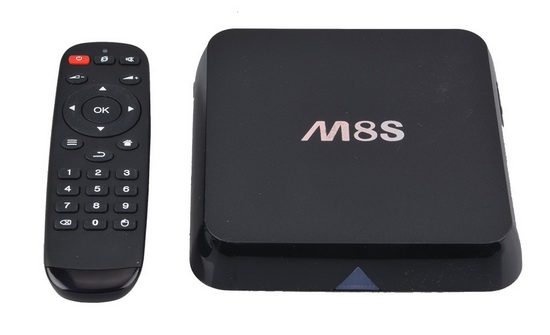
Download latest Android KitKat 4.4.2 stock firmware for M8S TV Box from here or here.
Firmware details
Archive: cyx_m8s_ap6330_8g2g_150728_SD升级
Model: Acemax M8S TV Box
Image file size: 482 MB
Platform: Amlogic S812
Image: n200-ota-20150728.zip
Build number: n200-user 4.4.2 KOT49H 20150728 test-keys
Caution: Please do not update firmware unless you know what you are doing, you really want it or it is absolutely necessary. Firmware updates may occasionally have bad results, like bricking your device, temporarily or permanently. The firmware update process is done entirely at your own risk. Before attempting to update the firmware, back up your data.
Did this article help you? If so, please tell me in a comment what do you think about it.


I just got my M8S with this software and i was wondering if theres a update for lollipop ??
http://chinagadgetsreviews.com/download-android-lollipop-5-1-stock-firmware-for-m8s-tv-box.html
Is this one compatible ??
this firmware is for k200 box not n200 it bricked my m8s thanks for that
Is this rom good for OTT tv box m8s (from geekbuying)?
Yah thanks I tried to use this for my m8s and it bricked it because I believe this is not the correct firmware…..what should I do now I have an expensive paper weight…u really shouldn’t make mistakes like this because it can take money out of peoples pockets!
Yes,
i did try upgrade this fw for my m8s board ID m8&m9_v02
and it was dead.
Anyone have solve this issue?
Thanks
M8S S812 – lovely box just a great shame that they’re not set up correctly. My first one looks like whoever set it up fell asleep on it. Sent that back and got another equally as bad. Now on 4th and its just as badly setup. Then you get the farce with the firmware that end up bricking them. Is it too much to ask to have the correct firmware listed by the actual boxes. Not this hit amiss? Certainly put me off buying these again and certainly would not recommend either.
OTT TV BOX Android player Model M8S
Using the burning tool. I have a connection, but I cant get any up grade or recovery to load into the burning tool.
I haven’t gone in the box yet and jumped anything. should I be able to load the burning tool even before i go to this step.
Hi, i had totally wiped the android operating system from my M8S box by accident. So i was left with a box that would load its operating system at all, but display a blank screen with just the time on the top right corner of the screen.
I was unsure of the above firmware for my M8S, so after hours of research i came across a website that helped me get my M8S box back up and running. It was fairly straight forward, and i used a 4GB SD card (2GB Is Fine) to transfer all 5 files from the zip file to the SD card, and then i inserted the SD card into the M8S box on the side, and pressed down on the reset button with a pin in the AV port at the back of the M8S, and then while the reset button was pressed down i inserted the power cable into the back of the M8S box, and nothing appeared, but i still kept it pressed and the screen black screen flashed from on to off approximately 8 times, before the android logo appeared, and the SD card was then recognised as the files on the SD card were being installed.
The 5 Files are named as follows:
M8S_5-05-2016.zip
aml_autoscript
factory_update_param.aml
recovering.img
u-boot.bin
All of these files within the ‘M8S’ zip file need to be transferred over to the SD card.
link to where i had found this version of android for the M8S box is:
https://www.entertainmentbox.com/latest-m8s-firmware-download/
The M8S files within this article i did not try as i was unsure of what n200-ota-20150728.zip would do to my box.
I have no participation in creating any of the files, and i hope this post can help someone, because i know what it feels like to think your M8S box is dead.
hi does anybody have a link to the n200 firmware please
Yes, I would like to request the latest n200 firmware for my M8S Android box as I cannot find it any where. The latest firmware I have on my box is dated Feb, 2015.
Nice..
Heloo everbody,any link for n200?been searching high and low and found nothing.pls help..thanks 🙂