
An AI tracking phone gimbal keeps your smartphone steady and follows your movement, making solo filming easier without a camera operator. This guide explains how to set up tracking, plan your frame, choose a shooting mode, and avoid common recording mistakes. Creators comparing portable stabilization and tracking options can explore the latest zhiyun gimbal models. The right setup can support tutorials, workouts, travel videos, product demonstrations, and social content. Before filming, choose a phone gimbal that supports your smartphone’s weight, width, and thickness. Check whether tracking uses a mobile app or an external AI module, since this affects which camera applications and platforms are available.
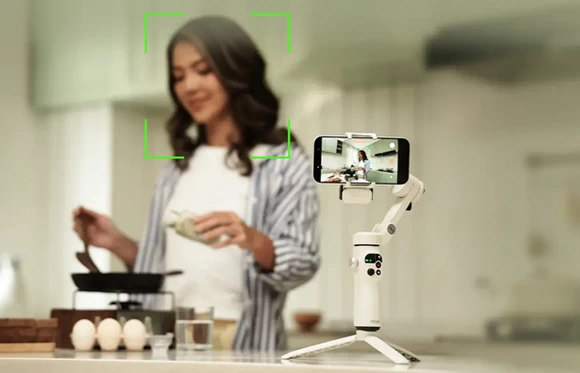
Set Up the Phone Gimbal Correctly
Mount the phone while the gimbal is turned off. Place it near the center of the clamp, make sure no lens is blocked, and remove any case or accessory that prevents a secure fit. An external lens or microphone can change the balance and restrict the gimbal arms. Place the mounted gimbal on its tripod and turn it on. Move it through its available range to confirm that the phone does not strike an arm. Connect the app or AI module, select yourself as the subject, and record a short test.
Plan the Frame and Tracking Area
Give the camera enough distance to show your movement without creating excessive empty space. Eye-level placement works well for tutorials and direct-to-camera videos, while a higher angle is useful for cooking, crafts, and tabletop demonstrations. Walk through the filming area during the test. Confirm that the gimbal can follow you without reaching the end of its rotation range. Remove objects that could hide your face or body from the tracker. Lighting also affects tracking. Avoid standing directly in front of a bright window, which can turn the subject into a silhouette. Face a window or soft light instead, and choose a background that provides visual separation.
Use AI Tracking With Controlled Movement
Automatic tracking works best when movement is deliberate. Begin with a simple path, such as walking from one side of the frame to the other. Maintain a consistent pace and pause at each important position so the camera can settle. For tutorials or product demonstrations, mark two or three positions on the floor. These reference points help you repeat movement across multiple takes. When recording workouts, keep the exercise area within the range tested during setup. Gesture and remote controls can start or stop a take from a distance. Test each command first because support may vary by gimbal, phone, and camera app.
Choose the Right Shooting Mode
AI tracking determines where the camera points, while the shooting mode determines how the gimbal responds to movement. Pan-follow mode is a practical choice for most solo videos because it follows horizontal movement while maintaining a stable horizon. Lock mode keeps the camera directed toward a selected area and works well for demonstrations performed around a table or workbench. More responsive follow modes suit dance, fitness, and faster action, but they may create unnecessary movement in interviews or educational videos. Adjust follow speed to match the subject. A slower response looks controlled in instructional content, while a faster setting can keep up with movement across a larger space.
Improve Stability, Lighting, and Audio
Keep movements smooth even when using a gimbal. Use gradual starts and stops, avoid sudden turns, and take small steps when walking. Three-axis stabilization reduces unwanted rotation but cannot remove every vertical bounce caused by footsteps. Stable footage also needs clear lighting and sound. Use window light or a compact fill light to keep your face visible. If the phone is too far away for clean audio, add a compatible wireless microphone and secure its receiver or cable away from the motors.
Avoid Common Solo Filming Mistakes
Do not begin an important recording without testing the complete route. Moving too close to the camera, leaving the frame quickly, or turning away for too long may cause the tracker to lose you. A gimbal cannot correct missed focus, subject motion blur, poor exposure, or distracting composition. Review a short sample before recording several takes. Check facial focus, sound level, background clutter, and whether the framing remains consistent. Battery levels also deserve attention. Charge both the phone and gimbal before a longer session, especially when using continuous tracking, Bluetooth controls, or built-in lighting.
Conclusion
An AI tracking phone gimbal can give solo creators smoother footage and more consistent framing with fewer interruptions. Mount the phone securely, test the tracking area, choose a suitable follow mode, and move at a controlled pace. Once these fundamentals are reliable, creative angles and more complex sequences become easier to capture.
Did this article help you? If so, please tell me in a comment what do you think about it.
Don’t miss any of our future video tutorials, follow us on Youtube. Like us on Facebook. Join our Best Deals Telegram Channel. Join our Android TV Box Firmware Updates Telegram Channel. Subscribe now to our newsletter. If you need Tech Reviewer or Youtube Influencer read this. Donate now here to support CGR Team!





