
A good speaker deserves to remain useful long after its original companion app starts showing its age. If you still own a Xiaomi Mi Smart Network Speaker MDZ-16-DA, CGR Speaker Remote EN 0.9 Android application offers a fresh way to control it, browse its internal music library, and enjoy internet radio through a modern English interface. Here at China Gadgets Reviews, we are sharing the Android APK for owners who want to keep using their existing hardware with a practical alternative to the original Xiaomi MI Speaker application, package com.mi.umi.controlpoint, including the legacy v1.2.88 release. A Windows desktop companion also provides another way to approach speaker control from your computer. CGR Speaker Remote is an independent application and is not affiliated with Xiaomi.
A Modern Alternative to the Legacy Xiaomi MI Speaker App
The original Xiaomi application belongs to an earlier generation of Android software. The supplied MI Speaker v1.2.88 APK includes native libraries for the older 32-bit ARM architecture, which creates a compatibility obstacle on Android devices that support only 64-bit applications. CGR Speaker Remote EN 0.9 takes a different approach. Its APK contains no bundled native libraries and uses Java code running through Android’s managed runtime. This makes it compatible with 64-bit Android devices without depending on Xiaomi’s old 32-bit native components. For owners upgrading to phones running Android 16 or Android 17, removing that legacy dependency is an important step. However, 64-bit support and complete operating-system compatibility are separate matters: discovery, playback, network access, and timer behavior should still be checked on the specific phone and Android version being used.
A Fresh English Interface
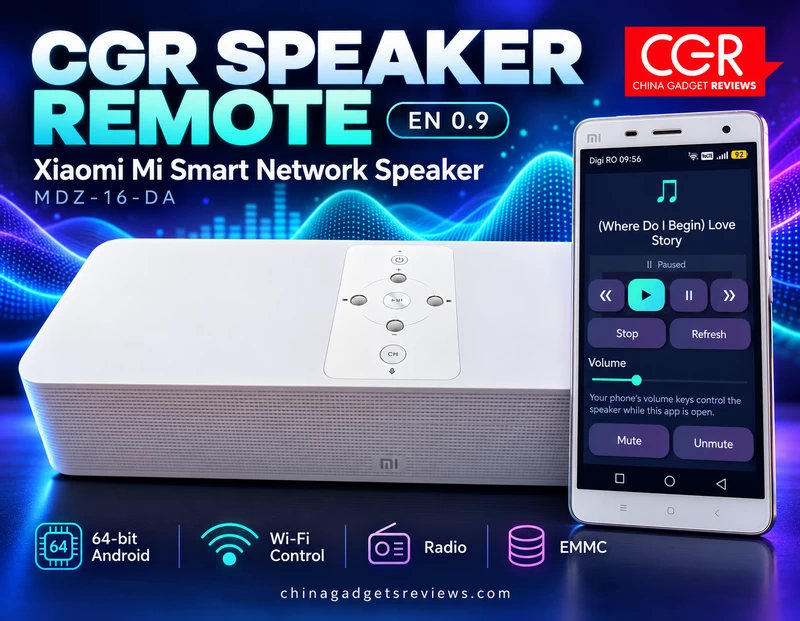
CGR Speaker Remote EN 0.9 brings the main controls together in four sections: Player, Radio, EMMC, and Settings. The interface combines a dark background with turquoise highlights, large controls, and CGR branding. The layout keeps everyday tasks close at hand. You can move from playback controls to radio stations, explore music stored inside the speaker, or manage the connection without navigating through the original Xiaomi interface. The Android APK is also remarkably compact, measuring approximately 289 KB.
Wi-Fi Discovery and Automatic Reconnection
The app can search the local network for compatible speakers. Connect your Android device to the same local network as your speaker, open Settings, and select “Find speakers on Wi-Fi.” Once a speaker has been selected, the app remembers it and attempts to reconnect automatically the next time it opens. This makes everyday use more convenient, particularly when the speaker remains in the same room and on the same network. A manual connection option is also available using the speaker’s IP address or its UPnP device-description URL. This provides another route when automatic discovery does not find the device. The speaker should already be connected to your network. This release should not be assumed to replace every initial Wi-Fi setup or provisioning function of the original Xiaomi application.
Playback Controls and Physical Volume Buttons
The Player section provides previous-track, play, pause, next-track, and stop controls, together with a refresh button for updating playback information. Volume can be adjusted using the on-screen slider, while dedicated Mute and Unmute buttons provide quick access when you need to silence the speaker. A particularly convenient feature is support for the phone’s physical volume buttons. While CGR Speaker Remote is open, these buttons control the connected speaker’s volume, making adjustments feel more natural during everyday listening. Available commands depend on the services exposed by the connected speaker and its firmware.
Internet Radio with Editable Stations
The Radio section includes 20 preset stations, divided between 10 Romanian and 10 international choices. The supplied selection includes names such as Kiss FM, Radio ZU, Europa FM, BBC World Service, Radio Paradise, and SomaFM Groove Salad. You can save favorites, add custom stations, and edit an existing station’s name or stream address by pressing and holding its entry. Support for direct HTTP and HTTPS stream URLs gives you flexibility when adding your own sources. Editable addresses are especially useful because radio providers sometimes change their streaming links. Instead of waiting for a new app release, you can update the station entry yourself. Playback still depends on the speaker’s support for the stream’s audio format and connection requirements. A valid link does not guarantee that every older speaker can decode or access it. CGR Speaker Remote sends playback instructions to the speaker; it does not mirror all audio from your phone.
Browse Music Stored Inside the Speaker
The EMMC section gives you access to the speaker’s exposed internal music library. On a compatible device, you can browse folders and tracks, reload the library, and select music for playback. A search field filters the entries shown on the current page, helping you locate a particular folder or track more quickly. Page navigation is available when the library contains additional results. This feature is particularly useful for owners who already keep a music collection on their Xiaomi speaker. Its availability depends on the speaker exposing the appropriate media-library service. The EMMC browser is intended for browsing and playback; it should not be confused with a general file-upload or storage-management utility.
A Convenient Sleep Timer
CGR Speaker Remote also includes a sleep timer with 15-, 30-, and 60-minute options, together with a cancellation button. This is a useful addition for evening listening, whether you prefer a radio station or music stored on the speaker. The timer’s stop time is approximate, and the phone must remain connected to the speaker over Wi-Fi. Android background restrictions may also affect when the stop command is delivered.
Which Speakers Can Work with CGR Speaker Remote?
The Xiaomi Mi Smart Network Speaker MDZ-16-DA is the main model addressed by this release. Other speakers previously controlled through the original Xiaomi MI Speaker application may also work if they expose compatible local UPnP playback, volume, and media-library services. Compatibility depends on the model and firmware. Previously using the Xiaomi app is a useful starting point, but it does not guarantee support for every feature in CGR Speaker Remote. On another compatible speaker, playback and volume control may be available even when internal-storage browsing is not.
Download CGR Speaker Remote EN 0.9 for Android
The English Android package is available as CGR_Speaker_Remote_EN_0.9.apk. Download the APK to your Android device, open it, and allow installation from the browser or file manager you are using if Android requests permission. After installation, connect your phone and speaker to the same local network and search for the speaker from Settings. If discovery fails, check whether a VPN, guest Wi-Fi network, or router client-isolation setting is preventing communication between devices. You can also try the manual connection option. Download it from here ot from here.
Windows Desktop Companion
The Windows companion uses an English launcher named Start_EN.cmd. This launcher starts CGR-Speaker.jar through the Java runtime located inside the package’s runtime folder. To use the Windows edition, extract the complete desktop package, keep its folder structure intact, and double-click Start_EN.cmd. The launcher is configured to use the included Java runtime, so a complete package avoids the need to select a separate Java installation manually. Your computer and speaker must be able to communicate over the local network. If Windows Firewall requests access, allow the application on your trusted private network. The Windows download must include the application JAR and bundled runtime alongside the launcher. Start_EN.cmd on its own is not a standalone Windows application. Download it from here ot from here.
Keep Your Existing Speaker Useful
CGR Speaker Remote EN 0.9 gives owners of the Xiaomi Mi Smart Network Speaker MDZ-16-DA a practical way to keep enjoying their hardware with an English interface and support for modern 64-bit Android devices. Automatic reconnection, accessible playback controls, editable radio stations, internal-library browsing, and a sleep timer bring useful everyday functions together in one compact app. If your Xiaomi speaker still sounds good, a more convenient controller can make it worth using again.
=
Did this article help you? If so, please tell me in a comment what do you think about it.
Don’t miss any of our future video tutorials, follow us on Youtube. Like us on Facebook. Join our Best Deals Telegram Channel. Join our Android TV Box Firmware Updates Telegram Channel. Subscribe now to our newsletter. If you need Tech Reviewer or Youtube Influencer read this. Donate now here to support CGR Team!





