
Digital Wellbeing on Your OPPO Phone
Technology has become integral to everything we do, to the point that it has become difficult to find time to disconnect. Overattachment to the digital universe – jumping on board with digital trends, hounding for content and social media buzz – detaches us from the physical world and some of the most important aspects of our lives.
Without guidance it can be difficult to maintain balance between the joyful conveniences of technology and valued interactions like intimate connections with friends and family, and personal interests and pursuits.
It is for this purpose that Digital Wellbeing is being introduced as a mainstay on all Android devices, with the intension of ensuring users are properly supported with tools and information that help lead a more balanced lifestyle. Mobile devices are of course wonderful but can also cause obsession and require constant attention to notifications, news, and social media. Many studies indicate that overuse of devices can contribute to poor psychological and physiological health, with common negative consequences including sleep deprivation, anxiety, stress, and depression. This can be mitigated by employing the features of Digital Wellbeing available on your OPPO phone. Digital Wellbeing is constantly being developed upon in order to update tools which improve the mobile device experience for users. OPPO’s ColorOS 6 is based on Android 10 and seeks to include and improve upon many useful features.
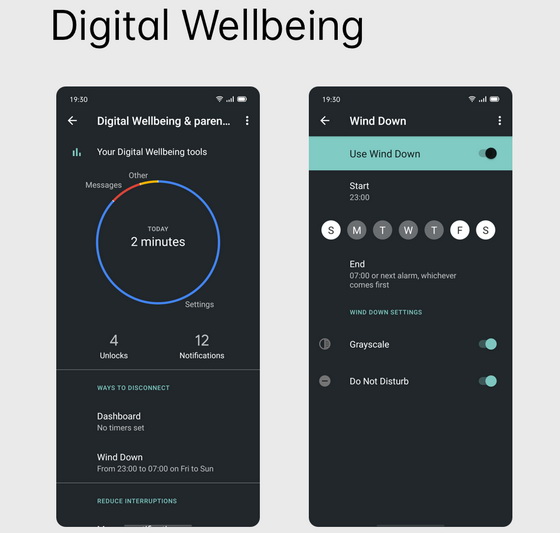
One key Digital Wellbeing example is Grayscale, which helps manage device use by turning the screen black and white. Excluding eye-catching vivid colors which are designed to grab the attention of the user will help mitigate unnecessary engagement and allow the user to focus on more important tasks. Greyscale can be set to take effect after a set device usage time. Enabling greyscale mode both deters the user from unnecessary engagement with the device and conserves battery life. Several Digital Wellbeing features aim to put more control in the hands of the user by making it convenient to limit, customize, and silence notifications.
Do Not Disturb
With one quick tap, Do Not Disturb hides all notifications.
Snooze Notifications
Hit snooze to temporarily hide specific types of notifications for as long as you like.
Customize Notifications
Decide what alerts you see, how often you see them, and how they look and sound. Controlling the inflow of your device notifications can ease your mind and limit the amount of thought and energy consumed by superfluous use. OPPO phones are designed with the intent of simplifying and enhancing lives, not causing unnecessary stress. It is often ideal to unplug and fully focus on the real world in several scenarios – while in conversation with others, immersed in nature, sleeping, driving, working, and so on. The act of limiting notifications with a quick button press can help keep our minds clear and focused.
The following features are coming soon to selected OPPO devices with the latest update of ColorOS 6.
Dark Mode
The highly anticipated Dark Mode presents users with a system-wide, highly personalized, and deeply immersive mobile experience. The darker color gradation allows for greater color contrast and makes reading and receiving information on your phone much clearer. Dark Mode is designed to highlight key information while also reducing eye strain. Additionally, a schedule can be set to automatically switch your system and chosen apps to Dark Mode at your designated time.
Full-Screen Navigation Gestures
With this update, ColorOS has been further optimized for swipe gestures on both sides of the screen. ColorOS offers 3 sets of navigation gestures to cater to different needs, including swipe gestures on both sides, swipe-up gestures, and virtual buttons. With a simple swipe, you can swiftly access your favorite apps.
Permission Controls
The Permission Controls feature puts further power in your pocket by allowing the user to set app location permissions to “Only While Using.” This function is particularly useful for protecting user privacy and makes denying location permission more convenient than ever.
Digital Wellbeing
Finally, of course, is our headliner – Digital Wellbeing. By tracking app usage time, number of notifications received, and the number of times you unlocked your phone, you can take steps toward better balancing your digital usage. App Timers and Wind Down features can assist with your time management with settings such as Grayscale.
Did this article help you? If so, please tell me in a comment what do you think about it.
Don’t miss any of our future video tutorials, follow us on Youtube. Like us on Facebook. Add us in your circles on Google+. Watch our photo albums on Flickr. Subscribe now to our newsletter.














