
This firmware is for Egreat A9 III TV Box with HiSilicon HI3798CV20 as CPU.
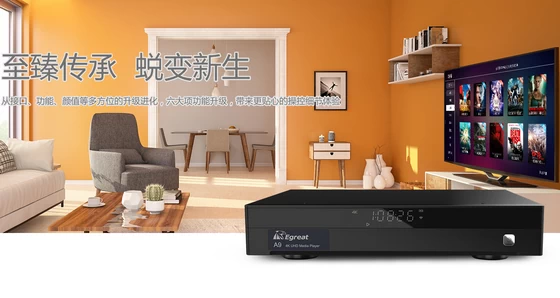
Download latest Android 7.0 stock firmware v3.0.9.2 for Egreat A9 III TV Box from here.
Firmware details
Archive: A9_III_BD_CN_Firmware_20211217_v3.0.9.2_pd
Model: Egreat A9 III TV Box
Image file size: 718 MB
Platform: HiSilicon HI3798CV20
Image name: update.zip
Inside archive: firmware + bootargs.bin + fastboot.bin + recovery.img
Firmware version: v3.0.9.2
Build number: Hi3798MV200-eng 7.0 NRD90M eng.root.20211217.060328 release-keys
Firmware upgrade instructions
This version firmware has three ways to update, user data won’t be wiped. Settings –> About –> OTA Update
1. OTA Update. The device will upgrade to newest firmware after you connect internet.
2. USB Update.
3. Forced refresh/recovery system.
The instructions to force to recovery the firmware
1. Please download the forced recovery firmware, the forced recovery firmware contains the following 4 files: update.zip, fastboot.bin, recovery.img, bootargs.bin
Please do not modify the file names and copy these four files to the root directory of the U-disk of FAT32 disk format.
2. Cut off the power supply of this machine, inset the U-disk into the USB2.0 interface of this machine, with a slender hard object (something like the clip after expansion) to insert into the RST small round hole, keep holding down the RST key in RST round hole not loosened, turn on the machine power after holding down the RST button.
3. Keep the posture, release the RST button until the TV screen appears the prompt (the green android small robot animation icon) of being forced refresh/recovery system, the system will automatically complete the forced refresh/recovery system process.
4. Please be patient, after the forced refresh/recovery system is completed, this machine will automatically restart, after restart, the player can be normally put into use.
Notes
– Please do not turn off or cut off the power of this machine during the progress of upgrading, otherwise it may cause this machine can’t boot.
– The file name of the forced recovery system is very important, do not modify the file name (including capital and lower-case).
– If you failed in a check, it is likely that the file has not been downloaded successfully or the file has been corrupted, please download again.
Changelog
1. Fix the problem that the menu key may get stuck when the secondary option list pops up during local playback;
2. Fix the problem that when the “File” column is set as the priority on the poster wall, the problem of changing the storage disk and entering it will automatically jump to the “All” column;
3. Fixed the problem that the screen saver function might appear abnormal;
4. Optimize the scraping prompt on the poster wall, and no longer display the prompt that the poster is being scraped when setting the file priority;
5. The newly added poster wall uses the C4 smart central control to obtain a list of movie posters and display them, as well as the function of controlling playback by C4 on mobile phones and tablets;
6. Added RS232 separate “pause” playback command function;
7. The new wireless network interface displays the wifi signal strength;
8. Added the function of clearing the saved wifi network in the wireless network;
9. Update and adapt the audio theater to play online video and call the local player to play;
10. Update two built-in background images;
11. Update the display of the Egreat and Haibei brand logos on the music player menu interface;
12. Update the built-in application version;
Overseas Department EGREAT TECHNOLOGY
Mail: sales1@egreatworld.com
Skype:lijuan19890320
Web: www.egreatworld.com
Caution: Please do not update firmware unless you know what you are doing, you really want it or it is absolutely necessary. Firmware updates may occasionally have bad results, like bricking your device, temporarily or permanently. The firmware update process is done entirely at your own risk. Before attempting to update the firmware, back up your data.
Did this article help you? If so, please tell me in a comment what do you think about it.
Don’t miss any of our future video tutorials, follow us on Youtube. Like us on Facebook. Join our Best Deals Telegram Channel. Join our Android TV Box Firmware Updates Telegram Channel. Subscribe now to our newsletter.




