
Elecrow CrowView Note 15.6″ – Turn Any Device into a Mobile Workstation
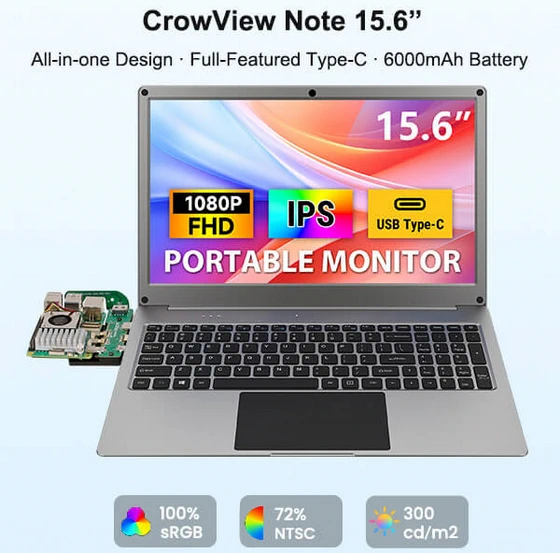
💡 Your Smartphone, Reinvented as a Laptop
Forget carrying bulky laptops. With a full-featured USB Type-C connection, the CrowView Note instantly turns your smartphone into a desktop-like environment. Whether you’re handling emails, editing documents, or managing tasks, you now have a true mobile office in your backpack.
🧠 Built for Makers, Developers & Tech Enthusiasts
This isn’t just for casual users. The CrowView Note is engineered for versatility:
– Seamlessly supports Raspberry Pi 5/4B, Jetson Nano, Arduino UNO Q, and other SBCs
– Ideal for coding, testing, embedded systems, and IoT projects
– A compact yet powerful development workstation anywhere you go.
🌈 Stunning 15.6” FHD IPS Display
Visual clarity meets precision:
1080P Full HD resolution delivers crisp, detailed visuals
100% sRGB color gamut ensures accurate colors for creative work
180° rotation support adapts to any workflow or environment
Whether you’re editing content, watching media, or presenting, the experience remains immersive and professional.
🔋 Power That Moves With You
Equipped with a 6000mAh built-in battery, the CrowView Note keeps you productive without being tethered to a wall:
– Long-lasting usage for work sessions on the go
– Reverse charging capability to power your smartphone when needed
🔗 Universal Compatibility
No ecosystem limits here:
– Works with Windows, macOS, Android, and Linux
– Supports gaming consoles like PS4 and PS5
– A single device for work, play, and development
⚙️ Clean, Integrated Design
No clutter. No complexity. Just efficiency.
Built-in keyboard and display in a sleek form factor
Minimal wiring—plug, connect, and start working instantly
Perfect for travel, remote work, or minimalist desk setups
🎯 Why CrowView Note Stands Out
The CrowView Note isn’t just another portable monitor—it’s a complete mobile productivity ecosystem. It bridges the gap between smartphones, SBCs, and traditional computers, giving you true computing freedom anywhere.
Did this article help you? If so, please tell me in a comment what do you think about it.
Don’t miss any of our future video tutorials, follow us on Youtube. Like us on Facebook. Join our Best Deals Telegram Channel. Join our Android TV Box Firmware Updates Telegram Channel. Subscribe now to our newsletter. If you need Tech Reviewer or Youtube Influencer read this. Donate now here to support CGR Team!















