A train window turns a crowded platform into a ribbon of color. Inside the carriage, an open earbud case rests on a passenger’s palm while the city moves beyond the glass. I would build a gadget video around that contrast: a small, steady object in the foreground and an environment beginning to travel. The scene would introduce a creative concept for a product, without pretending to demonstrate its actual sound quality or battery life. For a technology audience, that distinction would shape the whole project. The video could communicate portability and the feeling of leaving for the day, while specifications and hands-on judgments would come from real product information. In a concept like this, seedance 3.0 provides a way to turn product references and a written scene into video. My task would be to direct a plausible moment, then examine whether the result keeps the gadget recognizable.
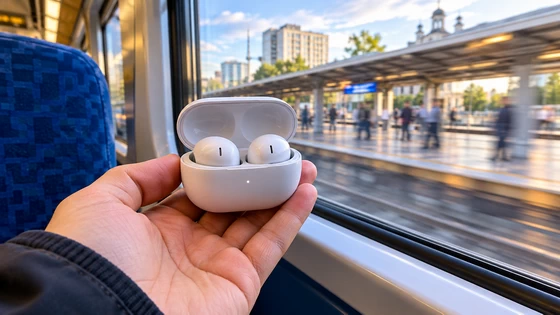
The case is the visual anchor
I would prepare photographs of the actual case from the front, from above and with the lid open. A clear overhead image would be particularly useful because the hinge, charging recesses and earbud shapes can be easy to confuse at an oblique angle. I would work with photographs I own or have permission to upload, and choose a case with little visible lettering for this first concept. The opening composition would place the hand near the lower third of the frame. The case would already be open, so the video would not need to solve an elaborate hinge movement while the train starts moving. A sleeve in a neutral color would separate the hand from the carriage interior. The window would occupy the background, giving the frame its sense of travel without introducing another person as a competing subject. My first sketch would keep the earbuds inside the case. Taking one out and placing it in an ear might sound like a natural next step, but it adds several delicate interactions to a very short shot. For this version, the passenger would simply hold the case still, then bring it slightly closer as the platform slips away. That one movement could make the scene feel personal while remaining easy to review.
References for different kinds of information
Seedance 3.0 supports reference-led video creation alongside text-to-video and image-to-video. I would separate the jobs of my inputs: the photographs describe the gadget, a short train-window clip suggests background movement, and the prompt explains the hand’s action and the camera position. The video reference would be footage I had the right to use, with no identifiable passenger taking up the frame. I would select a window clip with a gradual departure, rather than one filmed while the train was already moving quickly. A slow start gives the scene a beginning. The background can change from recognizable platform shapes to a softer sense of motion while the hand remains steady. If the reference includes a strong camera shake, I would choose another clip instead of trying to compensate with a complicated paragraph of instructions. An audio reference could contribute a subdued carriage atmosphere to the generated video. I would describe a low travel rumble and a quiet interior, avoiding music that might imply a demonstration of the earbuds. The soundtrack belongs to the scene as a whole. It cannot show a buyer what the device actually sounds like, and I would keep any claim about listening performance out of the caption as well.
Directing the departure
The first Seedance 3.0 prompt would be specific about the relationship between foreground and background: close view of an adult passenger’s hand holding an open earbud case beside a train window; the case follows the supplied product photographs; the train begins to leave the platform; soft daylight falls across the case; the camera remains close and stable; the hand makes one small inward movement near the end. I would ask for an understated scene with quiet carriage ambience. I would choose a brief output using the model and duration options available in the generator. A wide frame would give the platform room to move, while a vertical frame would emphasize the hand and the window edge. For a short social concept, I would begin vertically and keep the product clear of the areas likely to be covered by interface text. The camera should not have to search for the case. The first attempt would be an exploration, not a finished advertisement. Seedance 3.0 gives me a way to see whether the references and direction produce the intended moving scene. I would watch once at normal speed before pausing on individual frames. If the overall action feels disconnected, polishing the background color would be premature. The departure and the hand need to belong to the same moment.
When the background steals the shot
Suppose the moving platform becomes so bright or detailed that the earbud case disappears into the foreground. My next revision would soften the background and reduce its visual contrast. I would keep the case photographs and the basic action unchanged. This is a more useful adjustment than adding dramatic lighting to the product, which could make the ordinary commute look like an implausible studio setup. Another possible issue is an unstable lid or a changing number of visible earbuds. I would compare those details with the reference images and simplify the angle if necessary. A slightly more overhead view could make the geometry easier to read. In Seedance 3.0, I would then regenerate the scene with that clearer composition and review the case again rather than assuming that a recognizable first frame guarantees a reliable ending. The passenger’s hand would receive the same attention. Fingers should support the case in a plausible way, and the small inward movement should not turn into an unexplained rotation. If the motion introduces problems, I would remove it and let the departing platform carry the shot. A steady foreground can still make an effective video when the setting changes meaningfully behind it.
Turning the concept into a useful clip
Before making a batch of Seedance 3.0 variations, I would check the current credit estimate for the selected settings and decide which single uncertainty deserves another attempt. For this project, that might be the departure speed or the case angle. I would not generate unrelated airport and cafe versions until the train scene worked. A focused comparison makes it easier to see what changed and whether the change helped. A suitable Seedance 3.0 take would be downloaded and assembled with the rest of the product material in a separate editor. Any model name, price or specification would be added as controlled text there, using verified information. If the clip accompanied a review, I would label the generated sequence as a concept and keep it visually distinct from actual testing footage. The creative scene should support the review’s communication without becoming evidence for a performance claim. I would end on the case still held beside the window, with the platform no longer visible. That completes the small transition from waiting to travelling. The viewer has seen the gadget in a plausible imagined setting and has a clear final view of its shape. For a technology creator, this is a practical use of AI video: develop one carefully directed visual idea, revise the details that fail, and keep the finished concept honest about what it shows.
Did this article help you? If so, please tell me in a comment what do you think about it.
Don’t miss any of our future video tutorials, follow us on Youtube. Like us on Facebook. Join our Best Deals Telegram Channel. Join our Android TV Box Firmware Updates Telegram Channel. Subscribe now to our newsletter. If you need Tech Reviewer or Youtube Influencer read this. Donate now here to support CGR Team!