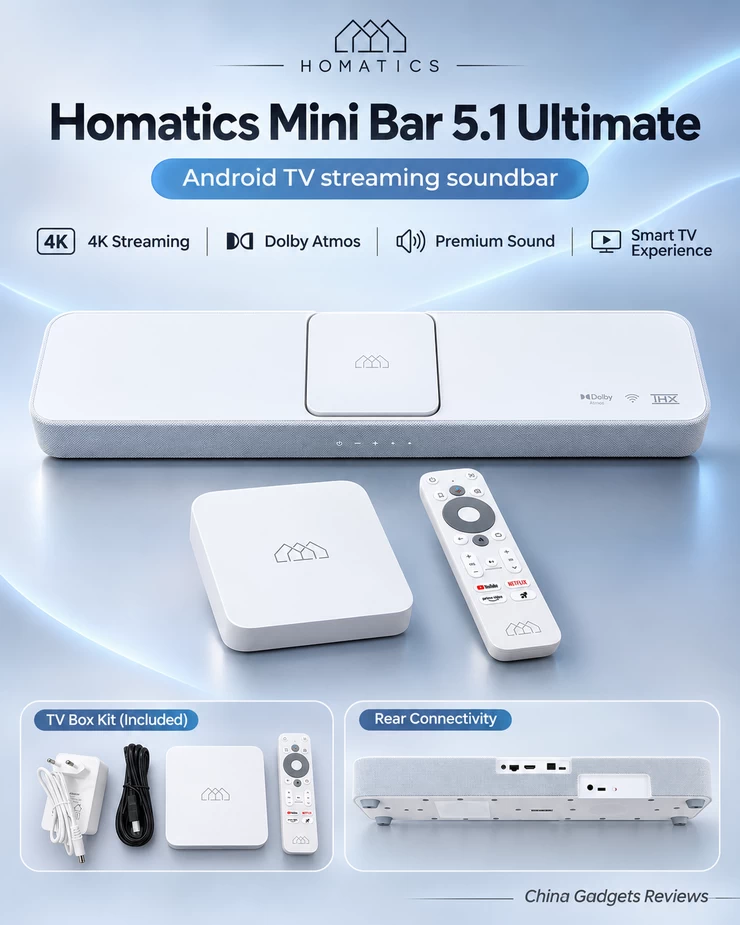
An extensive hands-on optimization project focused on responsiveness, multimedia stability, security and sound, with a free PowerShell toolkit for the Homatics community. The Homatics Mini Bar 5.1 Ultimate combines an Android TV media player with a dedicated soundbar, creating a particularly interesting platform for home entertainment enthusiasts. Its Amlogic S905X4-powered SEI804HM media module offers considerably more than a conventional streaming device, but its software architecture is also more complex. After spending several days investigating Android TV 14 firmware build 8963, I wanted to discover how far I could improve the everyday experience without sacrificing the original firmware, security architecture or multimedia capabilities. The result is CGR V34 Ultimate Home Cinema Edition, a comprehensive system optimization project rather than a custom ROM. I am now sharing the CGR V34 Community Edition PowerShell toolkit with the Homatics community as a free preview.
A Smarter Approach to Android TV Optimization
Rather than aggressively removing system applications, modifying firmware partitions or forcing processor frequencies, I concentrated on targeted adjustments that can be performed through Android Debug Bridge.
My objective was to create a more responsive and refined Android TV experience while retaining the original functionality of the device. The bootloader remains locked, Verified Boot reports a green state, and SELinux continues to operate in enforcing mode.
The entire public optimization process requires no root access, bootloader unlocking or firmware flashing.
System Performance and Interface Responsiveness
One of the most immediately noticeable improvements comes from configuring the Android interface animations at quarter speed. Navigation feels more direct, application transitions are shorter, and the overall interface appears more responsive.
I also performed selective Android Runtime optimization using the ART Speed compilation profile. This included the Android TV Launcher, system settings, the native NES Sound application and numerous multimedia applications, including Netflix, YouTube, YouTube Music, Disney+, Spotify, SkyShowtime, Amazon Prime Video, Kodi, VLC and DIGI TV.
All fourteen targeted compilation operations completed successfully. While the actual performance benefit varies between applications, this approach can improve code execution and application responsiveness at the expense of additional storage usage.
Memory Management and System Resources
Throughout the optimization process, I carefully monitored memory utilization, background processes and storage consumption.
Available RAM reached approximately 1.98 GiB following background process cleanup and optimization, while a subsequent measurement showed approximately 1.33 GiB available. The system retains around 800 MiB of swap and approximately 22 GB of available internal storage.
These measurements were recorded under different operating conditions and should not be interpreted as standardized performance benchmarks.
I deliberately avoided aggressive RAM boosters and automatic task killers. Instead, I preserved the Android memory management architecture and selectively disabled Google Calendar synchronization, which was unnecessary for my dedicated multimedia environment.
Essential Google services, Chromecast functionality, remote-control components, HDMI services and proprietary Homatics audio services remain intact.
Advanced Sound Optimization
Audio was undoubtedly the most challenging aspect of this project. Despite the impressive multimedia capabilities of the Homatics Mini Bar 5.1 Ultimate, I experienced excessive loudness even at the lowest volume levels.
My investigation involved the native NES audio architecture, Dolby MS12 processing, DTS components, Android Audio HAL, hardware mixer configuration and the communication between Android services and the dedicated soundbar electronics.
I eventually configured a custom equalizer profile with all frequency bands reduced by 6 dB, combined with the Small sound-space setting. Several Dolby Volume Leveler and Dialogue Enhancer database values were also adjusted.
The volume subjectively improved during the optimization process, although the precise contribution of each adjustment remains unverified.
Importantly, I preserved the existing Dolby Atmos and DTS configurations rather than disabling advanced audio processing altogether.
My investigation also uncovered recurring communication failures between the NES Sound Daemon and the installed SoundEQ application. This remains an interesting technical issue requiring further investigation.
Rather than risking the internal DSP firmware by installing older applications or incompatible updates, I decided to retain the currently functional audio configuration.
Wi-Fi Performance and Network Stability
Wireless connectivity is another important aspect of a premium streaming experience.
Despite operating several metres away from my router, with two walls separating the devices, the Homatics achieved a negotiated Wi-Fi 6 connection speed of 576 Mbps, with a signal strength of approximately −64 dBm.
Local network testing returned zero packet loss and an average latency of approximately 4 milliseconds. Internet connectivity also completed a short test without packet loss.
These results are encouraging, although negotiated wireless speeds should not be confused with actual internet throughput.
The optimized configuration also includes optional opportunistic Private DNS configuration, while retaining the original Wi-Fi drivers and network architecture.
Video Playback, HDR and HDMI Configuration
Instead of forcing the highest possible resolution or enabling permanent HDR conversion, I chose to respect the capabilities of the connected television.
My LG television negotiated a Full HD output at 59.94 Hz with HDR10 support. HDR passthrough was already configured, allowing compatible content to retain its appropriate dynamic range.
HDMI CEC, ARC and System Audio Control were preserved.
Automatic frame-rate switching remains an application-dependent feature that should be tested individually, particularly when switching between movies, sports broadcasts and live television.
Security and Long-Term Stability
Security was never treated as an obstacle to performance optimization.
CGR V34 preserves the original Android security architecture while explicitly enabling package verification, including verification settings for applications installed through ADB.
Processor frequencies, thermal protection mechanisms and firmware partitions are left untouched.
Temperature monitoring revealed normal thermal status during testing, although adequate ventilation remains important when using the media module inside the soundbar enclosure.
I also recommend disabling ADB debugging once maintenance is complete and keeping the device’s applications and security updates up to date.
Introducing CGR V34 Community Edition
To make this project accessible to other enthusiasts, I have consolidated the selected optimization procedures into a free PowerShell toolkit for Windows.
CGR V34 Community Edition includes three operating modes: Audit, Apply and Restore.
Audit mode allows users to inspect their device without making modifications. Apply mode performs selected optimizations after checking the firmware identity and security configuration. Restore mode provides a mechanism for restoring recorded settings and supported package states.
Additional optional features include selective ART compilation, a storage TRIM request, Google Calendar synchronization deactivation, network configuration and experimental soundbar-specific settings.
The toolkit does not contain proprietary firmware images, modified APKs or personal diagnostic information.
It is currently released as a community preview based on the individually tested commands used during my Homatics optimization project. The consolidated script still requires independent hardware validation.
How to Install and Use CGR V34 Community Edition
Getting started with CGR V34 Community Edition is straightforward and requires no root access, bootloader unlocking or firmware flashing. Download the ZIP archive using the link provided below and extract its contents into a folder on your Windows PC. Download and extract the official Android SDK Platform Tools, which include the ADB utility required for communication with your Android TV device.
On your Homatics device, enable Developer Options by navigating to Settings → Device Preferences → About and pressing the Android TV OS Build entry seven times. Enable ADB debugging and network debugging, if available, and make sure your Windows PC and Android TV device are connected to the same trusted local network.
Open PowerShell in the extracted CGR V34 folder, specify your actual ADB path and replace the example IP address with your Android TV device’s IP address.
Step 1 – Connect and audit your device
$adb = 'C:\platform-tools\adb.exe'
$target = '192.168.1.100:5555'
& $adb connect $target
& $adb devices -l
powershell.exe -NoProfile -ExecutionPolicy Bypass -File .\CGR_V34_Community.ps1 -Adb $adb -Serial $target -Mode Audit
Step 2 – Apply the recommended optimization profile
powershell.exe -NoProfile -ExecutionPolicy Bypass -File .\CGR_V34_Community.ps1 -Adb $adb -Serial $target -Mode Apply -StateFile .\my-device-state.json -CompileApps -TrimStorage -DisableCalendarSync -QuietUI -AdaptiveStandby -NetworkProfileThis command enables the core optimization profile together with selective ART compilation, storage maintenance, background application management, quiet interface settings and network optimization. Omit the Calendar Sync option if you use Google Calendar synchronization, and omit NetworkProfile if you wish to preserve your existing DNS configuration.
Step 3 – Restore the original settings, if necessary
powershell.exe -NoProfile -ExecutionPolicy Bypass -File .\CGR_V34_Community.ps1 -Adb $adb -Serial $target -Mode Restore -StateFile .\my-device-state.jsonKeep the generated JSON restoration file in a safe and private location. No automatic reboot is performed. Once everything has been verified, disable ADB debugging when it is no longer required.
Please note that CGR V34 Community Edition 1.0 is a community preview specifically targeting the Homatics SEI804HM Android TV 14 firmware build 8963. Other firmware versions should be inspected using Audit mode only. Optional experimental soundbar settings are documented separately in the included README file. Restoration covers supported settings and package states, not complete firmware or application data recovery.
Download CGR V34 Community Edition
CGR V34 Community Edition is available free of charge to the Homatics and Android TV enthusiast community. The downloadable package includes the PowerShell optimization script, comprehensive documentation, restoration instructions and SHA256 checksums. The current release targets the exact Homatics SEI804HM Android TV 14 build 8963 firmware. Users running different firmware versions should use Audit mode only until compatibility has been established. Please read the included documentation carefully before applying any modifications. Settings restoration is not a complete firmware backup, and ART compilation and storage maintenance operations cannot be reversed precisely through the restoration journal. Download CGR V34 Community Edition from here ot here.
Final Verdict
CGR V34 Ultimate Home Cinema Edition represents the culmination of an extensive hands-on investigation into the Homatics Mini Bar 5.1 Ultimate.
The result is a deliberately configured Android TV platform with a more responsive interface, optimized application compilation, conservative background resource management, refined audio settings and preserved security protections.
Rather than promising unrealistic performance improvements, this project demonstrates what can be achieved through transparent, targeted and carefully considered No-Root optimization.
There is still room for further investigation, particularly regarding the proprietary NES audio architecture and internal DSP communication. Nevertheless, the current configuration provides a promising foundation for everyday multimedia entertainment.
I am pleased to share this project with the community and look forward to feedback from other Homatics owners.
Developed by China Gadgets Reviews. Free for the community. No root. No firmware flashing. No unnecessary compromises.
Did this article help you? If so, please tell me in a comment what do you think about it.
Don’t miss any of our future video tutorials, follow us on Youtube. Like us on Facebook. Join our Best Deals Telegram Channel. Join our Android TV Box Firmware Updates Telegram Channel. Subscribe now to our newsletter. If you need Tech Reviewer or Youtube Influencer read this. Donate now here to support CGR Team!