
IMILAB SC230 Buyer’s Guide
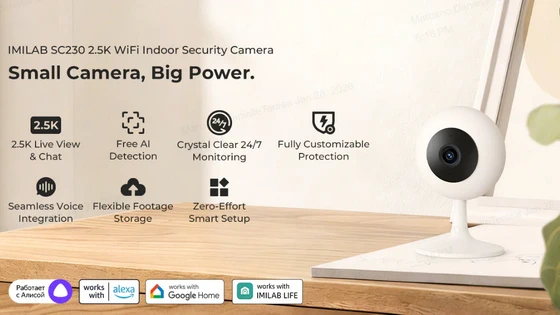
IMILAB SC230: An Overview
The IMILAB SC230 is small in appearance yet big in possibilities. This indoor security camera has a 115° wide monitoring angle, making it ideal for living rooms, home offices, man caves, and nurseries. Additionally, users can enjoy 2.5K live view and two-way audio for clear footage and communication with guests, pets, and children. IMILAB SC230 features local AI detections to help detect humans, crying babies, pets, and loud noises. You will receive a notification when an anomaly is detected, reducing the chance of false alerts and allowing you to react faster.
What We Love About SC230
– Local AI Detections: Children need room to explore their surroundings. Dogs and cats have their designated couches to sleep on while the family is away from home. Regardless of the situation, the IMILAB SC230 has multiple AI-assisted detections to keep users in the know. These local AI detections include humans, baby cry, pets, and noises.
– 2.5K Live View and Chat: Your children, pets, and house guests will hear you loud and clear thanks to the SC230’s two-way audio and 2.5K resolution.
– Crystal Clear 24/7 Monitoring: Thanks to multiple night vision modes, including infrared night vision and smart color vision, the IMILAB SC230 provides clear footage even in low lighting. The 33ft night vision range adds more clarity with your nighttime footage.
– Easy Tool-free Installation: Installing the IMILAB SC230 is a breeze. Use the included 3M sticker to mount this indoor camera on the wall, ceiling, or table. No screws or additional tools needed.
Use with IMILAB Life App
IMILAB SC230 is our first indoor camera to support the all-new IMILAB Life App. This app is your AI-powered smart home security assistant to help meet your monitoring needs. With a tap off the app, you can playback footage, create virtual gates, and receive notifications for the situations that matter most to you. Please note that IMILAB Life is not available in all regions.
Installation Guide
Before installing the SC230, make sure the camera with the app first to avoid connectivity issues. The camera includes a 3M adhesive sticker, which allows you to place SC230 in your ideal location.
Where to Use IMILAB SC230
– Near Litter Box: With cats, it’s important to keep track of their bathroom habits as they get older. Use the IMILAB SC230 near or above the litter box to monitor your cat’s motions. That way you can stay informed when the time comes for the next vet visit.
– Baby Nursery: New moms and dads have a lot on their mind when they bring their newborns home for the first time. The IMILAB SC230 will help you monitor your bundle of joy while you’re in another room.
– Inside of Garage: Some people prefer to park the car in the garage while others use it as an additional storage space. Regardless, the IMILAB SC230 will keep an eye on your valuables.
Frequently Asked Questions (FAQ)
1. Which app supports SC230?
A: IMILAB SC230 supports the IMILAB Life App.
2. Does SC230 support WiFi-6 connectivity?
A: Yes! SC230 supports WiFi-6 connectivity.
3. Why is my SC230 not connecting?
A: Please make sure the SC230 is connected to the IMILAB Life App prior to installation. For additional assistance, contact our support team at help@imilab.com.
Availability
IMILAB SC230 is now available on imilabglobal.com.
Did this article help you? If so, please tell me in a comment what do you think about it.
Don’t miss any of our future video tutorials, follow us on Youtube. Like us on Facebook. Join our Best Deals Telegram Channel. Join our Android TV Box Firmware Updates Telegram Channel. Subscribe now to our newsletter. If you need Tech Reviewer or Youtube Influencer read this. Donate now here to support CGR Team!















