Technology evolves rapidly, but some of the most interesting devices are not necessarily the newest ones. At China Gadgets Reviews, we have always appreciated hardware that continues to deliver value long after its original launch, especially when its capabilities are limited more by outdated software than by the equipment itself. This philosophy inspired our latest software project: CGR Mi Speaker Remote PRO, an independent Android companion application developed specifically for the Xiaomi Mi Smart Network Speaker (MDZ-16-DA). The Xiaomi Mi Smart Network Speaker is an interesting piece of audio hardware, combining wireless connectivity, integrated speakers, network music playback, and internal storage in a compact design. Unfortunately, using older network-connected speakers with contemporary smartphones can become increasingly inconvenient as operating systems, application frameworks, and network permissions evolve. Rather than abandoning perfectly serviceable audio equipment, we decided to build a modern Android application that makes its existing functionality more accessible. The result is CGR Mi Speaker Remote PRO, a dedicated wireless control and music management solution designed to give the MDZ-16-DA a fresh mobile experience in 2026. Developed with Android 17 in mind while retaining support for earlier Android versions, the application brings together speaker control, internet radio, internal music storage management, smartphone music streaming, and useful playback tools in a single interface. Our objective was not simply to replace a few remote-control buttons. We wanted to make this older Xiaomi speaker considerably more practical for everyday listening.
A Fresh CGR Red Interface Designed for Modern Android
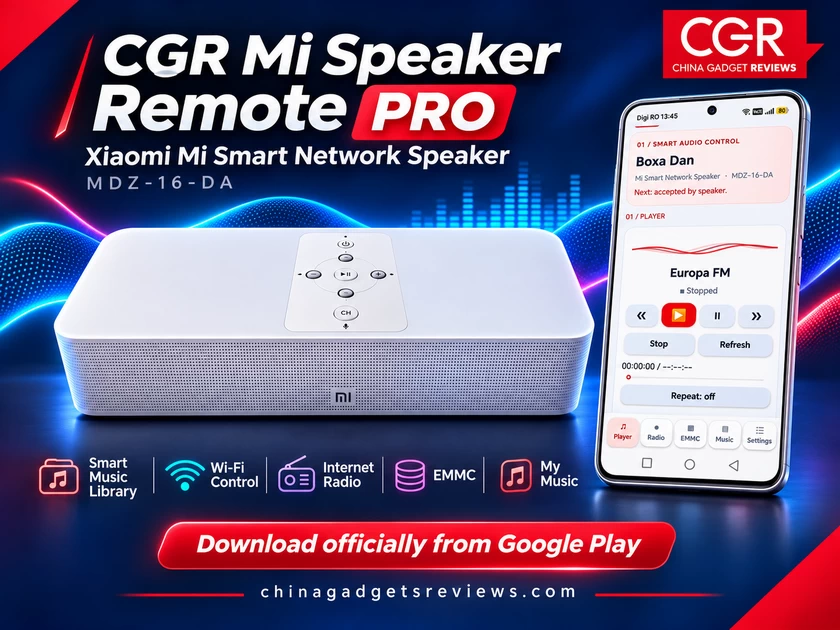
One of the first things users will notice about CGR Mi Speaker Remote PRO is its redesigned visual identity. We wanted the application to feel consistent with our other software projects, particularly CGR ActionCam Studio PRO, while maintaining an interface specifically designed for audio playback and music management. The result is a contemporary design built around the signature CGR Red color scheme, complemented by light backgrounds, dark typography, rounded controls, colorful music cards, and carefully organized navigation. The main interface is divided into five sections: Player, Radio, EMMC, Music, and Settings. This layout provides quick access to the application’s core functionality without forcing users to navigate complicated menus. Large playback buttons make common operations immediately accessible, while dedicated library interfaces provide the additional organization required for extensive music collections. We also paid attention to smaller elements of the experience, including visual feedback, screen transitions, navigation consistency, and the presentation of connection status. The goal was to create an interface that looks and feels appropriate for a modern Android smartphone, even though the speaker itself belongs to an earlier generation of connected audio devices.
Wireless Speaker Control – Your Smartphone Becomes the Remote
The foundation of CGR Mi Speaker Remote PRO is its ability to communicate with the Xiaomi Mi Smart Network Speaker through a local Wi-Fi network. Once the speaker and smartphone are connected to the same compatible network, the application can discover the device and establish communication using its existing UPnP-based control capabilities. This allows users to interact with the speaker directly from their smartphones, without depending on the original companion software for the supported functions. The Player section provides access to essential playback operations, including Play, Pause, Stop, Previous, Next, volume adjustment, and playback-position controls where supported. The application can also display information reported by the speaker, including the current media title, transport state, and playback position. For users who keep their speakers on a desk, shelf, or elsewhere in the room, having these controls available on a smartphone is particularly convenient. The application also incorporates repeat and shuffle functionality for supported local music playback scenarios, helping users enjoy longer listening sessions without continuously managing individual tracks. Instead of turning the smartphone into a separate audio player, our priority was to preserve the speaker as the actual playback device and use Android as a convenient control interface.
Smart EMMC Music Library – Hundreds of Songs, Finally Organized
One of the most valuable features of CGR Mi Speaker Remote PRO is its dedicated management interface for music stored inside the speaker. The Xiaomi Mi Smart Network Speaker includes internal eMMC storage, making it possible to maintain a local music collection directly on the device. This is particularly useful because music stored on the speaker can be played without continuously downloading the same files from an external streaming service. However, navigating hundreds of tracks through a basic folder browser quickly becomes frustrating. During our development and testing, we worked with a speaker containing 759 audio tracks across 22 folders, representing approximately 4.57 GiB of reported audio-file sizes. That collection highlighted the need for something considerably more advanced than a conventional list of filenames.
Our solution is the CGR Smart Music Library.
Instead of displaying every file in a simple scrolling dialog, the application provides a dedicated music management interface with colorful track cards, searchable information, and multiple ways to explore the collection. Users can browse tracks, artists, albums, folders, favourites, and recently played music, depending on the information available in the indexed library. A search field makes it possible to find songs using parts of their titles, artist names, album information, or folder names. For example, searching for an artist can quickly narrow a library containing hundreds of tracks to a much smaller, more manageable selection. The application also supports sorting and filtering by several useful criteria, including alphabetical order, file format, folder, and available media information. Rather than rebuilding hundreds of visual elements simultaneously, the library uses an efficient scrolling interface that reuses visible list items. This approach helps reduce unnecessary memory consumption and keeps navigation responsive when working with large music collections. Where the speaker does not provide complete artist or album metadata, the application can derive useful labels from filenames and folder organization. These inferred details should not be confused with verified embedded audio tags. For us, this is one of the most meaningful improvements offered by the application. An internal music library containing hundreds of tracks becomes much more enjoyable when the content is organized in a way that resembles a contemporary music player.
My Music – Stream Your Smartphone’s Music to the Speaker
Internal speaker storage is only one part of the experience. Many users maintain substantial music collections on their smartphones or tablets, including MP3 files, downloaded albums, personal recordings, and other locally stored audio. CGR Mi Speaker Remote PRO also provides a dedicated My Music section for accessing compatible audio files stored on the Android device. With the Smart My Music Library introduced in version 2.1.4, we extended the same organizational approach used for EMMC music to the smartphone’s own collection. Instead of relying on a basic list, users can explore their local tracks through a modern music library interface with search, filtering, sorting, artist and album views, folders, favourites, and recent playback information. This makes the application considerably more useful for someone who stores 500, 1,000, or even more audio files on a phone or tablet. The application uses Android’s media library facilities to discover accessible audio content, with the required user permission. For compatible local tracks, the application can transmit the audio to the Xiaomi speaker over the local network using its built-in audio relay functionality. The phone acts as the source of the music, while the speaker remains the playback destination. This can be especially useful when a particular track is not stored in the speaker’s eMMC memory, but is already available on the smartphone. Naturally, phone-to-speaker playback depends on both devices remaining connected to the appropriate network and on the application’s local streaming service remaining available.
Internet Radio – Rediscover the Joy of Radio Listening
Music collections are important, but we also wanted CGR Mi Speaker Remote PRO to offer a convenient way to enjoy internet radio. The dedicated Radio section provides access to a selection of online radio stations, allowing the speaker to be used for music, entertainment, talk shows, and other live audio content. A particularly useful feature is the application’s radio compatibility mode. Many modern radio stations distribute their audio through HTTPS endpoints, redirects, or playlist files. Older network speakers may have difficulty accessing some of these streams directly. To address this limitation, CGR Mi Speaker Remote PRO includes a local HTTP relay mechanism. In this mode, the smartphone retrieves a compatible radio stream and makes it available to the speaker through a temporary local network address. This can help bridge the gap between modern internet radio services and older playback hardware without modifying the speaker’s original firmware. The application includes handling for common radio playlist formats, supported audio streams, and certain HTTP redirects. However, actual compatibility depends on the station’s stream format, the speaker’s supported audio codecs, and network availability. The application also includes logic for restoring radio playback when a previously selected station needs to be restarted after reopening the app. When the smartphone supplies the radio stream, that relay must remain active. The speaker cannot continue receiving it if the source service is permanently stopped. For everyday listening, this feature can turn an older network speaker into a practical internet radio receiver.
Favourites, Search and Playback Management
One of our priorities throughout development was ensuring that large music collections remain manageable. The Smart Music Library provides convenient favourite controls, allowing users to mark tracks they enjoy and return to them without searching through hundreds of files again. Favourites are maintained locally by the application, with separation between the speaker’s internal collection and music stored on the smartphone. This distinction is important because the two libraries represent different sources and should not become mixed together. Search functionality is also designed to tolerate common variations in filenames, including capitalization, punctuation, underscores, and diacritics. That matters when managing personal music collections accumulated over many years, where filenames and folder structures are rarely perfectly standardized. The application also provides access to relevant track information and contextual actions, allowing users to explore their libraries more conveniently. With hundreds of tracks available, these seemingly small usability improvements can make a substantial difference. Built for Large Music Collections Without Overloading the Interface Performance became an important consideration as the application evolved. Displaying hundreds of music files simultaneously is not necessarily difficult for a modern smartphone, but repeatedly rebuilding large interfaces or performing network operations on the main interface thread can lead to unnecessary delays. For this reason, CGR Mi Speaker Remote PRO separates music library processing from the controls responsible for the speaker’s playback. Its catalog-based approach allows searching and filtering to operate on locally indexed information rather than requiring a new network scan for every search. The music library also uses recycled list rows to reduce unnecessary interface allocations during scrolling. Music stored on the phone is scanned separately from music stored in the speaker’s eMMC memory. The two collections are organized through a consistent interface, but maintain their own sources and playback paths. This distinction helps keep the application flexible without compromising the functionality of either library.
Connection Diagnostics and Android 17 Compatibility
Developing a companion application for older network hardware requires more than an attractive interface. Modern Android versions introduce additional security, networking, and background execution restrictions that can affect device discovery and local connectivity. CGR Mi Speaker Remote PRO has therefore been designed with these requirements in mind, including local network access permissions on supported Android versions. The application uses local device discovery and communication rather than requiring the speaker to connect to a proprietary CGR cloud platform. A dedicated Diagnostics section can provide useful information about connection status and help identify communication problems. This can be particularly valuable if a router isolates wireless clients, a VPN affects local networking, or the smartphone cannot discover the speaker. The application also includes settings related to language, radio compatibility, and selected playback behaviors. English and Romanian are supported, making the interface accessible to an international audience while retaining a convenient localized experience for Romanian users. The Android project is configured to support Android 8 through Android 17, with Android 17 compatibility addressed in its application permissions and build configuration. As with any network-based companion application, actual operation depends on the Android device, its network configuration, and the speaker’s firmware.
Local Music, Local Control and No Mandatory Cloud Account
One of the advantages of this project is its reliance on local connectivity for the main control functions. The application does not require users to create a separate CGR account simply to operate the speaker or browse their compatible local music collections. Commands are transmitted within the local network, while supported music and radio streaming workflows use the speaker’s existing network playback capabilities. The speaker’s original files are not deleted or modified by ordinary library browsing, searching, or playback operations. Favourites and application preferences are maintained on the Android device. The core experience is designed without a recurring subscription or mandatory CGR cloud service. For users who prefer direct control over their devices and locally stored music, this is an important practical advantage.
Why CGR Mi Speaker Remote PRO Adds Real Value
The main value of CGR Mi Speaker Remote PRO goes beyond basic remote-control functionality. A simple remote can adjust volume or start playback, but a carefully designed companion application can substantially improve the entire listening experience. The ability to manage hundreds of songs stored on the speaker, search by artist or album, browse smartphone music through a similar interface, access compatible internet radio stations, and manage playback from one place transforms the way an older network speaker can be used. In our case, the development process was particularly interesting because we were able to preserve the existing UPnP-based communication and playback capabilities while building a much more contemporary user experience around them. We did not need to replace the speaker’s firmware or turn the hardware into something it was never designed to be. Instead, we focused on making its original features more accessible, organized, and convenient. That is precisely the kind of software improvement we enjoy developing at China Gadgets Reviews.
Compatibility, Availability and Pricing
CGR Mi Speaker Remote PRO has been developed specifically for the Xiaomi Mi Smart Network Speaker, model MDZ-16-DA. It is not intended as a universal remote for every Xiaomi speaker, nor should it be confused with applications designed for the Xiaomi XiaoAI touchscreen speaker family. Its supported functionality depends on the speaker’s existing UPnP capabilities and the local network environment. The application is planned as a premium Google Play download with a suggested one-time price of 2.99 USD, without a recurring subscription. CGR Mi Speaker Remote PRO is an independent application developed by China Gadgets Reviews and is not affiliated with, sponsored by, or officially endorsed by Xiaomi. Additional information, support resources, development updates, and compatible-device details will be available through China Gadgets Reviews at https://chinagadgetsreviews.com/.
Google Play Store: https://play.google.com/store/apps/details?id=com.chinagadgetsreviews.speaker.unified
Final Verdict – Making an Older Xiaomi Speaker More Useful Than Ever
CGR Mi Speaker Remote PRO reflects our belief that useful technology should not become obsolete simply because its original software experience has aged. The Xiaomi Mi Smart Network Speaker MDZ-16-DA remains an interesting audio device, particularly for users who appreciate local music playback, internal storage, and Wi-Fi connectivity. By developing a modern Android companion application around those capabilities, we have created a more convenient way to control and enjoy the speaker. The combination of the CGR Red interface, remote playback controls, Smart EMMC Music Library, smartphone music management, internet radio compatibility, favourites, and diagnostics provides a more complete experience than a basic remote-control utility. For us, the most satisfying part of the project is seeing an older piece of hardware become enjoyable to use again through thoughtful software development. Good audio hardware deserves a modern companion, and useful technology should not have an expiration date imposed by outdated software. CGR Mi Speaker Remote PRO is another step in our mission to give existing gadgets a longer, more practical, and more enjoyable life.
Did this article help you? If so, please tell me in a comment what do you think about it.
Don’t miss any of our future video tutorials, follow us on Youtube. Like us on Facebook. Join our Best Deals Telegram Channel. Join our Android TV Box Firmware Updates Telegram Channel. Subscribe now to our newsletter. If you need Tech Reviewer or Youtube Influencer read this. Donate now here to support CGR Team!