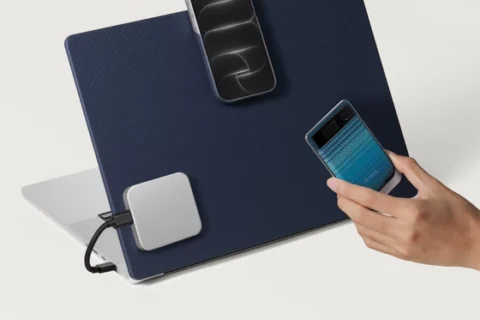
Filming yourself with a smartphone should be straightforward, yet choosing the rear cameras often means giving up a clear view of your framing, leaving you to record a test clip, check the result and repeat the process until everything looks right. The newly launched SmallRig Wired Touchscreen Display Adapter for Smartphones addresses that everyday frustration by bringing monitoring and touchscreen phone control to a compact accessory designed for creators working on their own, whether they are recording product showcases, presenting a tutorial or capturing their next vlog.
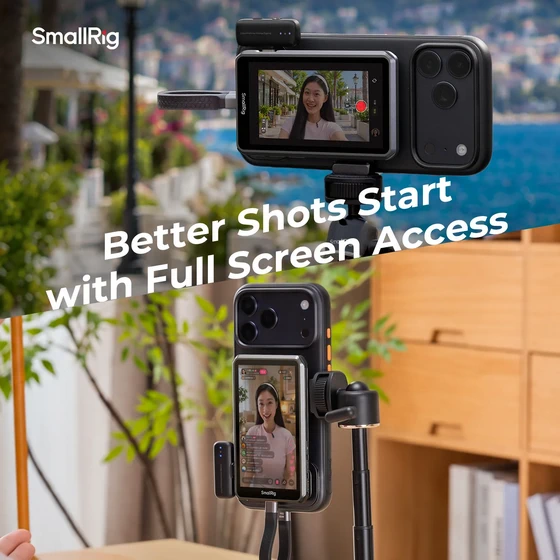
The appeal begins with a wired, plug-and-play connection, which keeps setup simple and gives creators a direct way to connect their compatible smartphone to an external display. For someone regularly moving between a desk, a tripod and a handheld filming setup, that straightforward approach could make the accessory especially useful, allowing more attention to stay on the presentation, the composition and the moment being captured.
What makes this SmallRig accessory particularly interesting is its touchscreen reverse control, which allows users to operate a compatible connected phone directly from the external screen. Instead of repeatedly turning the smartphone around to reach its display, creators can keep the camera facing the scene while interacting through the monitor, making it easier to manage a solo recording setup when both the presenter and the camera operator are the same person. SmallRig lists support across compatible devices from Apple, Huawei, Samsung, Xiaomi, Vivo and Oppo, although buyers should check their specific model before ordering.
Magnetic mounting adds another practical element, allowing the display to attach magnetically to an iPhone for shooting and monitoring in a compact arrangement. This is an appealing approach for mobile creators who want to keep their equipment manageable, particularly when switching between filming themselves, showing a product up close and capturing footage away from their usual recording space.
For more flexible positioning, the version supplied with the double-sided magnetic 1/4″-20 mounting adapter provides a way to incorporate the display into tripod or selfie-stick setups. That flexibility opens up useful possibilities for tabletop demonstrations, seated presentations and handheld content, where placing the monitor where it can be seen comfortably can make the entire filming process feel more natural. Package contents vary by edition, so shoppers should select the version that includes the mounting accessories they need.
SmallRig also advertises 4K 120fps monitoring support for the iPhone 15, 16 and 17 Pro and Pro Max series, giving the adapter particular appeal for creators interested in demanding smartphone video workflows. Available recording modes still depend on the connected phone and application, so the monitor should be viewed as a way to support the filming experience rather than an upgrade to the phone’s own camera capabilities.
For vloggers, reviewers and anyone building a solo content setup, the attraction is easy to understand: seeing the shot while remaining in front of the camera can help reduce the guesswork that interrupts an otherwise good recording session. By combining a direct wired connection, touchscreen interaction and flexible magnetic mounting, SmallRig has created an accessory with a clear purpose and an immediately relatable use case.
Discover the SmallRig Wired Touchscreen Display Adapter for Smartphones on the official EU store, check compatibility with your phone and choose the package that best fits your recording setup.
Did this article help you? If so, please tell me in a comment what do you think about it.
Don’t miss any of our future video tutorials, follow us on Youtube. Like us on Facebook. Join our Best Deals Telegram Channel. Join our Android TV Box Firmware Updates Telegram Channel. Subscribe now to our newsletter. If you need Tech Reviewer or Youtube Influencer read this. Donate now here to support CGR Team!