In the world of DIY electronics and smart device development, a compact display can do much more than simply show information. With the Elecrow CrowPanel 2.1″ HMI ESP32 Rotary Display, makers get a versatile interactive platform that combines a vibrant round touchscreen, intuitive rotary controls and powerful wireless connectivity in one compact package. Designed for smart home interfaces, IoT projects, custom control panels and experimental hardware builds, this clever little display brings a more natural way to interact with electronic devices. Whether you’re building a dedicated smart home controller, a multimedia interface or a custom dashboard, the CrowPanel offers plenty of possibilities for turning your ideas into functional projects.
A Crisp Round Display That Makes Every Interface Stand Out
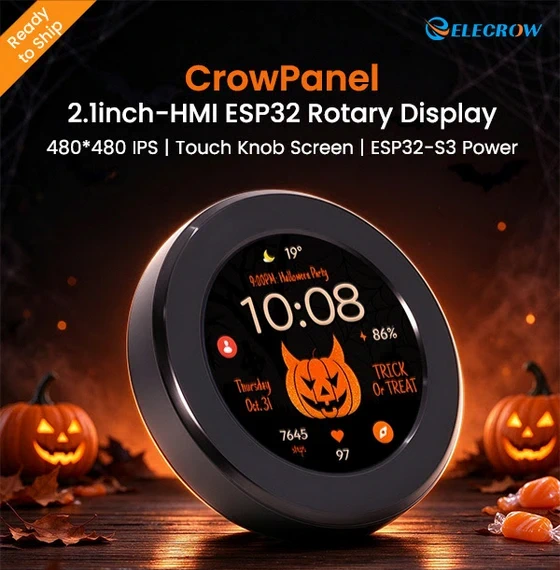
The first thing that catches your attention is the CrowPanel’s 2.1-inch circular IPS display with a 480 × 480 resolution. Its round format provides a distinctive alternative to conventional rectangular screens, making it particularly appealing for smart control panels, desktop accessories and custom embedded devices. The IPS panel offers clear visuals for displaying menus, system information, status indicators and custom graphics. From a compact smart home dashboard to a personalized interface for a DIY project, the display gives developers a practical canvas for creating interfaces that look modern and feel purpose-built. Its compact footprint also makes it suitable for projects where space matters, allowing you to integrate a capable visual interface without dedicating a large area to a conventional display.
Turn, Tap and Take Control
What truly sets the CrowPanel apart is its combination of rotary knob input and capacitive touch interaction. Instead of relying exclusively on touchscreen controls, users can rotate the physical knob clockwise or counterclockwise to navigate options, adjust values and control supported functions. A full press adds another input method, while the capacitive touchscreen provides direct interaction with on-screen elements. This dual-control approach opens the door to more intuitive interfaces. Imagine turning the knob to adjust smart lighting brightness, scrolling through music selections, changing the temperature on a custom thermostat interface or navigating settings on a compact desktop controller. The possibilities depend on the software you develop, but the hardware provides the essential ingredients for a flexible, tactile user experience. For projects inspired by premium consumer electronics, this combination of physical controls and touchscreen functionality can make a DIY device feel considerably more polished.
ESP32-S3 Performance for Creative Projects
At the heart of the CrowPanel is the ESP32-S3 dual-core, 32-bit microcontroller, capable of operating at clock speeds of up to 240 MHz. This provides a capable foundation for interactive embedded applications, including graphical interfaces, sensor-driven dashboards and wireless control systems. Developers can build responsive menus, process input from the rotary knob and touchscreen, and coordinate communication with other devices. The ESP32-S3 is particularly attractive to makers because it combines processing capabilities with integrated wireless connectivity. Rather than assembling a display, a separate microcontroller and additional wireless hardware from scratch, the CrowPanel brings key components together in a single development platform. That integrated approach can simplify prototyping, reduce wiring and help keep projects compact.
Wi-Fi and Bluetooth for Connected Devices
Modern DIY electronics increasingly rely on wireless communication, and the CrowPanel is equipped for connected applications. Its support for 2.4 GHz Wi-Fi and Bluetooth Low Energy (BLE) makes it suitable for projects that communicate with compatible devices, interact with network services or form part of a broader smart home setup. You could develop a Wi-Fi-connected control panel for monitoring sensor readings, build a wireless interface for a compatible DIY device or experiment with Bluetooth-enabled accessories. For IoT enthusiasts, the combination of a graphical display, physical controls and wireless connectivity provides a useful starting point for creating interfaces that do more than display static information. Of course, the exact capabilities depend on the firmware, connected hardware and software integrations you implement.
Arduino IDE and LVGL Support: Make It Your Own
Hardware is only half the story. The real appeal of a development display lies in how easily you can customize it. The CrowPanel supports the Arduino IDE and the LVGL graphics library, giving developers familiar tools for building custom applications and graphical user interfaces. Arduino IDE support offers an accessible entry point for makers who already work with the ESP32 ecosystem. Meanwhile, LVGL provides a framework for creating more sophisticated graphical interfaces, including menus, buttons, gauges, status panels and other interactive elements. This flexibility makes the CrowPanel suitable for everything from straightforward prototypes to more ambitious interface experiments. Want a minimalist control screen with a few essential functions? A dashboard with live sensor data? A custom interface with animated elements and rotary navigation? You can build an experience around the needs of your project rather than adapting your design to a generic display. The result is a development platform that encourages experimentation and rewards creative thinking.
Flexible Expansion for More Ambitious Builds
The CrowPanel also includes a 5V power/programming interface and expansion connections for UART, I²C and FPC. These interfaces provide additional options for integrating compatible peripherals, communicating with external components and expanding the functionality of a finished project. I²C can be useful when working with compatible sensors and modules, while UART supports serial communication with other devices. The FPC connection offers another expansion option for supported hardware. Combined with its wireless capabilities, these connections give developers several ways to integrate the display into a larger embedded system. The module’s low-power design is another consideration for compact and portable applications, although actual energy consumption and battery life will depend on the display settings, wireless activity, connected peripherals and overall implementation.
What Can You Build with the CrowPanel 2.1″?
The combination of a round IPS screen, rotary input, touchscreen and ESP32-S3 opens up a broad range of project ideas. Smart home controller: Create a dedicated interface for controlling compatible lights, monitoring sensors or navigating home automation functions. Desktop control dial: Build a custom controller for supported applications, shortcuts or adjustable settings. DIY thermostat: Display temperature readings and let users change target values with the physical knob. IoT information dashboard: Present network data, sensor readings and device status in a compact circular interface. Multimedia controller: Experiment with playback controls, volume adjustment and media navigation. Custom embedded interface: Develop a dedicated HMI for a compatible machine, electronic project or experimental device. These are examples rather than ready-made functions included with the hardware. Bringing them to life requires suitable firmware, compatible peripherals or software integrations where necessary.
Why It Deserves a Place on Your Maker Bench
The Elecrow CrowPanel 2.1″ Rotary Display is appealing because it combines several useful building blocks in a single module. Instead of treating the screen as a simple output device, it integrates visual feedback, touch interaction, physical rotary input, wireless connectivity and a programmable microcontroller. Its circular 480 × 480 display gives projects a distinctive appearance, while the rotary knob provides an alternative to touchscreen-only navigation. ESP32-S3 processing and Arduino IDE and LVGL support round out a package designed for developers who want room to experiment. For beginners, it offers an interesting foundation for learning about embedded interfaces and connected electronics. For experienced makers, it can help accelerate prototyping and simplify the development of custom control devices.
Final Verdict: A Small Display with Big Potential
The Elecrow CrowPanel 2.1″ HMI ESP32 Rotary Display is a compelling option for anyone who wants to add a more polished, interactive interface to a DIY electronics project. Its strongest selling points are the combination of a high-resolution circular IPS display, rotary and capacitive touch controls, ESP32-S3 processing, Wi-Fi and BLE connectivity, and support for popular development tools. Together, these features provide a flexible foundation for smart home controllers, IoT dashboards, desktop accessories and custom embedded interfaces. It is not simply a screen to connect and forget. It is a platform to program, customize and transform into something that fits your own ideas. If you’re ready to move beyond basic displays and experiment with a more tactile, customizable approach to device control, the CrowPanel 2.1″ is worth a closer look.
Explore the Elecrow CrowPanel 2.1″ Rotary Display here.
Did this article help you? If so, please tell me in a comment what do you think about it.
Don’t miss any of our future video tutorials, follow us on Youtube. Like us on Facebook. Join our Best Deals Telegram Channel. Join our Android TV Box Firmware Updates Telegram Channel. Subscribe now to our newsletter. If you need Tech Reviewer or Youtube Influencer read this. Donate now here to support CGR Team!