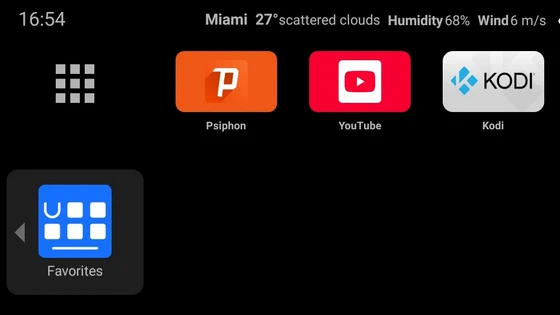
Ugoos Team keeps updating it’s own Android Launcher. The Ugoos ULauncher is a custom home screen launcher developed by Ugoos for their Android TV boxes. It’s designed to replace the standard, often cluttered, launcher that comes with most Android TV devices with a cleaner, more streamlined, and user-friendly interface. Its primary goal is to provide a more focused experience, putting your most-used apps and streaming services front and center while removing unwanted content like recommendation rows, ads, and news feeds.
Key Features:
– Clean and Simple Interface: The most noticeable feature is its minimalist design. It typically consists of a top row for your favorite apps and a simpler bottom row or menu for settings and other functions. It removes the “discovery” or “for you” rows that are common in launchers like the Google TV launcher, which can feel intrusive and slow down the device.
– Customizable App Row: You can easily pin your most-used applications to the main bar at the top of the screen. This allows for instant access without scrolling through a full app drawer.
– No Ads or Bloatware: ULauncher is ad-free. It doesn’t push sponsored content or recommendations, creating a distraction-free environment.
– Lightweight and Fast: Because it’s not resource-heavy, it often results in a snappier and more responsive navigation experience compared to the official launchers, especially on mid-range hardware.
– Integrated Settings Menu: It often includes a quick-access menu for key device settings like network, display resolution, sound, and sleep mode, making it unnecessary to dive deep into the full Android Settings menu for common tasks.
Ulauncher 1.7.14 Changelog 20.11.2025
1. Fixed hiding/showing of recommendation channels for some apps.
2. Fixed the launch of recommendation cards for certain apps.
3. Fixed an issue where the app would restart when long-pressing the Menu button (panel hiding).
4. Fixed incorrect recommendation banners when dpi changed.
5. Optimization and improvements.
Find UGOOS: Facebook / X (Twitter)
Did this article help you? If so, please tell me in a comment what do you think about it.
Don’t miss any of our future video tutorials, follow us on Youtube. Like us on Facebook. Join our Best Deals Telegram Channel. Join our Android TV Box Firmware Updates Telegram Channel. Subscribe now to our newsletter. If you need Tech Reviewer or Youtube Influencer read this. Donate now here to support CGR Team!