
Unveiling the Future: Get Ready for the Minix N512 Mini PC
In the ever-evolving world of technology, the demand for compact, efficient, and powerful computing solutions has never been higher. Enter the Minix N512 Mini PC, a device that promises to revolutionize the way we think about personal computing. This blog aims to provide an in-depth look at this groundbreaking product, exploring its features, benefits, and how you can make the most out of it. Whether you’re a tech enthusiast, a professional, or someone looking for a reliable and quiet mini PC, this article will guide you through everything you need to know about the Minix N512 Mini PC.
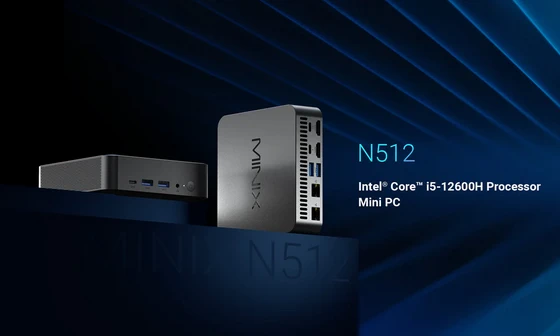
Introducing the Minix N512 Mini PC
The Minix N512 Mini PC is the latest addition to the Minix lineup, a brand known for its innovative and high-quality computing solutions. This mini PC is designed to cater to a wide range of users, from home entertainment enthusiasts to business professionals. Its compact size, powerful performance, and quiet operation make it a standout choice in the crowded mini PC market.
Highlighting Key Features of the Product
The Minix N512 Mini PC is packed with features that set it apart from the competition. Here are some of the key highlights:
1. Compact Design: The Minix N512 is incredibly small, making it easy to fit into any workspace or entertainment setup. Its sleek, modern design ensures it looks great wherever you place it.
2. Powerful Performance: Despite its small size, the Minix N512 doesn’t compromise on performance. Equipped with the latest Intel processors, it delivers fast and efficient computing power for all your needs.
3. Quiet Operation: One of the standout features of the Minix N512 is its quiet operation. Thanks to advanced cooling technology, this mini PC runs silently, making it perfect for environments where noise is a concern.
4. Versatile Connectivity: The Minix N512 comes with a wide range of ports, including USB, HDMI, and Ethernet, ensuring you can connect all your devices with ease.
5. Energy Efficiency: Designed with energy efficiency in mind, the Minix N512 consumes less power than traditional desktops, helping you save on energy costs.
6. Expandable Storage: With options for expandable storage, you can easily upgrade the Minix N512 to meet your growing needs.
Getting the Most Out of Your Minix N512
Setting up your Minix N512 Mini PC is a simple process. Follow these steps to get started:
1. Unboxing: Carefully unbox the Minix N512 and ensure all components are present, including the power adapter, HDMI cable, and any other accessories.
2. Connecting to a Display: Use the HDMI cable to connect the Minix N512 to your monitor or TV. Ensure the display is set to the correct input source.
3. Powering On: Plug in the power adapter and turn on the Minix N512. The device should boot up automatically.
4. Initial Setup: Follow the on-screen instructions to complete the initial setup, including connecting to your Wi-Fi network and signing in with your user account.
5. Installing Software: Once the setup is complete, you can start installing your preferred software and applications. The Minix N512 supports a wide range of operating systems, including Windows and Linux.
Tips and Tricks for Maximizing Its Performance
To ensure you get the best performance out of your Minix N512 Mini PC, consider the following tips and tricks:
1. Regular Updates: Keep your operating system and software up to date to ensure optimal performance and security.
2. Optimize Storage: Regularly clean up unnecessary files and consider using external storage or cloud services to free up space on your Mini PC.
3. Use a Surge Protector: Protect your Minix N512 from power surges by using a surge protector, especially in areas prone to electrical fluctuations.
4. Monitor Temperature: While the Minix N512 is designed to run quietly and cool, it’s still a good idea to monitor its temperature, especially during heavy usage.
5. Customize Settings: Explore the settings menu to customize your Mini PC’s performance, including power settings, display preferences, and more.
6. Utilize Ports: Take full advantage of the versatile connectivity options by connecting external devices such as printers, external drives, and additional monitors.
7. Regular Maintenance: Perform regular maintenance tasks such as disk defragmentation, virus scans, and system cleanups to keep your Mini PC running smoothly.
Conclusion
The Minix N512 Mini PC is a game-changer in the world of compact computing. Its combination of powerful performance, quiet operation, and versatile connectivity makes it an ideal choice for a wide range of users. Whether you’re looking to save space, reduce noise, or simply enjoy a high-performance computing experience, the Minix N512 has something to offer. In this blog, we’ve explored the key features of the Minix N512, discussed the advantages of owning one, and provided tips on how to set it up and maximize its performance. We hope this guide has given you a comprehensive understanding of what the Minix N512 Mini PC can do and how it can benefit you. We encourage you to share your thoughts and experiences with the Minix N512 Mini PC. Whether you’re a current owner or considering purchasing one, your feedback and insights can help others make informed decisions. The future of computing is here, and it’s quieter, more powerful, and more compact than ever before. Get ready to embrace the future with the Minix N512 Mini PC!
Did this article help you? If so, please tell me in a comment what do you think about it.
Don’t miss any of our future video tutorials, follow us on Youtube. Like us on Facebook. Join our Best Deals Telegram Channel. Join our Android TV Box Firmware Updates Telegram Channel. Subscribe now to our newsletter. If you need Tech Reviewer or Youtube Influencer read this. Donate now here to support CGR Team!















