
USB4 Will Make Life Easier For Everyone
Although the U in USB stands for Universal, it certainly isn‘t as universal as it could be. There are a bewildering number of different versions and variations of USB out there, and confusion among consumers is widespread.
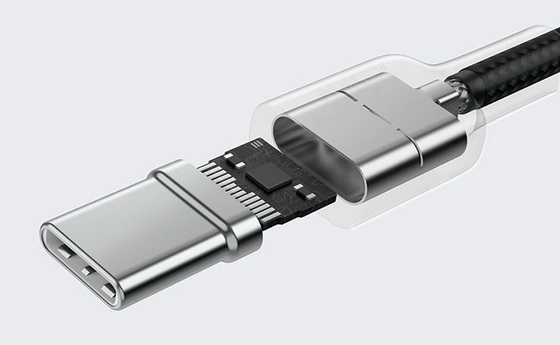
Having different connector types like USB-A, micro-USB, and USB-C is bad enough, but the underlying technology also varies heavily. There is USB 2.0, USB 3.1 Gen1x1 (AKA USB 3.0), USB 3.2 Gen2x2, and so on. These may also separately support other charging or video standards, but there‘s no guarantee and you have to read the specifications carefully. We do our best to label our products clearly, but it‘s inevitable there will be some degree of confusion for consumers.
However, it seems that hope may be on the horizon. Last year, the USB Implementers Forum (USB-IF) announced USB4, the snappily-named successor for the current hodgepodge of standards and terminologies.
First of all, let‘s get the name straight. USB-IF has decided to name the new standard “USB4”, with the conspicuous absence of a space, while in the same document they refer to “USB 2” and “USB 3”, complete with spaces. The latter two have been retroactively renamed, having originally been USB 2.0 and USB 3.0 respectively, but it seems like integers are currently de rigueur in the world of tech naming (Bluetooth 5 succeeded Bluetooth 4.0, WiFi 802.11ac has been renamed “WiFi 5”, and “Android 10” was the first non-confectionary-based Android version).
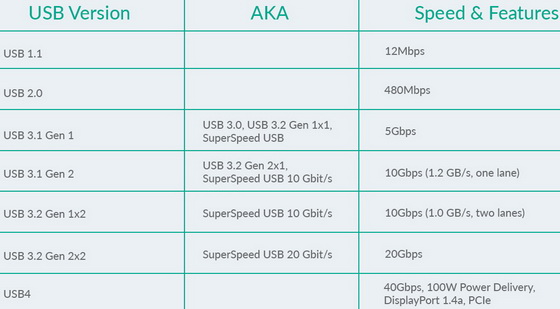
In February 2020, USB-IF went on to confirm that there will be two versions of USB4 available; USB4 20Gbps and USB4 40Gbps. Once again, this style of naming is refreshingly transparent and easy to understand, a far cry from the previous collection of standards. When browsing for cables consumers will know at a glance exactly what data transfer speeds are supported, and will appreciate that USB4 is clearly a step-up from the multitude of USB 3 versions. At the moment, the horribly-named “USB 3.2 Gen 1×1” is actually slower than USB 3.1 Gen 2, even though most consumers would naturally expect 3.2 to be a step up from 3.1. More confusingly, both USB 3.1 Gen 1 and USB 3.2 Gen 1 can also be referred to as USB 3.0. Realizing that the naming system was awful, USB-IF introduced the “SuperSpeed USB” brand name, but this wasn‘t adopted as widely as was hoped for, and if anything only added to the confusion. Even today, many consumers still refer to blue-colored USB ports as USB 3.0, even though officially that term was phased-out in 2013. The table below shows the various USB versions, including the complicated situation with the USB 3 series.
So what does USB4 actually provide, and in what ways is it superior to the USB 3 standards? First of all, transfer speeds have been elevated up to a maximum of 40Gbps, and 20Gbps for the slower version. USB 3.2 Gen 2×2 (quite a mouthful) also provided 20Gbps, but this standard isn‘t particularly widespread, and most consumers will only have experienced the 5Gbps offered by USB 3.1 Gen 1. To try to put 40Gbps into some context, using this transfer speed you could copy the entire contents of a 1TB hard drive in just 3 minutes and 40 seconds, compared to about 30 minutes using USB 3.1 Gen 1, and more than 5 hours using standard USB 2.0 (with USB 1.1 from the late 90s it would have taken more than 8 days).
It‘s also worth noting that USB4 now specifically uses the USB-C connector. USB 3 sometimes used USB-C ports, but more commonly used blue-colored USB-A ports. It also sometimes used something called USB micro-B SuperSpeed, which you often see on portable hard drives (pictured below), as well as the rare Type-B SuperSpeed connector. The earlier USB 2.0 standard used no fewer than eight different port layouts, so restricting USB 3 to four connector types was already progress. With USB4, such complications are eliminated and all devices use the same connector type, making life much easier for everyone.
Now that USB Power Delivery (PD) is included as standard, USB4 also offers fast charging to go alongside the fast data transfer. While previous versions of USB 3 sometimes came packaged with USB PD compatibility, now it is compulsory (if it doesn‘t support PD, you can‘t call it USB4). This will bring PD‘s powerful and versatile charging to a much wider range of users, hopefully popularizing it further. USB PD is a universal charging standard that supports up to 100W, as well as nifty features such as bi-directional charging.
USB4 will also offer dual-channel video support, allowing you to output 4K resolution to two different displays at once, and all while using the same port for data transfer (using a hub or adapter).
If all this sounds familiar to MacBook users, it‘s because USB4 is based heavily on the Thunderbolt 3 standard, which appears on the latest MacBooks and ThinkPads. Thunderbolt 3 is a proprietary standard developed by Intel in collaboration with Apple, but Intel made the specification available to USB-IF for USB4. There are one or two differences between the two standards though.
One of the most ingenious aspects of USB4 is its ability to dynamically allocate the total 40Gbps bandwidth to different tasks. For example, when the port is only being used for data transfer, it can employ all for 40Gbps specifically for that, giving incredible transfer speeds. However, if the port is being simultaneously used for video output, the total bandwidth will be split according to the exact requirement (for example allocating 10Gbps to video output and keeping 30Gbps for data transfer). This is somewhat similar to AUKEY‘s Dynamic Detect system, only for data instead of charging power. Although Thunderbolt 3 also offers 40Gbps total bandwidth, data transfer is limited to USB 3.1 Gen 2 specification (10Gbps), with another portion of the total bandwidth being reserved exclusively for video, and another exclusively for PCIe. USB4 offers all of the functionality of Thunderbolt 3, but in a more flexible way that supports higher maximum performance.
The other advantage of USB4 is that it can be included on any hardware, while Thunderbolt 3 is limited to Apple and Intel devices. For example, a laptop using an AMD processor would never be able to use Thunderbolt 3, but USB4 is no problem.
It should be noted that although USB4 will generally be compatible with Thunderbolt 3 hardware, compatibility isn‘t compulsory. That means it‘s conceivable that some devices will offer USB4 ports that aren‘t compatible with peripherals designed for Thunderbolt 3 (for example certain external video cards). However, USB-IF have said they expect the vast majority of USB4 equipment to support Thunderbolt 3 as well.
The first hardware compatible with USB4 is expected to appear in late 2020, and the specification should start to become widespread during 2021. Here at AUKEY we‘re really excited about USB4 and are looking forward to producing all manner of cables, hubs, and other peripherals that help users get the most out of this new standard!
Did this article help you? If so, please tell me in a comment what do you think about it.
Don’t miss any of our future video tutorials, follow us on Youtube. Like us on Facebook. Add us in your circles on Google+. Watch our photo albums on Flickr. Subscribe now to our newsletter.














