
This is a simple tutorial on how to easily flash Android Lollipop 5.1 stock firmware on MXIII-G TV Box with Amlogic S812 CPU via Windows 10 PC.

BTW, you can now buy MXIII-G TV Box with 1GB of RAM from gearbest.com for only $56.99 with free shipping. You can also buy MXIII-G TV Box with 2GB of RAM from gearbest.com for only $63.99 with free shipping.
1. First Android Lollipop 5.1 stock firmware for MXIII-G TV Box from here.
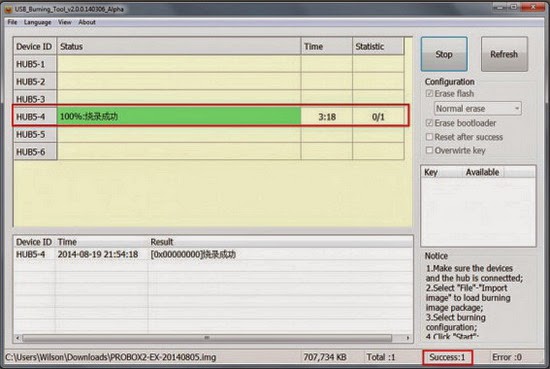
2. Extract the archive and run setup_v2.0.5.9 file, it will install the Amlogic Drivers and the USB_Burning_Tool v2.5.0.9. It’s working also on Windows 10 / 8.1 64 bit, but you’ll have to disable driver signature enforcement. Then you have to put MXIII-G TV Box in upgrade / flash mode. To do that, prepare a thin metal stick / paper clip, then press and hold the restore button (inside the AV port hole) and press Power button at the same time. After 3-5 seconds USB_Burning_Tool will detect the USB device. (Very important: make sure to first plug in the DC and OTG USB cables). If needed, reinstall AMLogic USB Burning Tool and the drivers.
3. Launch USB_Burning_Tool. Click ‘File’ and choose ‘Import image’, choose the .img file you just download. Click “Start” to start firmware upgrade, it should take around 3-4 mins and please do NOT power off / unplug MXIII-G TV Box during firmware upgrade. After finished firmware upgrade, it will auto disconnected. Now you can unplug it and connect to TV again.
For more details please watch the video below.
Did this article help you? If so, please tell me in a comment what do you think about it.
About Gearbest
GearBest is more than just a shopping site, it’s designed for gadget lovers by gadget lovers. We have a passion for all kinds of tech from retro style to the absolute cutting edge. At GearBest, our company vision is simple: to become the premier online electronics seller by providing an unparalleled selection of the very best gadgets, an unbeatable shopping experience, prompt shipping and exceptional customer service that exceeds expectations. For us, the customer is always king. Our total commitment to customers empowers us to work closely together with every customer. When you buy from us, the sale is not complete when we ship your order, it is complete when you are totally satisfied.
GearBest is more than just a shopping site, it’s designed for gadget lovers by gadget lovers. We have a passion for all kinds of tech from retro style to the absolute cutting edge. At GearBest, our company vision is simple: to become the premier online electronics seller by providing an unparalleled selection of the very best gadgets, an unbeatable shopping experience, prompt shipping and exceptional customer service that exceeds expectations. For us, the customer is always king. Our total commitment to customers empowers us to work closely together with every customer. When you buy from us, the sale is not complete when we ship your order, it is complete when you are totally satisfied.
Don’t miss any of our future video tutorials, follow us on Youtube. Like us on Facebook. Add us in your circles on Google+. Watch our photo albums on Flickr. Subscribe now to our newsletter.
can i use this update on Tronsmart MIII 2gb??
its the same hardware
@dan
You can try, if is the same SoC…
Great! I did this on my MXIII-G. It works!
But now I can’t make a backup anymore to my microSD with the UPDATE&BACKUP app.
In android 4.4.2 it made a backup on the microsd with a single file called BACKUP
in android 5.1 it made only the folderstructure in the folder Android. And it made an empty folder called .android_secure
I tried this on a microsd with ntfs fat32 and ext4. The MXIII-G didn’t recognized the ext4.
It looks like it made the backup to ntfs and fat32. but the folders are empty.
Is there a solution to make a good backup?
Everything was fine, the upgrade procedure works even under Windows XP. The H265 playing issues are now fixed. Thanks for your guide!
I have bought MXIII-G to play streaming content on my videoprojector, but
Google Play TV – DOESN’T WORK
Chili TV – DOESN’T WORK
Timvision – DOESN’T WORK
Infinity – DOESN’T WORK
All app of streaming povider doesn’t work
I have tryed to:
– delete root (superSU) – still NOT WORKING
– upgradare firmware to Lollipop (non rooted) – still NOT WORKING
So the most important thing that it has to do , doesn’t work. You can only play free content like youtube oer your personal file, but for this it is sufficient an hard disk with media player installed. whay else I can try?
Thanks a lot
Sergio
Dear Sir,
the flash to Android Lollipop 5.1 is reversible?
i mean…if I am not as happy I can go back to 4.4.2?
How?
Thank you very much.
Yes, of course you can.
Just flash back the KitKat stock firmware from here
http://chinagadgetsreviews.blogspot.ro/2015/07/download-latest-android-kitkat-442_22.html
Hello,
i get a failure during copy the Image to the box at 1 %, i hear the USB-disconnect sound,
[0x10105002]Romcode/Initialize DDR/Read initialize status/USB Control Setup Error…
i have win 10 on my Laptop, MX3 Box with 2 Gig RAM, driver signature verification is disabled…
please help
With Android 5.1 I can’t open the settings page. Always crashing on android. Everything else works fine, but as I cant access settings I cant connect wifi for example.
Help is apreciated
Tks,
Nuno
My MXIII-G does not light. When turning, go directly to a black screen with doll android. The doll has a blue ball in the stomach and a blue bar below. Load three seconds and crashes. Burning usb tool does not recognize the TV box. What can I do?
Hi,
I am also getting the same error message as Markus.
[0x10105002]Romcode/Initialize DDR/Read initialize status/USB Control Setup Error…
I have both win 10 and Win 8, MX3 S812 Box with 2 Gig RAM, driver signature verification has disabled.
What would have caused this error?
Help is appreciated.
Thanks.
Terence
I confirm that this works also for the MX-III (Not G). Great work and thanks!
Thank you! 😉
Hi.
When i Power on my Box First “Google Play” appears and the the white “android” logo. And thats it. Nothing more happens. Did you ever heard of this and do you have perhaps a solution?
Thank you very much
Regards
Tom
the error this time is “[0x10105002]Romcode/Initialize DDR/Read Initialize status/USB Control setup error”
Hi,
I just bought Andoer 4K (MXIII-G 1G) and after boot lollipop system is very freezing a still problem with falling google play. After I reflash to KitKat, everything is fine, system is fast a smooth. What is problem with lollipop? Has someone same problem?
Does exist any solution?
Thank you very much.
Pavel
I have an MXIII (I don’t think it’s an “G”)
The model is equal to the one you show, even the box…
I tryed to install and everything went ok. No error messages!
However the device does not work. It stays at the first image (something saying octacore and quadcore).
Is there any other .img available for my device?
Thks
Hi @all, i own an MX3 with an Amlogic S802 Quad-Core, does it work with this version of lollipop?
my mxq pro keeps rebooting into the ANDROID IS STARTING optimizing app 1-14. it goes thru the process of optimizing then starts it all over again. what can i do/ i have tried the hard reset and it still does the same thing. i can not get into the recovery mode because it stays in this loop.
The zip file for the MXIII-G_loliipop don’t work. It’s just for usb tool method. Do you have the sdcard method files?
Any body have try on a old mxiii 2g/8g no gigabyte model ??
Is it compatible with S802 processor model?
Is there link for the OTA or directions to download or is SD card image that I can transfer to the machine and update. I tried the given method and he did not work
Fantastic guide ….I now have a working android streamer instead of a dead one .
Thank you very much
Did anyone try this on MXIII amlogic s802 2ram 8rom devices?
Please beware that after making a system update, the system may change your resolution to 1080… which might make you think your device is not outputting to HDMI if your TV (Such as Sony Bravia) does not support that resolution. Cost me all morning… and only realised when I connected it to a smaller, but more recent, HDMI monitor that supported 1080…. SO CHECK WITH OTHER MONITORS BEFORE REINSTALLING OR RESETTING!
To answer a couple of questions:
The ANDROID splash screen should disappear in under 10 minutes, it is in the process of restarting with the new config.
If you can’t get into Settings, it’s because you haven’t let the box completely start up. When you see the Ironman launch screen, leave your box alone for another 10 minutes and everything should work.
I cannot see this working for the S802 but it does work for the S812 1gb/8gb box
The only I had was the mouse function on the remote no longer works.
i tried with S802. after finish upgrading when trying for first boot it showing “8 core mali 450 quad core s812. that’s it no progress.. “
i feel i broke the box i too update for S802 and getting the same
8 core mali 450 quad core s812. that’s it no progress.. “ Any solution
Good morning i made a clean install of the Lollipop 5.1.1, everything went fine only one thing that has changed and i would like to have on the splash screen when i switch on the Tv box it dosen’t show me anymore Google Tv but the Amologic S812?’, how can i have again the logo startup Google Tv?’.
Confident in some help..
Thank you.
Antonio
Hey there,
I’ve the same problem with some of the peeps here. I’ve this “8 core Mali 450” logo and it’s making me stress. Now I can’t watch my favourite channel…awwwww man!!! Help me pls….
[0x10105002]Romcode/Initialize DDR/Read initialize status/USB Control setup error
Hi , Does anyone know if this works on Window 7?
Cheers
For those of you guys have a just a logo of 8 core Mali… thats means this firmware are no compatible with your box… and backup restore can not work… the only things you need to do, is to find your nest firmware and re install Again
Need to upgrade my box
MXIII, 2gb rom
to either lolipop or marshmallow so
I can install kodi 17.
thanks
Raazi
Hi,
Very helpful,
After the update it looks like the screen is stuck on the Amlogic logo (Blue yellow logo).
It looks like it is not working…
Any idea?
For everyone getting “[0x10105002]Romcode” errors
I was getting the same thing – it seems the program is not a fan of USB3
ran it from USB2 port and worked first time.
You are welcome
Hello, I have followed your instructions to the letter. and I find myself with a blue and yellow logo S812 after reconnecting my MXIII to the TV. please help as I don´t know what to do now. Thank you
I done everything that you say to do but then it gets hung up at about 18% and the green progress bar sets on 3 and turns to red. This android box I have someone had installed Openelec on it and the Confluence is done with a media center called Wazo and I cannot get rid of it. I even tried to do a factory hard reset and no go. Can someone help me on sitting this M111 android box back to its factory state so I can get to Android? Right now it will only open in Openelec kodi 15.1. I have been working on this going on 2 days now and I am running out of solutions
Hello,
Lollipop 5.1 firmware is the last available for thix box tv?