
Beelink GTR6 BIOS Update to Enable Super Silent Fan or 4th HDMI port. Read more here about Beelink GTR6 AMD Ryzen 9 6900HX Mini PC.
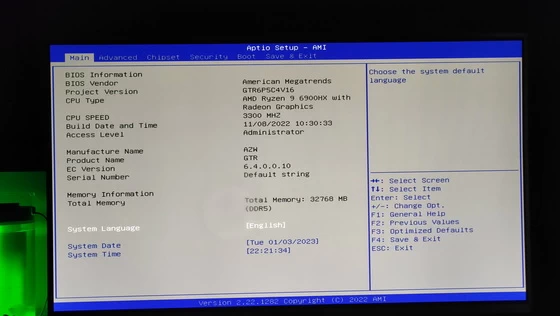
New BIOS update for Beelink GTR6
These BIOS update files are only necessary for computers that went on sale without the 4th port HDMI already activated or the dual fan system is very noisy in gaming mode. This is only a problem in the first units that have been put on sale, in the rest of the mini PCs Beelink already have this BIOS version installed by default. Before do anything, it is better for you to check with Beelink the serial number of your GTR6 model / BIOS version already installed. Contact Beelink team at beelink@bee-link.com.
BIOS update process
Download BIOS file with 4th HDMI active from here (Beelink_GTR6_BIOS_Update) or for Super Silent Fan from here (EC_GTR6_V6_4_0_0_11). Decompress the archive. Prepare a FAT32 formatted USB drive and copy the uncompressed files to the root of the USB. Restart the Beelink GTR6 while we are pressing F7 and in the boot menu select the USB drive. The update process will start and a text will appear. Wait about 2-3 minutes for it to finish. When it reaches the end, press the power button and restart normally. Watch the below video for more info. The BIOS update process is done entirely at your own risk. Good luck!
Did this article help you? If so, please tell me in a comment what do you think about it.
Don’t miss any of our future video tutorials, follow us on Youtube. Like us on Facebook. Join our Best Deals Telegram Channel. Join our Android TV Box Firmware Updates Telegram Channel. Subscribe now to our newsletter.






boa noite gostaria da firmeware mais recente do GTR6
gostaria bios mais recente gtr6 6900hx esta , esta dando tela azul e ja atualizei a bios com a ultima versao do site beelink