
Let me guess, one of the top 2 reasons for you to buy an EZCast dongle is to watch online videos on your TV. The other reason is to play games on the big screen.
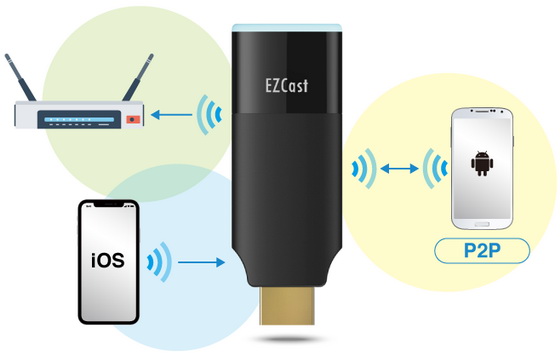
So we get a lot of questions about how to connect an EZCast 2 dongle to the internet, to get the best online video viewing experience, and also upgrade your dongles to the latest firmware. The best way to ensure a great internet connection to both your smartphone, the screen mirroring source, and your EZCast dongle, the screen mirroring receiver, is to connect your dongle to a fast and stable internet through your local Wi-Fi network.
Here are two ways to quickly connect your smartphone to EZCast to setup the internet.
Connect EZCast to a local Wi-Fi network using the QRCode scanner
When you execute the EZCast app and search for the EZCast dongle, you can use the QRCode scanner to scan the code shown on the TV screen. Once you successfully scan the QRCode, the app interface will be redirected to the Wi-Fi settings page. Then you will be able to connect the EZCast dongle to a local Wi-Fi network to access the internet. Finally, connect your smartphone to the same Wi-Fi network to start screen mirroring online videos on your EZCast-connected HDTV.
Connect EZCast dongle to the internet using Bluetooth
Another great way to connect the EZCast dongle to the internet is through Bluetooth on your smartphone and the EZCast dongle. Make sure your smartphone’s Bluetooth is turned on, then execute EZCast app to search for EZCast dongle. Access the Bluetooth feature at the bottom of the dongle-searching interface, and your EZCast dongle shall be available to connect if it is Bluetooth compatible.
Once your smartphone is connected to EZCast dongle, you will be prompted to share the local Wi-Fi login and password with the dongle. Once the Wi-Fi settings are shared, both your smartphone and dongle will both be connected to the same local Wi-Fi network, and ready to screen cast online contents.
Share mobile internet with EZCast
So what can you do if you are using EZCast without an accessible local Wi-Fi network, such as a hotel, youth hostel, or a client’s office? Check out the video below to share your smartphone’s internet with your EZCast 2 dongle. After you execute the 3G4G function, you will be prompted to type in your phone’s mobile hotspot settings, so your dongle can connect to your mobile internet. Once you have entered the mobile hotspot settings, you will disconnect from the dongle and both the EZCast dongle and your phone will switch to the mobile hotspot to connect to the internet.
Did this article help you? If so, please tell me in a comment what do you think about it.
Don’t miss any of our future video tutorials, follow us on Youtube. Like us on Facebook. Add us in your circles on Google+. Watch our photo albums on Flickr. Subscribe now to our newsletter.





