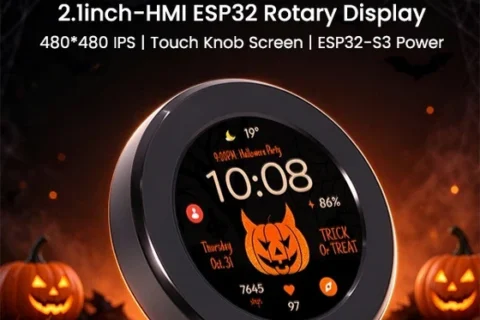
A compact circular touchscreen, a tactile rotary controller, and the flexibility of ESP32-S3 development come together in Elecrow’s latest CrowPanel, offering makers, developers, and smart home enthusiasts a creative platform for building intuitive, connected interfaces.
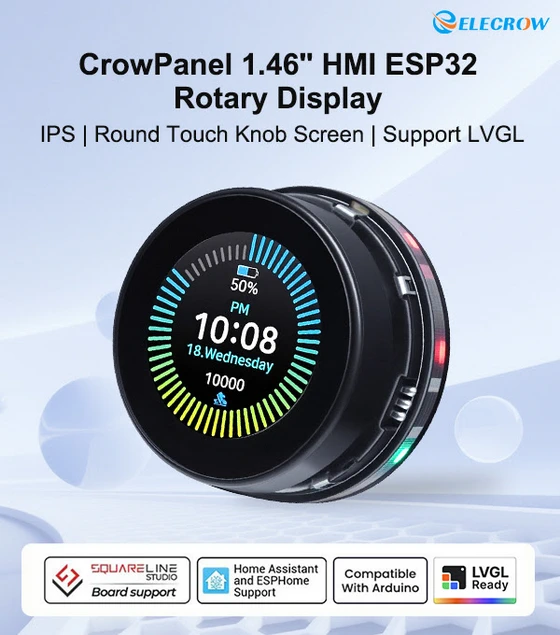
The growing popularity of smart home automation, compact IoT devices, and custom electronic projects has created an interesting demand for displays that can do more than simply present information. Developers increasingly want interfaces that feel natural to operate, occupy very little physical space, and provide enough processing power and connectivity to support sophisticated applications without requiring an unnecessarily complicated hardware arrangement. With the Elecrow CrowPanel 1.46-inch HMI ESP32 Rotary Display, that combination becomes particularly attractive, bringing together a high-resolution round IPS touchscreen, a multifunctional rotary knob, wireless communication, and extensive development compatibility in a remarkably compact package. Designed around the idea that sophisticated interaction does not necessarily require a large screen, this CrowPanel module offers an appealing starting point for anyone interested in creating personalised smart home controllers, interactive dashboards, portable electronics, or dedicated control interfaces. Its distinctive circular design also makes it an interesting alternative to conventional rectangular displays, especially for projects where visual appearance and physical interaction are equally important.
A Compact Circular Display with Plenty of Visual Potential
One of the most immediately appealing characteristics of the CrowPanel is its 1.46-inch round IPS display, which delivers a resolution of 360 × 360 pixels within a compact circular viewing area. Although the physical dimensions are modest, the available resolution provides considerable flexibility for presenting graphical elements, including animated indicators, status information, interactive menus, virtual dials, and custom-designed control panels. The IPS technology is particularly relevant for applications where the display may be viewed from different angles, while the circular format naturally complements interfaces inspired by traditional instruments, smart thermostats, audio equipment, and modern dashboard controls. Rather than adapting a conventional rectangular layout to a smaller enclosure, developers can design around the screen’s geometry, creating interfaces that feel purposeful and visually integrated with the hardware. For a smart home project, this might mean displaying room temperature, lighting intensity, or connected device status through a clean graphical interface, while a portable electronic instrument could use the same screen for measurements, settings, and real-time feedback. The possibilities extend considerably beyond these examples, especially when the display is combined with its integrated physical controls.
Touchscreen Convenience Meets Tactile Rotary Control
What makes this CrowPanel especially interesting is the combination of capacitive touch input and a physical rotary knob, allowing users to interact with the same interface through different methods depending on the application. The rotary mechanism supports clockwise and counterclockwise rotation, together with a pressing action, providing an intuitive way to navigate menus, adjust numerical values, confirm selections, or switch between functions. At the same time, the capacitive touchscreen enables direct interaction with graphical elements, giving developers the freedom to combine familiar touch gestures with the precision and tactile feedback of a physical controller. This dual-input approach could be particularly valuable in smart lighting systems, where turning the knob adjusts brightness while touching the display changes lighting modes, or in audio applications where rotation controls volume and pressing confirms a selected function. It could also work well in compact industrial interfaces, desktop accessories, and experimental electronics where precise adjustments are easier to perform with a rotary controller than through touch alone. Elecrow has also incorporated ambient lighting into the design, adding another visual dimension that developers can potentially use to enhance the appearance and interaction experience of their projects.
ESP32-S3 Processing Power for More Ambitious Projects
Behind the circular interface is an ESP32-S3 dual-core microcontroller operating at frequencies of up to 240 MHz, supported by 8 MB of PSRAM and 16 MB of Flash storage. This hardware configuration provides a capable foundation for embedded graphical applications, particularly those requiring responsive interfaces, wireless connectivity, and more elaborate visual elements than a basic character display can accommodate. The additional memory is particularly welcome when working with graphical user interfaces, where image assets, interface components, and application logic can place greater demands on available resources. Combined with the ESP32-S3 architecture, the CrowPanel provides a practical platform for developers who want to experiment with increasingly sophisticated interfaces while retaining the flexibility of an established microcontroller ecosystem. Rather than treating the screen as a simple peripheral attached to an external development board, Elecrow has integrated the processing hardware into the display module itself, making the product especially appealing for compact projects where space, component count, and installation simplicity are important considerations.
Built-In Wi-Fi and Bluetooth for Connected Applications
Modern interactive devices increasingly depend on their ability to communicate with other hardware, local networks, and connected services, and the CrowPanel addresses this requirement through integrated 2.4 GHz Wi-Fi and Bluetooth 5.0 Low Energy connectivity. These wireless capabilities open the door to a wide range of IoT applications, from displaying information received over a local network to controlling compatible smart home devices and communicating with other embedded systems. A custom desktop controller could potentially retrieve data from a home automation platform, while a compact environmental monitoring station could present readings from connected sensors through a visually engaging interface. The inclusion of Wi-Fi and BLE also makes the module relevant for projects where wireless communication is preferable to additional cabling, particularly when the display is intended to function as a self-contained control point rather than simply an output screen.
Expansion Options and Development Flexibility
Elecrow has equipped the CrowPanel with UART, I2C, and FPC expansion interfaces, giving developers additional opportunities to connect sensors, external modules, and supporting electronics. These connections are important because they allow the device to become part of a larger embedded system, rather than restricting it to the functions available through its integrated hardware. Compatibility with the Arduino IDE provides a familiar development environment for hobbyists and experienced makers alike, while support for the LVGL graphics library is particularly significant for developers interested in creating polished graphical interfaces with custom layouts, widgets, animations, and interactive elements. The product is also presented with Home Assistant and ESPHome support, making it especially interesting for users exploring personalised home automation interfaces. Project-specific configuration and integration work may still be required, but the combination of development tools, wireless communication, and physical input options gives the module considerable versatility. Elecrow additionally highlights a low-power design intended to support portable and battery-powered applications, although actual operating time will naturally depend on display brightness, wireless activity, application workload, and the power system used in the finished project.
From Smart Home Controllers to Creative Embedded Electronics
The most compelling aspect of the CrowPanel is arguably the range of applications that its hardware combination makes possible. For smart home enthusiasts, it could become a compact wall-mounted controller for lighting, climate settings, or automation scenes, offering a more engaging interaction method than a conventional switch. For audio enthusiasts, the circular display and rotary input could provide the basis for a customised volume controller with visual feedback, while makers working on desktop accessories might use it to create a programmable shortcut controller, timer, or system status display. Its potential also extends into educational electronics, portable instruments, experimental user interfaces, and compact industrial control projects, where developers can explore how graphical feedback and tactile input work together within a small physical footprint. The important distinction is that the CrowPanel is a development platform rather than a finished consumer appliance, so the ultimate functionality depends on the software, connected components, and creativity invested in each project. That flexibility is precisely what makes it attractive to the maker community.
What’s Included and Why It Matters
Elecrow supplies the 1.46-inch rotary display with a USB cable and a four-pin Dupont cable, providing the essential hardware for getting started with development and external connections. The company also advertises a one-year warranty and customer service support, which may provide additional reassurance for buyers incorporating the module into personal or professional projects. The compact construction, integrated processing capabilities, and flexible connectivity make this a particularly interesting option for anyone looking to reduce the complexity of a custom interface while maintaining substantial control over its appearance and behaviour.
Final Thoughts: A Small Interface with Big Creative Possibilities
The Elecrow CrowPanel 1.46-inch HMI ESP32 Rotary Display presents an appealing combination of modern display technology, physical interaction, and embedded development flexibility. Its circular IPS touchscreen gives projects a distinctive visual identity, while the rotary knob adds the tactile control that many touch-only interfaces lack, making the overall design suitable for applications where quick adjustments and intuitive operation are especially important. I particularly like the decision to combine an ESP32-S3 processor, generous onboard memory, Wi-Fi and Bluetooth connectivity, and compatibility with Arduino IDE and LVGL in such a compact format. These features give developers a versatile foundation for experimenting with custom interfaces without sacrificing the convenience of integrated hardware. For makers building smart home controllers, IoT dashboards, portable instruments, or creative embedded electronics, the CrowPanel offers an interesting opportunity to turn relatively simple interactions into something more refined and engaging. It is a reminder that the quality of a user interface depends not only on screen size, but also on how intelligently visual feedback and physical controls are brought together. Small display, smart interaction, and plenty of room for creativity — that is the appeal of Elecrow’s latest CrowPanel rotary display.
Did this article help you? If so, please tell me in a comment what do you think about it.
Don’t miss any of our future video tutorials, follow us on Youtube. Like us on Facebook. Join our Best Deals Telegram Channel. Join our Android TV Box Firmware Updates Telegram Channel. Subscribe now to our newsletter. If you need Tech Reviewer or Youtube Influencer read this. Donate now here to support CGR Team!