
Discovering Best Repair Photo Online Tools [2025 Version]
Photos mark multiple essential events of our lives, and their significance extends beyond personal milestones to professional contexts. Suppose you are launching a product by posting its photo, but the quality is lost in the editing process. How can you manage repairing such photos? This article will assist you in restoring the quality of excessively damaged images due to over-editing, time passing, or other factors. You can achieve this by utilizing AI repair photo tools that are now available on the market and are discussed here.
Part 1. Why You Should Prefer Repair Photo Online Tools?
The internet offers various AI tools for repairing photos online, but desktop tools are also available, which can be confusing when choosing. This section highlights the reasons why online tools should be chosen over others for photo repair:
1. Optimized UI and Usage: If you repair photos online, the interface is hassle-free, and the process usually doesn’t take that long. Along with convenience, online tools provide instant previews that streamline the process.
2. Download Free: Desktop tools usually take up a lot of space on your drive and take up time to download. With online tools, there is no need for a high-end processor, as everything is cloud-based.
3. Economic Solution: Online tools are relatively affordable because you are paying for one tool or feature. However, desktop tools usually have packages that cover multiple tools that you may never use.
4. Privacy Policy: Online platforms usually do not keep data for long, which means your pictures are there only for a short time, lowering the risk of exposure.
Part 2. Insights into Best Repair Photo Online Solutions
Integrating AI into tools is not a big deal now, but whether they operate correctly or not is what matters. This section will discuss some reliable and free AI photo restoration tools:
1. Repairit Online – Photo Repair
One of the most reliable and efficient solutions to repair photos online is through the Repairit Online photo repair tool. The tool is easy to access from the browser and has AI integration, which makes the process take mere seconds. With its advanced upscaling functionality, picture graphics become exceptionally clear and ready to post.
Key Features
1. Drag and Drop Functionality: Users can drag their images to the browser, and the AI automates the repair process.
2. Saves Previous History: There is a “Save History” option that you can use to delete or keep the repaired images in case of low device storage.
3. Image Preview: It gives the option to preview images just after repairing them so that you can see if you are satisfied.
Guide to Repairit Online AI Repair Photo
If you want to learn how Repairit works, this section highlights its performance process:
Step 1. Upload Faulty Photos Within Repairit Online
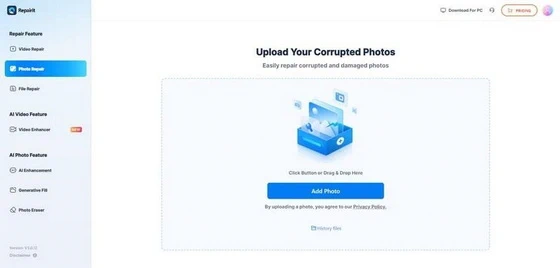
After accessing the online photo repair feature, click the “Add” button. In the new tab, click the “Add Photo” button, and upload images from your device.
Step 2. Start the Repair Process
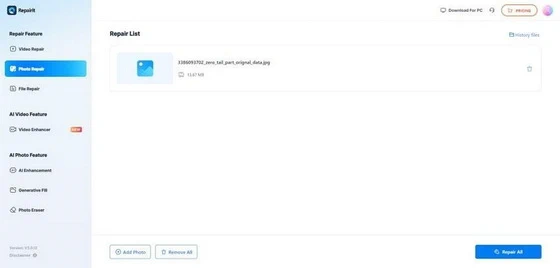
Once the images have been uploaded, tap the “Repair All” option at the bottom right corner.
Step 3. Download the Repaired Photos From Platform
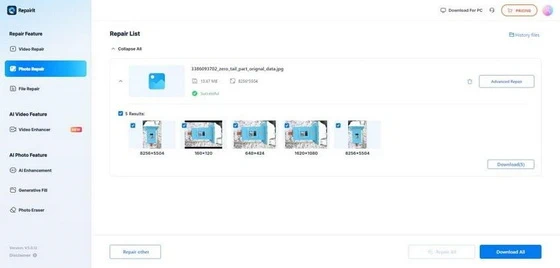
After the repaired photo has been generated, use the “Eye” icon to preview it, and tap the “Download All” button.
Pros
– Repairit Online supports a range of image formats, from common ones like JPG, PNG, and multiple others.
– AI optimization for enhancing other factors of image upscaling and turning B&W images into color.
– Focused on user productivity, it has batch processing, repairing many images at once.
Con
– Users cannot access all features without having a paid subscription.
2. VanceAI
If you want to repair images in high quality, this tool’s free AI photo restoration is for you. With AI advancement, the process has become advanced in terms of speed and automation. Users are able to get a glimpse of the photo that AI has repaired.
Key Features
1. This tool can transform your low-quality videos, even those in 480p, into 4k or HD.
2. The interface, layout, and controls are designed for effortless repair and editing.
3. It deletes your images after 24 hours, addressing users’ data privacy concerns.
Pros
– Repairs damages like scratches, blurs, stains, and faded parts on its own.
– Doesn’t require any installation or setup process to begin.
Con
– Requires good internet for seamless repair; otherwise, glitches may occur.
3. Nero AI
If it’s a product launch or content you daily post, this tool can help you with both through its image restore feature. It repairs your images from damage like cracks or fading and restores them to their glory. Moreover, if you find the repaired clarity of a photo lacking, use its AI enhancer to improve that.
Key Features
1. Vintage images can be filled with modern-day colors with it.
2. With this AI repair photo, the unwanted object or person can be blurred seamlessly.
3. Also has a video upscale feature for other forms of content.
Pros
– Considered ideal for editing or repairing 3D animated content.
– Has more than one AI model for a seamless image editing process.
Cons
– Inconclusive or unsatisfactory results with the repair of large files.
4. Hotpot.ai
A wide-ranging digital tool with AI integration and a variety of features that can help you repair and edit your images. Its picture restorer feature modifies low-quality or damaged images into their original and optimized form.
Key Features
1. It provides real-time image upscaling without damaging other aspects of a photo.
2. This tool can specifically enhance your face in images without disrupting the quality of the image.
3. Images with dull visuals or no colors at all can be made lively with the colorizer feature.
Pros
– Avoid task repetition and save time with real-time batch edits and previews.
– Allows users free trials to understand the tool and analyze results.</pros>
Con
– Every repair photo online output is integrated with a watermark.
5. ImgGen AI
For users preferring a tool with an accessible UI and drag and drop functionality, ImgGen AI repair photo is perfect. Its photo restoration feature utilizes AI algorithms for color maintenance and is ideal for old or Black and White images.
Key Features
1. Users can upscale visually degraded images up to 8K resolution.
2. Along with image restoration, the platform has text and background removal options.
3. Also supports batch processing and editing at once
Pros
– The image quality is not compromised while the tool restores images.
– Doesn’t require any subscription as images can be generated without a cost.
Con
– Has limited editing or restoring options compared to other paid tools.
Part 3. Alternative to Repair Photo Online | Enhance Image Details Offline
While online tools have certain benefits, they lack a certain eye for detail and are unreliable at times. This is where desktop solutions come into the picture, but the options are unlimited to choose from. However, Wondershare Repairit is a verified and dependable alternative to free AI photo restoration.
It features an extensive user interface that is easy to navigate and performs detailed photo repair, surpassing others in this regard. The software allows batch repair and editing, along with the option to analyse results before finalization. Moreover, you can find multiple photo formats and related features on one platform with AI automations, making the process easier.
Key Features of Repairit Offline to Note
1. AI Media Enhancer: This feature enables users to enhance their photos with a general mode, a portrait enhancer, and a colorization option.
2. Advanced Repair: Photos that are heavily damaged and cannot be fixed in general mode, users can provide a reference image to repair them in advanced mode.
3. AI-Powered Upscaling: With this modern and amazing feature, you can upscale the image damage up to 800%.
Conclusion
This isn’t just it for the AI repair photo online tools, however, the ones discussed above are reliable amongst most. Repairit photo repair is better suited for all types of photo damage, along with enhancing, upscaling, and editing. Therefore, it is recommended to use it, but for more extensive features, you can check out its desktop version.
.
Did this article help you? If so, please tell me in a comment what do you think about it.
Don’t miss any of our future video tutorials, follow us on Youtube. Like us on Facebook. Join our Best Deals Telegram Channel. Join our Android TV Box Firmware Updates Telegram Channel. Subscribe now to our newsletter. If you need Tech Reviewer or Youtube Influencer read this. Donate now here to support CGR Team!















