
Samsung’s New Smart Monitor Turns Your Home Into Whatever You Want
As we find ourselves staying indoors more and more, the number of daily tasks we are looking to achieve from the comfort of our own homes is increasing, too. Accordingly, people around the world have been searching for more convenient and flexible ways to achieve their everyday activities through technology – from working and learning to wellness and entertainment.
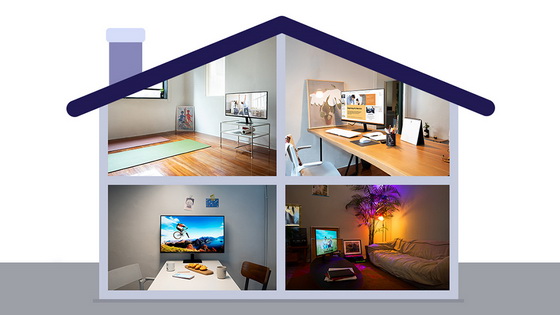
On November 16, Samsung Electronics introduced their Smart Monitor to the global market, an innovative screen that can easily transform a user’s home into an office, a gym and a cinema – all without the need for a PC. Read on for a guide to some of the ways you can get more done while staying at home with the all-new Smart Monitor.
1. Get More Done Without PC by Harnessing the Smart Monitor as Your Home Office
The Smart Monitor lets you turn even the smallest of domestic spaces into a home office. For seamless productivity, you can connect your other devices – such as your PC, smartphone or tablet – wirelessly to the display and instantly load up files using the Remote Access feature, which lets you control the programs and apps installed in your connected devices. The Smart Monitor also supports Microsoft Office 365, meaning that, when working from home, you can access documents and other Microsoft Office programs just as easily as you would if you were in your office.
2. Switch Off in Style when Using the Smart Monitor for Your Home Cinema
The Smart Monitor offers OTT services like Netflix and Disney Plus, and thanks to the advanced UI of the monitor, you can enjoy your favorite content with ease. Furthermore, the Smart Monitor has an AI-based Adaptive Picture function, which ensures the smartest and best possible picture quality for you, even in dark lighting conditions. To prevent eye fatigue, the Smart Monitor features an eye comfort display certified by TÜV Rheinland, a global leader in inspection and testing services, as well as an Eye Saver Mode which intelligently reduces blue light emissions.
3. Stay Productive When Using the Smart Monitor as a Home Learning Tool
In order to transform your living space into a constructive classroom, the Smart Monitor offers a lot of flexibility when it comes to at-home learning. Say you’re interested in building your drawing skills and have completed a drawing on your smartphone – just by tapping your smartphone on the side of the Smart Monitor, you can share your creation on the larger screen and take a closer look at it in detail.
4. Break a Sweat by Using the Smart Monitor as Your Home Gym Equipment
Instead of relying on the smaller screens of other devices to keep up with your health and wellness routines, you can be sure to make the most of every workout with the 32-inch display of the Smart Monitor. Once you’ve entered the video platform of your choice, such as YouTube, on your Monitor, you can select and control your favorite workout program using just your voice thanks to Bixby integration, or use the device’s remote control to pause, play and switch between programs.
To make the most of the many ways you can use Samsung’s new Smart Monitor, all you need to do is choose a place in your home to set it up, and whether you are looking to work efficiently or just enjoy your downtime, the Smart Monitor will do the rest.
Did this article help you? If so, please tell me in a comment what do you think about it.
Don’t miss any of our future video tutorials, follow us on Youtube. Like us on Facebook. Watch our photo albums on Flickr. Subscribe now to our newsletter.














