
You can now buy Cube iWork 10 Flagship tablet from Gearbest.com for only 167.39 USD.

Cube iWork 10 Flagship tablet.
Cube iWork10 Flagship version is featured with Intel Atom-X5 Cherry Trail Z8300 quad core CPU, builds in 4G RAM and 64G ROM, with 10.1 Inch 1920*1200 pixels Full HD IPS screen, and installed with the latest Windows10 + Android 5.1 dual OS, support 4K video, HDMI, OTG, WiFi, Bluetooth, etc;
The device is probably one of the best-looking tablets that we have seen, regardless of the price range. It is made from a combination of poly-carbonate and some metal alloy. The combination of colors is also interesting – it is black on the front side, and blue on the back and around the tablet. iWork 10 looks and feels premium in every possible aspect. Considering its size and weight, it is a very thin device at just 8mm but don’t worry because it is quite sturdy and durable. The front of the device houses large screen with several sensors coupled with front facing camera above it, and Windows home button bellow it.
There is power/lock button with volume buttons on the top of the device in the left corner, and it is easily reachable. The left side of the device houses all ports like micro USB for charging and transfer, HDMI, 3.5mm headphone jack, USB 3.0 and micro SD card slot. Speakers are located on the right side, and they are plenty loud.
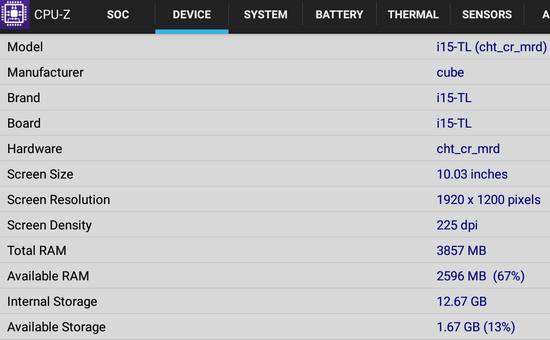
Cube iWork 10 is equipped with 10.1-Inch capacitive IPS screen with up to 10-point multi-touch support. Resolution of the display is 1920×1200, and it is more than enough for its size. Some of the competition come with the double amount of pixel on their screens, but the difference is not that big, and battery life suffers because of that. We believe that Cube made the right decision opting for this resolution. Display of this device offers excellent viewing angles, true-to-life colors and it is very bright. Bezels on the side of the screen are pretty big, but we think that this is a terrific thing. You can grab the tablet by the bezels and don’t interfere with the screen while watching videos for instance.
Next, watch the first impressions and the experience on Android Lollipop 5.1 stock firmware
Firmware tested: Android Lollipop 5.1 stock
Build number: i15-TL_V1.0_20160316
Kernel version: 3.14.37-x86_64-L1-R429
Model number: i15-TL
Root: Firmware is not rooted.
Real Life Benchmark & Tests
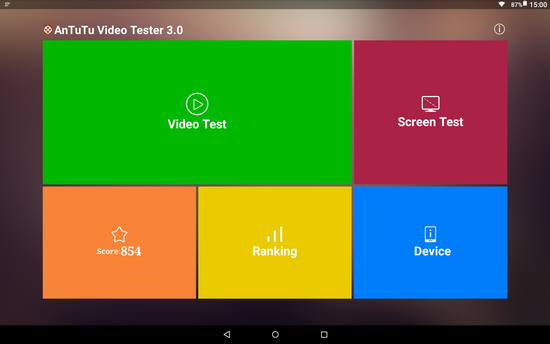
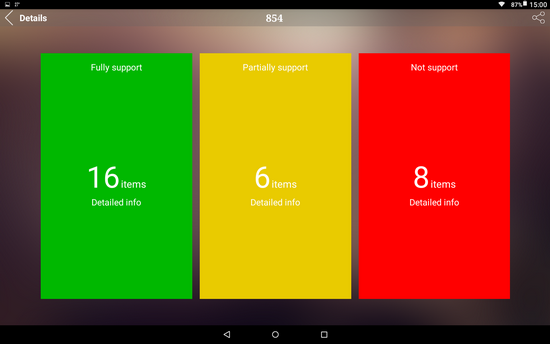
In Antutu Benchmark 6.1.6 Cube iWork 10 Flagship tablet achieves a very good score, about 65.500 points. In Antutu Video Tester 3.0 Cube iWork 10 Flagship tablet scores 854 points, a fair score in this test ranking. It played smoothly almost all video file types; this firmware version fully supports 16 video & audio format files, it partially supports 6 video & audio format files and doesn’t manage to play 8 files.
Wifi Internet speed tested gets also pretty good values: about 45 Mbps in download and the upload speed was over 35 Mbps. The router used in this test is Xiaomi Mi WiFi Router, mounted in another room.
Conclusion
Cube iWork 10 Flagship tablet seems to be a great tablet, but the Android OS seems to be unstable and needs improvements. During our tests, we experienced several force closes, hangups and stability issues. Google Play and gapps are working, but updating some applications caused several restarts of the tablet. These issue should go away in the next firmware update.
The battery life wasn’t too good also, but the overall features, hardware configuration and the price makes Cube iWork 10 Flagship a tablet to recommend.
Photo gallery full album here. Unboxing Cube iWork 10 Flagship Tablet here. Cube iWork 10 Flagship Tablet BIOS Settings here. First Run of Cube iWork10 Flagship tablet – Download Windows 10 drivers from here.




Did this article help you? If so, please tell me in a comment what do you think about it.
Don’t miss any of our future video tutorials, follow us on Youtube. Like us on Facebook. Add us in your circles on Google+. Watch our photo albums on Flickr. Subscribe now to our newsletter



How can I activate the mouse on the keypad. .it keeps on asking touch to activate keyboard and I don’t know what to touch on the keyboard