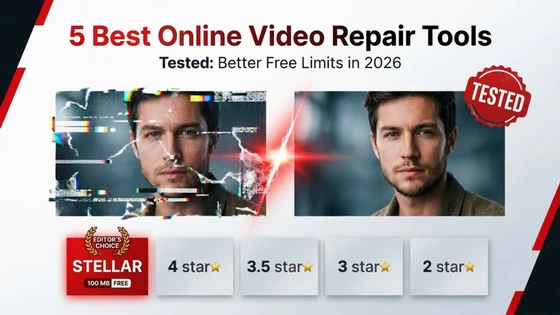
I hate that. So this review grades every tool on one simple question: how much real value do you get before the paywall shows up?
Quick Comparison Table
| Tool | Free Plan Limit | Monthly Price | Max File Size | Verdict / Best For |
| Stellar Online Video Repair | 100 MB free video repair + preview + download | $9.99 | 5 GB upload | Best overall value. Editor’s Choice. |
| EaseUS Fixo Online | Preview only on most files | $39.95 | 2 GB | Polished UI, wallet-unfriendly price |
| Cleverfiles | Watermarked preview | Dynamic pricing | 20 GB | Monster files, if you’ve got patience |
| Wondershare Repairit | 50 MB | $9.99 | 3 GB | Big name, stingy free tier |
| Fix.Video | No free download | $99 | Varies | Forensic labs, not casual editors |
1. Stellar Online Video Repair — Best Overall Value Editor’s Choice
I expected Stellar Online Video Repair to be decent. I didn’t expect it to clear my entire test bench. The 100 MB free tier repaired my full drone clip, not a trimmed teaser. That alone puts it ahead of half this list.
Key Features
– 100 MB free repair, no credit card required up front
– 17+ format support, including MP4, MOV, AVI, MKV, AVCHD, MTS, and 3GP
– Sample file matching for deeply damaged headers. When I uploaded my sample clip from the same drone, it rebuilt the index on a file two other tools called hopeless
– Browser-based repair over an encrypted connection, with files auto-deleted after the session
– Clear visual preview in original quality before you pay a cent
In my tests, the Mavic MOV came back with clean audio sync and zero macro-blocking. The dashcam MP4 needed the sample-file route, and the result graded fine and shipped to my client on time.
Pros & Cons
Pros
– The free tier is actually usable
– $9.99/month undercuts most rivals by 4x
– 5 GB upload ceiling covers most drone and mirrorless clips
– Honest preview. What you see is what you download
– Desktop software available with no capping
Cons
– Advanced sample-based repair takes a bit longer on big files
Oddly enough, my only gripe was a Friday-evening queue of about 10 minutes. Worth it, frankly.
2. EaseUS Fixo Online Video Repair
Fixo looks great. The interface is the cleanest of the bunch, and uploads flew. Repairs on my Sony Alpha MP4 kept accurate color and sound.
Key Features
– Drag-and-drop UI with zero learning curve
– Solid MP4 and MOV engine
– 2 GB file cap
Pros & Cons
Pros
– Fast, friendly interface
– Reliable on mildly corrupted files
Cons
– $39.95/month is 4x Stellar’s price
– 2 GB cap rules out most 4K drone clips
– Free plan mostly shows a preview, not a saveable file
Here’s the catch: the quality is real, but the pricing feels aimed at people who expense software. If you ask me, Fixo wins on design and loses on value.
3. Cleverfiles Online Video Repair
Cleverfiles is the oddball. It accepts files up to 20 GB, which nobody else here matches. I sent a 6 GB MTS reel from an AVCHD camcorder just to see. Annoying part is everywhere this tool as promoted in free-tier but on the contrary, they charge dynamically as per each file repair and mind you the price to performance ain’t at all justified.
Key Features
– 20 GB upload support
– Handles obscure container formats
Pros & Cons
Pros
– Unmatched size headroom
– Works on long-form footage
Cons
– Slow. My 6 GB file took nearly 3 hours
– Higher failed-repair rate. Two of five files came back unplayable
– Dynamic pricing that shifted mid-session
That said, if your footage tops 5 GB, Cleverfiles may be your only browser option. Just budget an afternoon.
4. Wondershare Online RepairIt
RepairIt rides on a famous name. The desktop suite is genuinely good. The online version feels like a teaser for it.
Key Features
– 50 MB free tier
– $9.99/month plan, capped at 3 GB files
Pros & Cons
Pros
– Trusted brand, stable servers
– Same $9.99 entry price as Stellar
Cons
– 50 MB free limit barely covers a 30-second clip
– 3 GB paid cap versus Stellar’s 5 GB
– Pushy upsells. I noticed a desktop-app pop-up twice per session
On the flip side, mild corruption on small phone clips repaired fine. For anything from a real camera, I kept hitting the ceiling.
5. Fix.Video
Fix.Video skips the free download entirely. You can upload and preview, but saving costs a flat $99/month.
Pros & Cons
Pros
– Strong results on severely broken forensic footage
– Simple, no-nonsense workflow
Cons
– No true free tier
– $99/month prices out every casual user I know
– Shows preview in cheap lowered quality
– Dated interface
To be frank, this is a specialist’s instrument. A forensic lab may shrug at $99. A wedding editor won’t.
What to Look for Before Paying for Online Video Repair
After two weeks of uploads, here’s my buyer’s checklist:
– Format versatility. Cameras don’t shoot one flavor. You want MP4, MOV, MTS, AVCHD, MKV, and 3GP covered, so one tool handles the whole bag.
– Free preview vs. free repair. A preview proves the engine works. A free repair, like Stellar’s 100 MB, proves the company trusts it.
– Upload caps. 4K drone footage runs 2–6 GB per clip. Anything under a 5 GB ceiling will frustrate you.
– Privacy habits. Look for SSL encryption and automatic file deletion. Your client’s footage is not a training set.
FAQs
Can I repair a corrupted MP4 or MOV file online for free?
Yes, within limits. Stellar’s 100 MB free tier repaired my dashcam MP4 end to end. Most rivals stop at a preview.
Which online repair tool gives the most generous free file limit?
Stellar Online Video Repair, at 100 MB. Wondershare caps you at 50 MB, and Cleverfiles gives no free download at all.
Why do some online tools require a sample video file?
Severe corruption destroys the file’s index. A healthy sample shot on the same camera gives the engine a template to rebuild headers and codec tables. Stellar’s sample matching rescued my Mavic files this way.
Is Stellar Online Video Repair worth the $9.99 subscription compared to EaseUS or Fix.Video?
In my testing, yes. You get a bigger free tier, a 5 GB ceiling, and a price 4x below Fixo and 10x below Fix.Video. It’s the only tool here I’d renew.
Do these tools work on GoPro or dashcam files?
Mostly. My GoPro MDT and dashcam RSV fragments needed sample-based repair, and Stellar Online Video Repair handled both.
Now if you’ll excuse me, I have a wedding recap to finish.
Did this article help you? If so, please tell me in a comment what do you think about it.
Don’t miss any of our future video tutorials, follow us on Youtube. Like us on Facebook. Join our Best Deals Telegram Channel. Join our Android TV Box Firmware Updates Telegram Channel. Subscribe now to our newsletter. If you need Tech Reviewer or Youtube Influencer read this. Donate now here to support CGR Team!