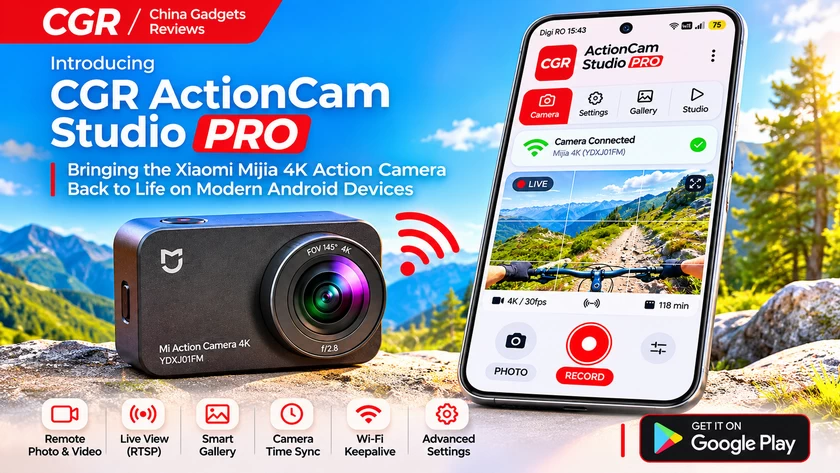
Technology advances at an incredible pace, but newer does not always mean better, especially when perfectly capable hardware becomes increasingly difficult to use simply because its original companion software has failed to keep up with modern smartphones. At China Gadgets Reviews, we have always appreciated gadgets that continue to deliver excellent value long after their original launch, and we strongly believe that good hardware should not become obsolete just because the software ecosystem around it has changed. This philosophy inspired our latest Android development project: CGR ActionCam Studio PRO, an independent companion application designed specifically for the Xiaomi Mijia Mi Action Camera 4K (YDXJ01FM).
The Xiaomi Mijia 4K was one of those action cameras that managed to attract considerable attention by offering an appealing combination of compact dimensions, 4K video recording, a convenient touchscreen, wireless connectivity, and a versatile design suitable for travel, outdoor activities, vehicle recordings, and everyday content creation. Although several years have passed since its introduction, the camera itself remains a useful piece of equipment, particularly for owners who have taken good care of their devices and see little reason to replace them simply to regain convenient smartphone control. Unfortunately, older companion applications do not always age as gracefully as the hardware they were developed to support, and compatibility with newer Android versions can become a frustrating obstacle.
Rather than accepting these limitations, we decided to develop our own modern Android companion application, built around the camera’s existing wireless communication protocol and designed to make its original capabilities easier to access. What initially started as an effort to restore convenient camera control gradually evolved into a more comprehensive software project, bringing together remote photography, video recording, live preview, advanced settings, intelligent media browsing, Wi-Fi connection management, and several useful tools for content creators. The result is CGR ActionCam Studio PRO, a dedicated solution designed to help Xiaomi Mijia 4K owners continue enjoying their cameras in 2026 and beyond.
The application is developed for modern Android devices, with support configured for Android 10 through Android 17. Our objective was never to change the camera into something completely different, but to create a practical, polished, and reliable companion that respects the original hardware while offering the convenience expected from contemporary mobile software.
A Fresh CGR Red Interface Designed for Modern Android
One of our main priorities during development was to create an application that looks and feels like a modern Android product rather than an outdated remote-control utility. We wanted CGR ActionCam Studio PRO to share the visual identity of our other software projects, including CGR Mi Speaker Remote PRO, while maintaining an interface specifically optimized for photography, video recording, and camera management. The result is a contemporary design built around the characteristic CGR Red color scheme, complemented by light backgrounds, dark typography, generously rounded buttons, carefully structured information cards, subtle transitions, and clear visual feedback.
The interface is organized into four main sections: Camera, Gallery, Studio, and Settings, accessible through a convenient bottom navigation bar. This arrangement places the essential camera controls first, keeps captured media just one tap away, and separates advanced streaming functionality from the settings that users may need to adjust less frequently. Large PHOTO and RECORD controls make the most important operations immediately accessible, while connection indicators provide a quick overview of the communication status between the smartphone and the camera. We also introduced a more consistent visual hierarchy, making it easier to distinguish primary actions from informational elements without filling the screen with unnecessary technical details.
Considerable attention was given to the smaller aspects of the experience. Buttons provide visual and tactile feedback, navigation transitions are designed to feel smooth without becoming distracting, and the various screens follow a consistent design language. The settings interface has also been reorganized to avoid the clutter commonly associated with technical camera applications. We wanted the entire experience to feel natural on modern Android smartphones, including devices with larger displays, while preserving the practicality that an action camera companion application should offer. The goal was simple: give an older camera a modern software interface worthy of the hardware it continues to provide.
Wireless Camera Control – Photography and Video Recording Made Easier
At the heart of CGR ActionCam Studio PRO is its ability to communicate directly with the Xiaomi Mijia 4K through the camera’s built-in Wi-Fi connection. After activating Wi-Fi on the camera and connecting the Android smartphone to its wireless network, the application establishes a local communication session and provides convenient access to the supported camera controls. There is no need to navigate the camera’s small touchscreen every time a recording needs to be started or a photograph needs to be taken, which becomes particularly useful when the device is mounted on a tripod, positioned inside a vehicle, attached to a helmet, or installed somewhere that makes its physical controls inconvenient to reach.
Remote video recording is one of the essential functions, allowing users to start and stop recordings directly from their smartphones while the application interprets the camera’s responses. Photography receives similar attention, with remote photo capture, verified shooting-mode selection, and useful timer options for situations where touching the camera could introduce unwanted vibration. Depending on the options exposed by the connected firmware, the interface can also provide access to additional shooting configurations and camera-specific modes. Rather than assuming that every command has been accepted successfully, the application attempts to verify relevant state changes, making the experience more predictable and helping users understand whether the camera is ready for the requested operation.
During development, we paid particular attention to the camera’s mode-selection behavior. Older action camera firmware does not always expose settings using the names or command sequences expected by generic applications, so reliable operation requires more than simply sending a conventional instruction. CGR ActionCam Studio PRO uses the camera’s supported mode_setting information to distinguish between recording and photography modes, with additional safeguards designed to avoid unnecessary commands that could interfere with normal operation. In practical testing with our Xiaomi Mijia 4K, both remote photography and video recording were successfully restored, demonstrating how a carefully implemented companion application can make existing hardware significantly more convenient to operate.
Live View – See What Your Camera Sees
One of the most useful features of CGR ActionCam Studio PRO is its integrated Live View functionality, which allows users to monitor the camera’s field of view directly on their smartphones through the local RTSP video stream. This can make a substantial difference when preparing shots in situations where the camera’s built-in display is difficult to see, particularly when the device is mounted in an unusual position or pointed toward a subject that cannot easily be monitored from behind the camera. Instead of repeatedly moving between the camera and the subject, users can use the smartphone to check framing, adjust positioning, and prepare their recordings more comfortably.
The Live View interface includes an expandable viewing area and an optional composition grid, giving users additional flexibility when organizing a scene or experimenting with different perspectives. We also made an effort to separate the preview workflow from the camera’s recording commands, because older camera firmware can be sensitive to the order in which streaming and capture operations are initiated. On the Xiaomi Mijia 4K, live preview and video recording are therefore managed as distinct operations, prioritizing reliable recording over attempting to maintain a simultaneous stream that the firmware may not support. Live View is intended primarily for framing and monitoring before a recording, rather than promising continuous video preview while the camera is actively recording.
For travel enthusiasts, hobbyist filmmakers, and anyone experimenting with creative camera placement, having a remote viewfinder available on a modern smartphone provides a level of convenience that can make the camera much more enjoyable to use. It is also a good example of how the original hardware capabilities can become more accessible through improved software without requiring any modifications to the camera firmware.
Improved Wi-Fi Stability, Keepalive and Automatic Reconnection
Wireless reliability became one of our most important development priorities as CGR ActionCam Studio PRO evolved. Like many older action cameras, the Xiaomi Mijia 4K creates its own local Wi-Fi network, allowing a smartphone to communicate directly with the camera without depending on a conventional internet connection. Although this approach is straightforward, modern Android power-management features, background restrictions, and automatic network selection can interfere with connections that do not provide internet access. During testing, we encountered situations where the application communicated correctly while the smartphone screen was active, but required reconnection after the device entered standby.
To improve this behavior, we introduced a dedicated Wi-Fi Keepalive mechanism that periodically checks whether the camera is still responding, using a lightweight status request approximately every 15 seconds while connection protection is active. This allows the application to monitor the control session and recognize communication failures without repeatedly issuing photography or recording commands. When an interruption is detected, the software can attempt to restore the connection, reducing the need for unnecessary manual reconnections and making the camera more convenient to use during extended sessions.
A further improvement is the optional background connection-protection system, implemented through an Android foreground service and a persistent notification. This feature is designed to help maintain the camera communication session when the smartphone screen is turned off or the application is temporarily moved out of view, subject to the operating system’s battery-management and network restrictions. We also included connection diagnostics that help distinguish between a working TCP session, an active Wi-Fi lock, and a connection that needs to be re-established. Although no Android application can guarantee that a camera’s own firmware will keep its wireless hotspot active indefinitely, these improvements are intended to provide a more dependable experience without interfering with the camera’s essential capture functions.
Smart Gallery – Managing Hundreds of Photos and Videos
CGR ActionCam Studio PRO is much more than a remote-control application. One of its most significant improvements is the integrated Smart Gallery, developed to make the management of photographs and videos stored on the camera’s memory card more convenient. A simple file list may work reasonably well when a memory card contains only a handful of recordings, but the experience becomes considerably less enjoyable when users have accumulated hundreds of photos, short clips, travel recordings, or action sequences. We wanted to make this process more organized without forcing users to remove the memory card or connect the camera to a computer every time they needed to find a particular file.
The Smart Gallery provides separate filters for photographs and videos, filename searching, chronological sorting, and grouping options based on day, week, or month. Users can browse files by their available capture dates, find recently discovered content, and organize the visible collection without changing the originals stored on the camera. The interface also supports recently found and found-today views, which are particularly useful when a camera reports an incorrect date or when newly captured media has not yet been properly indexed. These discovery-based categories are kept separate from the actual capture date so the application does not misleadingly present an old timestamp as the date on which a photograph was taken.
For larger collections, we implemented a more efficient scrolling interface that reuses visible list elements instead of creating hundreds of file cards simultaneously. This helps reduce unnecessary memory allocations and makes browsing more responsive. The gallery also supports long-press selection and multiple-file downloads, with confirmed batches of up to 25 items, allowing users to transfer groups of photographs and videos to their smartphones more conveniently. Folder selection, refreshing, and optional read-only metadata indexing provide additional flexibility, while the camera’s original files remain untouched during normal browsing and downloading operations.
We also refined the presentation of media formats and chronological ordering. JPEG photographs are identified correctly, RAW DNG files are distinguished from ordinary images, and sorting takes account of actual capture times when multiple files share the same discovery timestamp. These may appear to be small technical details, but they make a genuine difference when reviewing large collections and trying to find the latest material. For owners who regularly use their Xiaomi Mijia 4K while travelling or creating content, Smart Gallery can turn an otherwise basic file browser into a genuinely useful media-management tool.
Camera Date and Time Synchronization – An Essential Practical Improvement
An especially interesting challenge appeared during our development when we discovered that newly captured photographs were being assigned dates from January 2017, even though the camera was being used in November 2026. The problem was not caused by the gallery itself, but by the camera’s internal clock, which had retained an outdated date. As a result, files created on the same day were incorrectly grouped with much older recordings, making chronological filters such as Today or This Week appear unreliable. This is precisely the kind of issue that can make an older device frustrating to use, even when its camera hardware is functioning perfectly.
To address this problem, we introduced Camera Date & Time Synchronization, an additional feature available directly from the Settings interface. Rather than requiring users to navigate obscure firmware options or manually enter the date using the camera’s touchscreen, the application can send the smartphone’s local date and time to the camera after explicit user confirmation. The synchronization process checks the response returned by the firmware and, where available, verifies the reported camera clock. No firmware flashing or modification of existing media files is required.
During our testing with the Xiaomi Mijia 4K, this feature successfully corrected the camera clock, and subsequent photographs were created with filenames reflecting the correct November 2026 date instead of the outdated January 2017 timestamp. This confirmed that the function was not merely changing the way the application displayed files, but was actually helping the camera use the correct time for new captures. Previously recorded files retain their original names and metadata, while new photographs and videos can benefit from the corrected clock. For anyone who depends on accurate chronological organization, this is one of the most practical additions to the entire application.
Smart Settings – Advanced Camera Control Without Unnecessary Complexity
A common problem with companion applications for older cameras is that their firmware can expose dozens of configuration parameters, even though only some of them are intended to be changed directly. Displaying every reported value as an editable setting can produce a confusing interface full of options that either do nothing or are rejected by the device. We encountered exactly this challenge during development and decided that a more selective approach was necessary. Instead of presenting a long technical list without context, CGR ActionCam Studio PRO organizes the camera configuration into meaningful sections covering Video, Photo, Image, Camera, and Advanced options.
The Settings interface distinguishes between configurable parameters and informational values, using the options reported by the camera whenever possible to determine which controls should be made available. This helps prevent users from selecting unsupported values and avoids the misleading impression that every piece of firmware information represents a setting that can be modified. The application also includes searching and categorization, making it easier to find relevant options without scrolling through a seemingly endless list of technical parameters.
We additionally redesigned the date-and-time synchronization controls to use a compact card with a clearly visible action button, keeping the interface efficient and avoiding wasted screen space. Other settings related to connection protection, device information, and application behavior are integrated into the same visual language. The result is a configuration interface that remains useful for enthusiasts who enjoy exploring the technical capabilities of their camera while being considerably more approachable for users who simply want to adjust a few settings and start recording.
Studio – Exploring RTSP Streaming and Desktop Video Workflows
Another feature that distinguishes CGR ActionCam Studio PRO from a basic remote-control utility is its dedicated Studio section. We wanted the application to provide additional possibilities for users who enjoy experimenting with their equipment, particularly content creators who may wish to use the camera’s existing network video output in combination with desktop software. The Xiaomi Mijia 4K provides an RTSP-based preview stream, and the Studio interface includes tools for preparing and accessing this stream from compatible applications such as OBS Studio.
With the smartphone and computer connected through an appropriate network configuration, users can explore workflows involving remote video preview, monitoring, desktop recording, and potentially OBS Virtual Camera. The application provides access to the relevant stream information and preparation controls, making these experiments more approachable than manually investigating the camera’s network protocol. For technology enthusiasts, this creates an interesting opportunity to repurpose an older action camera within a contemporary content-creation environment.
It is important to distinguish these possibilities from a native USB webcam function. CGR ActionCam Studio PRO does not turn the Xiaomi Mijia 4K into a USB UVC webcam, and it does not independently broadcast video to YouTube, Twitch, or other online streaming platforms. Instead, it offers access to the camera’s existing network streaming capabilities, with the actual behavior depending on the firmware, RTSP availability, and the software receiving the stream. This feature is intended as an additional tool for enthusiasts rather than a guarantee that every webcam or livestreaming workflow will be supported.
Camera Diagnostics – Understanding What Is Really Happening
Developing reliable software for older hardware requires more than an attractive interface. It also requires a clear understanding of how the device responds to commands and how its internal state changes during everyday operation. For this reason, CGR ActionCam Studio PRO includes detailed diagnostics designed to provide useful information about the camera’s current connection, operating mode, available storage, reported battery level, recording state, preview status, and communication responses.
The diagnostics interface can also display information about Wi-Fi Keepalive, the most recent successful heartbeat, the active Wi-Fi lock, and the camera’s reported operating mode. When an operation is accepted, the application can provide a more meaningful confirmation than a generic success notification. When a command is rejected or the camera does not respond, the additional information can help distinguish between a temporary communication problem, a firmware limitation, or a function that is unavailable in the current operating mode.
We consider this level of transparency especially valuable for enthusiasts who continue experimenting with older cameras and want to understand how their equipment behaves. Instead of blindly retrying commands or assuming that every problem is caused by the smartphone, users have access to more precise information about the interaction between the application and the camera. Diagnostics are designed to provide useful read-only information without requiring firmware modification or complicated external utilities for ordinary troubleshooting.
Local Wi-Fi Connectivity Without a Mandatory Cloud Account
One of the aspects we particularly appreciate about CGR ActionCam Studio PRO is its straightforward approach to camera connectivity. The application communicates directly with the Xiaomi Mijia 4K through the camera’s own wireless network, without requiring a Xiaomi Home account or a separate CGR cloud account to access the core camera-control functions. Users activate the camera’s Wi-Fi connection, connect their smartphone to the corresponding network, and open the application to access the supported features.
Because the camera operates as a local wireless hotspot, the network normally does not provide internet connectivity. This is expected behavior and does not prevent the local remote-control and media-management functions from operating. Modern Android devices may require the user to approve access to the camera’s network or grant local-network permissions, depending on the operating system version and its security requirements. The application has been developed with these conditions in mind, including the networking changes introduced in Android 17.
The core camera-control experience does not depend on a recurring subscription, an advertising-supported cloud platform, or a mandatory online user account. This makes the application particularly appealing to users who prefer direct access to their devices and want to continue using existing hardware without adding unnecessary online dependencies. As with any application that communicates over an older local network protocol, we recommend using the camera in a trusted environment and keeping the Android device’s security updates current.
Why CGR ActionCam Studio PRO Adds Real Value in 2026
The real value of CGR ActionCam Studio PRO is not simply that it provides another way to press the camera’s recording button. Its advantage lies in bringing together several capabilities that make an older camera significantly more convenient to own and operate. Remote photography, video controls, live framing, organized settings, intelligent gallery management, multiple-file downloads, camera clock synchronization, Wi-Fi connection monitoring, and optional desktop streaming workflows all contribute to a more complete companion experience.
For us, developing this application was also an opportunity to demonstrate that older consumer electronics do not necessarily need to be replaced when their original software becomes inconvenient or incompatible with newer smartphones. Many action cameras from previous generations still offer perfectly adequate image quality for casual filming, outdoor adventures, cycling, holidays, vehicle recordings, and personal video projects. Their hardware may remain useful long after their original mobile applications have been discontinued or neglected, and a carefully developed alternative companion can help extend their practical lifespan considerably.
We particularly recommend CGR ActionCam Studio PRO to existing Xiaomi Mijia 4K owners who still enjoy their cameras but want a more convenient way to operate them from contemporary Android smartphones. If your YDXJ01FM is still working properly, there is little reason to abandon it solely because the original software experience feels outdated. A modern remote-control application can make the camera more enjoyable to use again, particularly if you frequently transfer photographs, manage large media collections, or mount the device in locations where its touchscreen is difficult to access.
Owners of other older action cameras may also recognize the broader principle behind this project: valuable hardware deserves continued software support. However, CGR ActionCam Studio PRO is developed specifically for the Xiaomi Mijia 4K YDXJ01FM and should not be assumed to work with other Xiaomi, Mijia, Yi, GoPro, or third-party action cameras simply because they offer Wi-Fi connectivity or similar features. Different models can use substantially different firmware interfaces and control protocols, so compatibility must be verified individually. We hope the project encourages other enthusiasts and developers to explore similarly practical solutions for preserving older camera hardware.
Compatibility, Google Play Availability and Pricing
CGR ActionCam Studio PRO has been developed for the Xiaomi Mijia Mi Action Camera 4K, model YDXJ01FM, and its current Android project is configured to support Android 10 through Android 17. The latest development milestone, version 1.4.4 FINAL RC1, brings together the CGR Red interface, verified camera mode controls, Wi-Fi Keepalive, background connection protection, Smart Gallery, date-and-time synchronization, organized Settings, RTSP Studio tools, and the latest gallery sorting and media identification improvements.
The application is intended to be offered through Google Play as a premium download with a proposed one-time price of €4.99, without a recurring subscription. Once the final release has completed validation and has been approved for distribution, users will be able to obtain the application directly through its official Google Play listing. Availability, final pricing, and supported Android devices will be indicated on that listing.
Google Play Store: https://play.google.com/store/apps/details?id=com.chinagadgetsreviews.actioncamstudio
Additional information, application updates, development news, and support resources will be available through China Gadgets Reviews at https://chinagadgetsreviews.com/.
CGR ActionCam Studio PRO is an independent application developed by China Gadgets Reviews and is not affiliated with, sponsored by, or officially endorsed by Xiaomi. The Xiaomi and Mijia names are used solely to identify the camera model for which the application has been developed.
Final Verdict – Bringing a Capable Action Camera into the Modern Android Era
CGR ActionCam Studio PRO reflects our belief that useful technology should not become obsolete simply because the original software surrounding it has aged. The Xiaomi Mijia Mi Action Camera 4K remains a capable and versatile piece of equipment for enthusiasts who appreciate its compact design, convenient touchscreen, 4K recording capabilities, and straightforward approach to capturing everyday adventures. By developing a modern Android companion application around its existing features, we have created a more practical and enjoyable way to interact with this camera without requiring invasive firmware modifications or expensive hardware upgrades.
The combination of the distinctive CGR Red interface, remote photography and video recording, RTSP Live View, intelligent media management, configurable camera settings, date-and-time synchronization, improved Wi-Fi stability, and useful diagnostic tools brings together the capabilities we believe a dedicated action camera companion should provide. The latest development improvements also demonstrate that small details, such as accurate media sorting, reliable mode verification, sensible settings organization, and proper handling of camera timestamps, can make a substantial difference in everyday usability.
For existing Xiaomi Mijia 4K owners, this application represents an opportunity to rediscover a camera they may have set aside simply because controlling it from a modern smartphone had become inconvenient. For technology enthusiasts, it is another example of how carefully developed software can extend the life of devices that still have plenty to offer. And for us at China Gadgets Reviews, it is a rewarding continuation of our commitment to exploring practical ways of keeping interesting hardware useful long after its original release.
Great hardware deserves modern software, and useful technology should not have an expiration date imposed by an outdated companion application.
CGR ActionCam Studio PRO is our contribution toward giving the Xiaomi Mijia 4K a second life, making it more convenient, more accessible, and more enjoyable to use in 2026 and beyond.
Did this article help you? If so, please tell me in a comment what do you think about it.
Don’t miss any of our future video tutorials, follow us on Youtube. Like us on Facebook. Join our Best Deals Telegram Channel. Join our Android TV Box Firmware Updates Telegram Channel. Subscribe now to our newsletter. If you need Tech Reviewer or Youtube Influencer read this. Donate now here to support CGR Team!