
Insta360 Flow 2 Series – Meet your pocket AI filmmaker
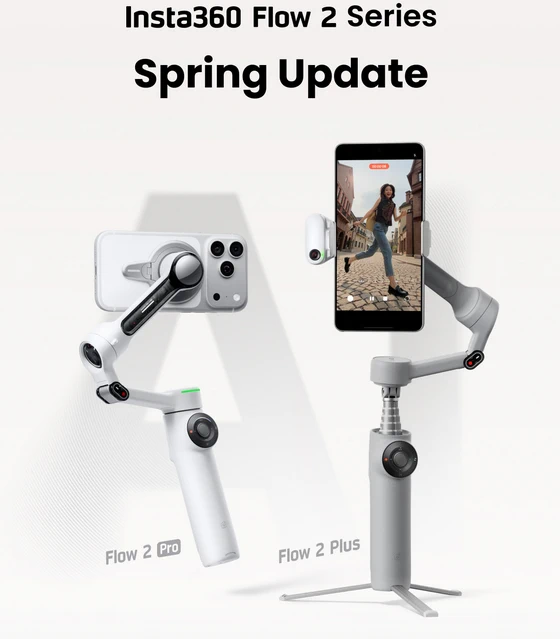
At the core of the experience is its identity as a “pocket AI filmmaker.” This isn’t marketing language—it reflects a real shift in how content is captured. The Flow 2 Series leverages advanced subject recognition and tracking algorithms to automate what used to require a dedicated operator. Whether you’re shooting solo vlogs, dynamic travel content, or fast-paced action clips, the system actively follows your movement, adjusts framing, and maintains cinematic stability without manual intervention.
One of the most impactful upgrades comes through native Apple DockKit integration. For iPhone users, this means tracking is no longer dependent on third-party apps or workarounds. The system communicates directly with iOS, enabling seamless, system-level subject tracking. The result is faster response times, greater reliability, and a frictionless shooting workflow where the technology simply disappears behind the experience.
Image consistency also sees a major leap forward with enhanced all-lens optimization. Modern smartphones rely on multiple lenses, but switching between them often introduces inconsistencies in exposure, sharpness, or color. The Flow 2 Series addresses this with refined processing that maintains visual continuity across lenses, whether you’re capturing ultra-wide landscapes or zoomed-in details. The transition feels natural, preserving the narrative flow of your footage.
Tracking performance itself reaches a new level with full 360-degree pan capabilities. Unlike traditional gimbals that impose rotational limits, the Flow 2 Pro variant can follow subjects freely in any direction. Combined with an unrestricted tilt range, this creates a true “no blind spots” system. It’s particularly valuable for creators working in dynamic environments—sports, events, or street content—where unpredictability is the norm.
Panoramic capture also becomes faster and more intuitive with the upgraded 360 Panorama 2.0 mode. Instead of complex setups or stitching delays, users can simply initiate the motion and let the system handle the capture in a fluid, automated sweep. The output is ready for sharing almost instantly, making it ideal for social-first creators who prioritize speed without sacrificing immersion.
The hardware design reinforces the product’s versatility. By integrating a gimbal, tripod, and selfie stick into a single foldable unit, the Flow 2 Series eliminates the need for multiple accessories. This all-in-one approach is not just about convenience—it fundamentally changes how and where you can shoot. From impromptu street captures to controlled indoor setups, the device adapts instantly to the scenario.
For iPhone users, the ecosystem advantage extends further with features like Dual View Mode and Apple Watch control. Dual View allows simultaneous or sequential capture within a single take, enabling more complex storytelling formats such as reactions or commentary overlays. Meanwhile, Apple Watch integration adds a layer of remote control that streamlines solo shooting—start recording, switch modes, or stop capture without ever touching the phone.
Android users are not left behind. The dedicated AI Tracker unlocks advanced subject tracking across virtually any app, bypassing typical software limitations. This ensures that regardless of platform, creators have access to consistent, intelligent tracking that performs reliably even in crowded or fast-moving environments.
What ultimately defines the Insta360 Flow 2 Series is not any single feature, but the cohesion of its system. Hardware, software, and AI converge into a tool that reduces friction at every step of the creative process. It anticipates movement, stabilizes unpredictability, and simplifies complexity—all while remaining compact enough to carry anywhere.
For creators who demand mobility without compromise, the Flow 2 Series is less of an accessory and more of a production upgrade. It doesn’t just help you shoot better footage—it actively enables a new standard of mobile storytelling.
Did this article help you? If so, please tell me in a comment what do you think about it.
Don’t miss any of our future video tutorials, follow us on Youtube. Like us on Facebook. Join our Best Deals Telegram Channel. Join our Android TV Box Firmware Updates Telegram Channel. Subscribe now to our newsletter. If you need Tech Reviewer or Youtube Influencer read this. Donate now here to support CGR Team!















