
Among all the add-ons that shapes OBSBOT Tail Air into the ultimate streaming camera, our robust NDI feature is a standout. Grasping the whole concept may seem complex at first, but fear not – we’re here to be your guide, helping you comprehend the workings of NDI and why it’s the perfect companion for Tail Air.
What is NDI?
NDI (Network Device Interface) is an open protocol designed for bidirectional video transmission over an Ethernet network in real-time. NDI-enabled products are widely used in live production system, making video creation and sharing much easier.
Optimal Transmission
– Ultra-low Latency. NDI HX3’s latency is as low as 100ms, comparable to the time it takes for you to blink.
– Visually Lossless Video. Supporting streaming up to 4K at 60fps, NDI HX3 ensures every transmitted frame is crystal-clear.
– Lower Bandwith Request. NDI HX3 significantly reduces bandwidth use, consuming around 50 Mbps for a 1080p60 stream.
What can NDI do for Tail Air?
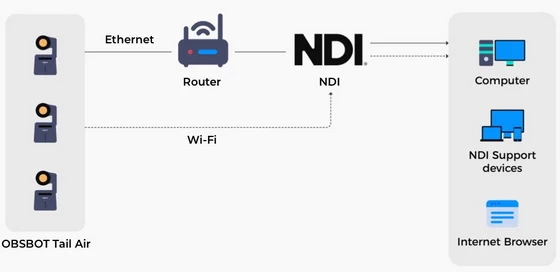
Here’s a quick rundown on how NDI works with Tail Air:
1. Enables Tail Air to transmit video over ethernet.
2. Puts videos shot from multiple Tail Air devices across locations into a network in real-time.
3. Allows audiences to access the videos in real-time through the same network.
Did this article help you? If so, please tell me in a comment what do you think about it.
Don’t miss any of our future video tutorials, follow us on Youtube. Like us on Facebook. Join our Best Deals Telegram Channel. Join our Android TV Box Firmware Updates Telegram Channel. Subscribe now to our newsletter. If you need Tech Reviewer or Youtube Influencer read this. Donate now here to support CGR Team!





