
SmallPDF vs. OnePDF – Which One is Better to Convert PDF Files
PDF (Portable Document Format) files have become the industry standard for sharing and archiving documents due to their ability to maintain formatting and layout regardless of the platform used to view them. However, there are times when users need to convert PDF files to different formats, such as Word, Excel, or PowerPoint. When it comes to PDF conversion tools, SmallPDF and OnePDF are two PDF conversion tools, although OnePDF is a recently established brand that may not yet have attained the same level of popularity. In this article, we will compare the features and benefits of these two platforms and explore which tool could be a better choice for users.

SmallPDF
SmallPDF is a popular online PDF converter that allows users to convert PDF files to various formats such as Word, Excel, PowerPoint, JPG, and more. It offers a simple and intuitive user interface that makes it easy for users to upload their files and convert them quickly. SmallPDF also provides a range of other PDF tools, such as compressing, merging, and splitting PDF files.
OnePDF
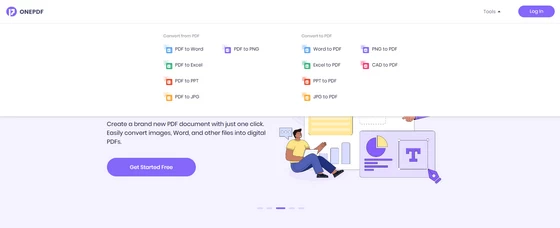
On the other hand, OnePDF is a newer platform that also provides a range of PDF conversion and editing tools. OnePDF is designed to be more user-friendly than SmallPDF, with a cleaner interface that is easier to navigate. It also offers some unique features that make it stand out from SmallPDF.
Speed
When it comes to speed, both SmallPDF and OnePDF are efficient in converting PDF files. SmallPDF has a reputation for being fast and reliable in completing file conversions. It boasts a streamlined process that allows users to drag and drop their files onto the platform, and then convert them quickly without any complicated steps. The processing time for SmallPDF may vary depending on the size of the file, but it generally takes just a few seconds to complete the conversion. On the other hand, OnePDF also offers a fast and efficient conversion process. Their platform uses cloud technology to convert PDF files, which enables users to convert their files quickly and without the need for any software downloads. OnePDF’s platform can convert files in just a matter of seconds, even for larger files. Overall, both SmallPDF and OnePDF are efficient in converting PDF files quickly. However, SmallPDF may have a slight edge when it comes to speed, as it offers a simpler and more streamlined process for converting files. Ultimately, the speed of each platform will depend on the specific needs of the user and the size of the files they are working with.
Pricing
When it comes to pricing, SmallPDF and OnePDF offer different options for users to consider. SmallPDF offers two pricing plans, the Team plan and the Pro plan. The Team plan costs $7 per month, with a minimum of two users and a maximum of 14 users. This plan is ideal for small to medium-sized teams that need to collaborate on PDF files. The Pro plan, on the other hand, costs $9 per user per month and is designed for individuals who need to work with PDF files on a regular basis. In contrast, OnePDF is a completely free web-based platform that allows users to convert, compress, merge, and split PDF files. Users do not have to pay any fees or subscribe to any plans to use OnePDF’s services. This makes OnePDF an attractive PDF conversion tool for individuals or small businesses who may not have the budget for a paid option. While SmallPDF’s pricing may be a drawback for some users, it’s important to note that their plans offer more advanced features than what is available for free on OnePDF. Users who need additional capabilities such as OCR, PDF editing, and e-signing will find these features on SmallPDF’s paid plans. On the other hand, OnePDF’s free platform is a great option for users who only need basic PDF conversion tools without any additional features.
In Conclusion
SmallPDF and OnePDF are two popular online PDF conversion tools that allow users to convert PDF files to various formats. SmallPDF is a well-established platform that offers a simple and intuitive user interface, while OnePDF is a newer platform designed to be more user-friendly, with a cleaner interface.
Both platforms are efficient in converting PDF files quickly, with SmallPDF having a slight edge when it comes to speed. SmallPDF offers two pricing plans, the Team plan and the Pro plan, while OnePDF is a completely free web-based platform. SmallPDF’s paid plans offer more advanced features such as OCR, PDF editing, and e-signing, which are not available on OnePDF’s free platform. Overall, the choice between SmallPDF and OnePDF will depend on the specific needs of the user and the features they require.
Did this article help you? If so, please tell me in a comment what do you think about it.
Don’t miss any of our future video tutorials, follow us on Youtube. Like us on Facebook. Join our Best Deals Telegram Channel. Join our Android TV Box Firmware Updates Telegram Channel. Subscribe now to our newsletter.















