
Samsung Electronics Globally Rolls Out Temporary Cloud Backup
A new and convenient way to keep hold of important data.
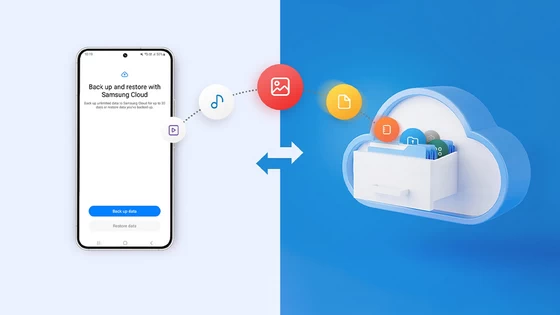
Samsung Electronics today announced the global rollout of Temporary Cloud Backup,1 a secure and easy way to save and transfer important data. In situations where Samsung Galaxy users may experience anxiety about losing their data, including photos, videos and private files, this feature is designed to provide comfort and reassurance. It highlights Samsung’s continued commitment to delivering powerful, connected experiences that help make users’ lives easier.
“Temporary cloud backup provides a reliable and convenient way for users to back up and restore important information,” said Chiyoung Seo, VP & Head of Cloud Team, Mobile eXperience Business at Samsung Electronics. “This upgraded switching experience based on Samsung Cloud2 aims to provide peace of mind to Samsung Galaxy users that precious data will not be lost, thanks to the connected power of Galaxy’s ecosystem.”
Users can choose to upload their data to Samsung Cloud storage via their Samsung Account,3 where it is kept safe and ready to be downloaded again. It is a free service, with no total storage limit, but individual file sizes are capped at 100GB. There is no need to use a PC or any external memory device, but Wi-Fi4 is required for data transfer.
Data is stored for up to 30 days from the date of users’ initial backup. Within this period, users will be able to restore their data whenever they want. Users are notified when approaching their time limit5 before their data is automatically deleted.
One Less Worry During Repairs or Replacements
Temporary Cloud Backup is an ideal service for ensuring data is preserved in various scenarios where users may be worried about losing their data, such as when getting a smartphone repaired. Samsung now includes the Temporary Cloud Backup as part of Maintenance Mode, helping to ensure personal data on a device,6 including private files within the Secure Folder, can be safely backed up for recovery after repairs.
This feature will also help Samsung Galaxy users upgrade their devices more conveniently, taking the stress out of device switching. For those preparing for their new preorder device to arrive, Temporary Cloud Backup provides a reliable and simple way to transfer their data. Users can confidently back up their data before performing a full reset on their old device, safe in the knowledge that it’s easy to recover that data at any time.
Users configuring their new device for the first time can restore their data as part of Setup Wizard. Even if they skip this stage, they can find Temporary Cloud Backup at any time within Maintenance Mode or the Reset function, enabling free and easy restoration at their convenience.7
Temporary Cloud Backup is the latest feature to be added to Samsung Cloud, mitigating risks of users losing data on lost, stolen or broken Samsung Galaxy devices. It is a secure, easy and seamless experience for backing up and restoring data on Galaxy devices that is protected by Samsung Account’s two-factor authentication, so users can feel more confident that uploading and restoring their data uses a secure process. Temporary Cloud Backup is just one of the ongoing efforts to optimize and improve the mobile experience for users across the Galaxy ecosystem.
The full global rollout of Temporary Cloud Backup takes place starting this fall for all Samsung Galaxy smartphones and tablets operating on One UI 6,8 starting with Galaxy S and Z series smartphones in Korea.
1 Available on Samsung Galaxy smartphones and tablets with One UI 6 or later. Availability of this feature may vary depending on market, carrier or model.
2 Temporary Cloud Backup supports data beyond native Samsung apps and account information, including but not limited to third party apps, photos, videos, audio, documents and files. Temporary Cloud Backup files will not be dependent of existing Samsung Cloud backup files, and backup data will not overlap.
3 Users must have a registered Samsung Account in order to use the Temporary Cloud Backup feature. For more information, please visit: https://support.samsungcloud.com/#/info-cloud-temporary-backup.
4 If Wi-Fi connection is interrupted, the backup or restore process will pause until the connection is restored.
5 Data can be stored for up to 30 days. Users will receive notifications on their phone 7 days prior to data deletion.
6 Support of data backup and restoration may vary depending on individual app policies.
7 Temporary Cloud Backup can be accessed via “Settings > General Management > Reset > Temporary Cloud Backup” or “Settings > Battery and Device Care > Maintenance Mode > Temporary Cloud Backup”.
8 For select markets, Temporary Cloud Backup was initially introduced as part of Maintenance Mode starting early January 2023. It was included within the Reset function from June. The availability of this feature may vary depending on market, carrier or model.
Did this article help you? If so, please tell me in a comment what do you think about it.
Don’t miss any of our future video tutorials, follow us on Youtube. Like us on Facebook. Join our Best Deals Telegram Channel. Join our Android TV Box Firmware Updates Telegram Channel. Subscribe now to our newsletter. If you need Tech Reviewer or Youtube Influencer read this. Donate now here to support CGR Team!















