
Full License Keys for Winxvideo AI – Enhance and Convert Your Videos with AI
In the ever-evolving landscape of video editing software, Winxvideo AI stands out as a complete toolkit powered by artificial intelligence. Packed with a plethora of features, this software aims to revolutionize the way users enhance, edit, and transform their videos and images.
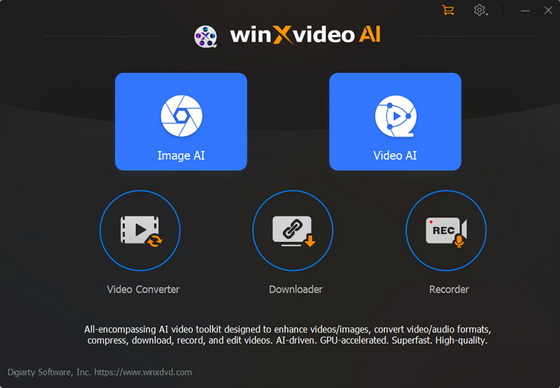
Key Features: Elevating Your Multimedia Experience
1. Enhance Video/Image with AI:
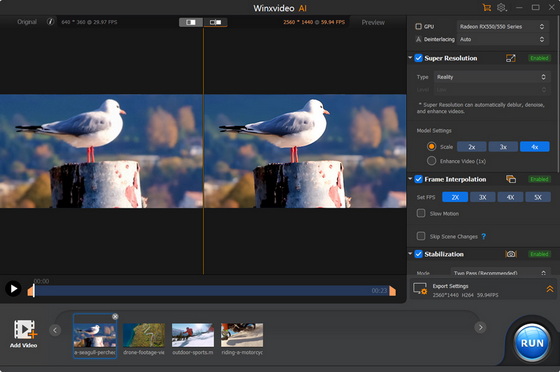
Upscaling Low-Quality Videos to 4K: For professional photographers looking to elevate their videos to a superior level, Winxvideo AI provides the ability to upscale low-quality video to 4K resolution, such as the old birthday, party, wedding videos and many more
Upscale Blurry Images: Addressing the concerns of photographers dealing with blurry images, Winxvideo AI offers a solution by intelligently upscaling and enhancing image clarity.
Increase Video Frame Rate to 60fps: Elevate the visual experience by increasing the video frame rate to a smooth 60 frames per second. This feature caters to sports and travel enthusiasts seeking cinematic quality in their videos.
Stabilize Shaky Videos: Whether recorded on a mobile device, GoPro, drone, or camera, Winxvideo AI employs AI algorithms to stabilize shaky videos, ensuring a steady and professional outcome.
2. Convert Video to Multiple Formats:
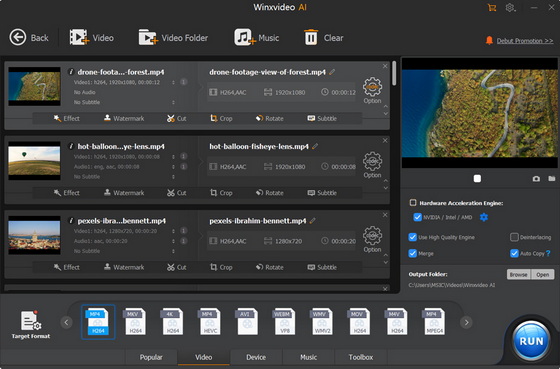
Flexibility is key, and Winxvideo AI understands that. Users can effortlessly convert videos to a wide array of formats, including MP4, HEVC, H.264, MKV, MOV, and more than 420 additional formats. This feature ensures compatibility with various devices and platforms.
3. Compress Video Size with Minimal Quality Loss:
In an era where large file sizes can be cumbersome, Winxvideo AI offers a groundbreaking solution. Users can compress video sizes by up to 90% without compromising quality. This is a boon for content creators who need to share videos online without sacrificing visual integrity.
4. Record Screen, Webcam, and Picture-in-Picture:
Winxvideo AI is not just about post-production enhancements; it also excels in capturing content in real-time. The software allows users to record screens, webcam feeds, and even create picture-in-picture compositions.
5. Edit Video with Easy Clicks:
For those who value the art of editing, Winxvideo AI provides a comprehensive set of editing tools. From trimming and splitting videos to merging clips and applying a variety of effects, users, including amateurs, have the creative freedom to craft their videos with precision.
Conclusion: A Paradigm Shift in Video Editing
Winxvideo AI is a robust tool revolutionizing video editing with AI features, versatile conversions, and a user-friendly interface. Ideal for professionals and enthusiasts, it elevates multimedia experiences for creators and casual users alike. Whether you’re a seasoned content creator or an amateur, Winxvideo AI transforms videos for photographers, stabilizes adventures for sports enthusiasts, and enhances memories for amateurs – a true game-changer.
Winxvideo AI Full License Keys
AIKJH-JZORF-E7HYP-LRGGG
AIZVL-TU7XS-V52KU-FBPG3
AIJ66-4SIX4-J42XG-2GQUH
Winxvideo AI Tech Specs
– Product page: https://www.winxdvd.com/winxvideo-ai/
– Download link: https://www.winxdvd.com/download/winxvideo-ai.exe
1. Supported OS:
Windows 11 (64 bit), Windows 10, Windows 8/8.1, Windows 7
2. System Requirements:
– GPU. Winxvideo AI automatically detects and utilizes GPU acceleration if your computer has a proper hardware, so that you can process and export video efficiently with high quality.
* NVIDIA: NVIDIA® GeForce GT 630 or higher
* Intel: Intel® HD Graphics 2000 or higher
* AMD: AMD Radeon HD 7700 series (VCE 1.0) or higher
* Apple Silicon: M1/Pro/Max/Ultra, M2/Pro/Max/Ultra, M3/Pro/Max
– Processor. 1 GHz Intel® or AMD® processor (Minimum)
– RAM. 1GB RAM (Recommended: 2GB or above)
– Hard Disk Space. 200MB of hard-disk space for installation
– AI Enhancement: Winxvideo’s AI features, incl. video/image upscaling, stabilization, and frame interpolation, require a large amount of computing power and therefore demands more RAM and disc space. Here are the minimal requirements if you are going to enhance video/photo:
* Vulkan: 1.2.x
* OpenCL: 1.0
* Hard Disk Space: 1GB
* RAM:2GB
3. Customer Support Email.
support@winxdvd.com
4. Language Support offered in the app.
English, French, German, Italian, Japanese, Spanish, Korean, Chinese
Did this article help you? If so, please tell me in a comment what do you think about it.
Don’t miss any of our future video tutorials, follow us on Youtube. Like us on Facebook. Join our Best Deals Telegram Channel. Join our Android TV Box Firmware Updates Telegram Channel. Subscribe now to our newsletter. If you need Tech Reviewer or Youtube Influencer read this. Donate now here to support CGR Team!
















The product key is not working
Without a license email, the license code does not work