
Set Up Multicast with OBSBOT UVC to NDI Adapter
NDI (Network Device Interface) facilitates seamless communication between various video production tools. You can integrate a UVC webcam now with an OBSBOT UVC to NDI Adapter for higher quality and lower latency. With the firmware upgrade of OBSBOT UVC to NDI Adapter, Multicast, a key feature in network transmission, can manage multiple NDI streams, optimizing the distribution without the redundancy of unicast or the overreach of broadcast. There is no doubt that Multicast is helpful in scenarios requiring synchronous delivery of identical content, such as live streaming, video conferencing, and real-time multimedia teaching.
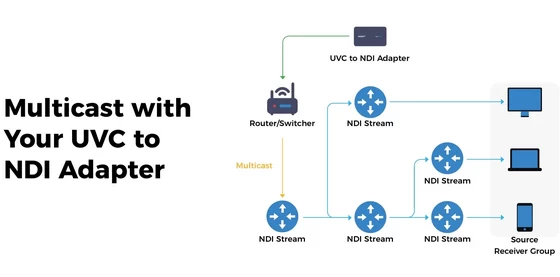
Here are Some Benefits of Multicast:
– Internet bandwidth saving: Multicast allows data from one source to be distributed to multiple subscribed group members simultaneously, greatly reducing the bandwidth consumption, which would be significant if unicast were used.
– Scalability: Multicast can support massive online audiences watching live events simultaneously, offering better scalability compared to Unicast.
– Low-latency transmission: Multicast can achieve lower end-to-end latency through optimized routing protocols, making it more suitable for live scenarios that require real-time performance.
Let’s Multicast Your NDI Streams as Follows:
Note: If you’re new to networking, handle multicast settings with care to avoid technical hiccups.
Step 1: Prerequisites for Setup
– UVC/USB Webcam
– OBSBOT UVC to NDI Adapter
– NDI Tools
– Net Switcher or Router
– Ethernet Cable
Step 2: Connect Your UVC to the NDI Adapter
Click here to see how to get NDI sources and access Web UI with your OBSBOT UVC to NDI Adapter.
Step 3: Configuring Multicast
1. After accessing Web UI, you should start by upgrading the firmware to the latest version.
2. Ensure the firmware has been successfully upgraded, then turn on the “Multicast” in the “Network”.
3. Enter a Multicast Address within the range of 224.0.0.0 to 239.255.255.255 (e.g., 239.255.0.0). And fill in a Multicast Subnet Mask within 255.0.0.0 to 255.255.255.252 (e.g., 255.255.0.0).
4. Click “Apply” to finish your Multicast settings.
Bandwidth Comparison with Multicast Unenabled
1. When multicast is not enabled and only one Studio Monitor in NDI Tools is used to pull video streams, the bandwidth can be observed at 33.6Mbps using network traffic monitoring software.
2. Open another Studio Monitor in NDI Tools to pull another video stream at the same time without multicast enabled, the bandwidth approximately doubles to 67.0Mbps.
3. But after enabling multicast, the previously doubled bandwidth decreases to 35Mbps, closely resembling the bandwidth(33.6Mbps) where only one Studio Monitor is used to pull video streams.
Did this article help you? If so, please tell me in a comment what do you think about it.
Don’t miss any of our future video tutorials, follow us on Youtube. Like us on Facebook. Join our Best Deals Telegram Channel. Join our Android TV Box Firmware Updates Telegram Channel. Subscribe now to our newsletter. If you need Tech Reviewer or Youtube Influencer read this. Donate now here to support CGR Team!















