
The Ultimate Guide to Choosing a Rugged Tablet: Durability Meets Versatility
In today’s fast-paced world, the demand for technology that can withstand harsh environments is steadily increasing. Whether you’re in construction, transportation, field service, or any other demanding industry, a standard tablet just won’t cut it. This is where rugged tablets come into play. Built to endure extreme conditions, these devices provide the durability and functionality required for tough jobs. In this article, we’ll delve into the key features of rugged tablets, the benefits they offer, and how to choose the right rugged Windows tablet for your needs.
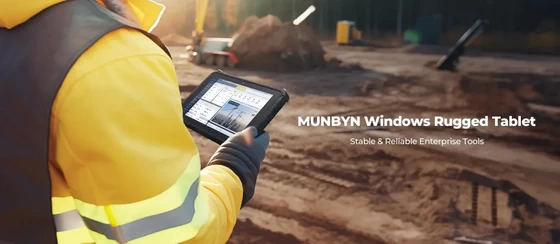
What is a Rugged Tablet?
A rugged tablet is a durable, portable computing device designed to operate reliably in harsh environments and conditions, such as extreme temperatures, wet or dusty settings, and areas prone to drops and shocks. These tablets are often used in industries like construction, manufacturing, logistics, and the military, where standard consumer-grade tablets would likely fail.
Key Features of Rugged Tablets
– Durability: Rugged tablets are built with reinforced frames, and shock-absorbing materials, and often come with IP ratings that certify their resistance to dust and water.
– Screen Protection: These tablets feature toughened glass or plastic screens that resist scratches and shattering.
– Environmental Resistance: They can operate in extreme temperatures, from cold to sweltering heat.
– Battery Life: Designed for long hours of use, rugged tablets typically have extended battery life and often support hot-swappable batteries.
– Connectivity: Despite their rugged nature, these tablets offer comprehensive connectivity options including Wi-Fi, Bluetooth, GPS, and often cellular connectivity.
The Benefits of Using a Rugged Tablet
Enhanced Productivity
Rugged tablets enable workers to complete tasks more efficiently in challenging environments. Whether it’s accessing blueprints on a construction site, conducting inspections in remote areas, or managing inventory in a warehouse, the robust design ensures continuous operation without the risk of device failure.
Cost-Effective
While the initial investment in a rugged tablet may be higher than a consumer-grade tablet, the long-term savings are significant. These devices are less likely to break or malfunction, reducing the costs associated with repairs, replacements, and downtime.
Versatility
Rugged tablets are incredibly versatile. They can be used for a wide range of applications, from data collection and communication to navigation and real-time reporting. Their ability to run industry-specific software makes them invaluable tools across various sectors.
Why Choose a Rugged Windows Tablet?
When it comes to choosing a rugged tablet, the operating system plays a crucial role. Rugged Windows tablets, in particular, offer several advantages:
Familiar Interface
For many businesses, Windows is the preferred operating system due to its familiarity and widespread use in enterprise environments. Employees are more likely to be comfortable with Windows, reducing the learning curve and improving productivity.
Software Compatibility
Windows tablets support a vast array of software applications used in different industries. From enterprise resource planning (ERP) systems to specialized field service software, a rugged Windows tablet can seamlessly integrate with existing systems.
Security
Windows operating systems are renowned for their robust security features, which are essential for protecting sensitive data in industries like healthcare, finance, and government.
Choosing the Right Rugged Windows Tablet
Selecting the right rugged Windows tablet involves considering several factors to ensure it meets your specific needs. Here are some key aspects to consider:
Environmental Requirements
Assess the conditions in which the tablet will be used. If it’s for outdoor use, ensure it has a high IP rating for dust and water resistance. For cold environments, look for tablets that can operate in low temperatures. MUNBYN Windows rugged tablets are built to withstand harsh conditions, including drops, shocks, water, and dust, ensuring seamless operation in any environment.
Screen Size and Resolution
Depending on the tasks, the screen size and resolution can be important. Larger screens are beneficial for viewing detailed schematics or maps, while higher resolutions provide clearer, sharper images.
Performance Specifications
Consider the processor, RAM, and storage options. High-performance specifications are necessary for running demanding applications smoothly.
Battery Life
Long battery life is crucial, especially for field workers who may not have easy access to charging points. Look for tablets with extended battery life and options for hot-swappable batteries.
Connectivity Options
Ensure the tablet supports the necessary connectivity options, such as Wi-Fi, Bluetooth, and cellular connectivity. Additional ports like USB, HDMI, and SD card slots can also be beneficial. MUNBYN rugged tablets provide multiple ports and wireless options, including Wi-Fi, Bluetooth, and optional 4G LTE, ensuring you’re always connected to your essential data and systems.
Ergonomic Design
Since rugged tablets are often used in the field, they should be lightweight and easy to carry. Features like hand straps, shoulder straps, and docking stations can enhance usability.
Conclusion
Investing in a rugged tablet, particularly a rugged Windows tablet, can significantly enhance the efficiency and reliability of operations in demanding environments. With their robust build, versatile functionality, and seamless integration with industry-standard software, these tablets are indispensable tools for modern enterprises.
When choosing a rugged tablet, carefully consider your specific needs and the conditions under which the tablet will be used. By doing so, you can ensure that you select a device that not only withstands the rigors of your industry but also boosts productivity and reduces long-term costs.
Did this article help you? If so, please tell me in a comment what do you think about it.
Don’t miss any of our future video tutorials, follow us on Youtube. Like us on Facebook. Join our Best Deals Telegram Channel. Join our Android TV Box Firmware Updates Telegram Channel. Subscribe now to our newsletter. If you need Tech Reviewer or Youtube Influencer read this. Donate now here to support CGR Team!















