
How to Control OBSBOT Tail 2 via Web UI
OBSBOT provides multiple software options for controlling the Tail 2, including OBSBOT Center, Obsbot Start, and Obsbot Live. Additionally, OBSBOT enables control of the Tail 2 through its Web UI without the need to download extra software. This article details three methods to access the Web UI, introduces its three control interfaces, and highlights its advantages.

Three Methods to Access Web UI
1. Access via IP Address
2. Access via Default Device Name
3. Access via NDI Studio Monitor
– Confirm your device and Tail 2 are connected to the same network.
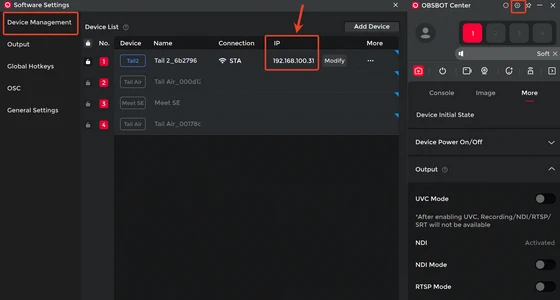
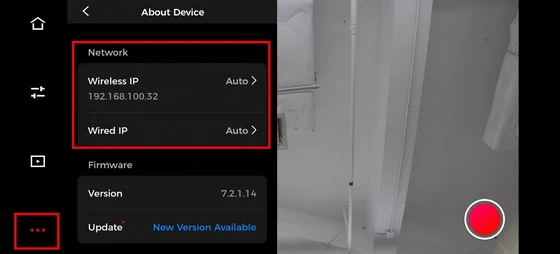
– Obtain Tail 2’s IP address from OBSBOT Center. (Settings > Device Management > IP) obtain IP address. You can also find Tail 2’s IP address from Obsbot Start. (Settings > About Device > Network) find Tail 2’s IP address
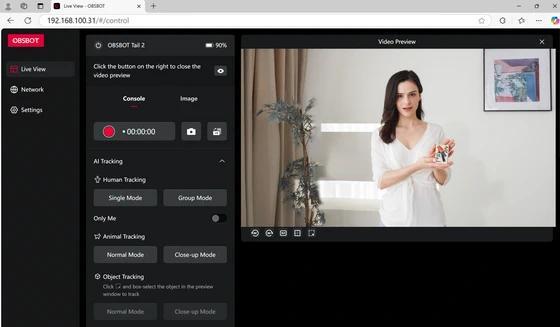
– Open a web browser in the device, enter “Tail 2’s IP address” in the address bar, and press Enter to access the Web UI.
Three Control Interfaces of Web UI
Tail 2’s Web UI is a multifunctional platform with three control interfaces: Live View, Network, and Settings. Each interface offers features to enhance the user experience and optimize OBSBOT Tail 2’s performance.
1. Live View Interface
2. Network Interface
3. Settings Interface
The Live View interface presents a real-time video preview of the OBSBOT Tail 2. It includes AI tracking mode options, tracking settings, PTZ adjustments, and position presets, facilitating real-time monitoring and quick camera configuration.
Advantage of Controlling Tail 2 via Web UI
The Web UI of Tail 2 enables cross-platform control via any modern browser on PCs, tablets, or smartphones, eliminating the need for additional software. The intuitive interface enables users to preview real-time footage while fine-tuning PTZ angles, tracking settings, etc. For live-streaming teams, all members can log in to the Web UI from their device to control Tail 2 based on their roles, enhancing workflow efficiency significantly.
Don’t miss out on the advantages of controlling Tail 2 via Web UI. Start exploring Tail 2’s Web UI today to boost your live-streaming experience!
Did this article help you? If so, please tell me in a comment what do you think about it.
Don’t miss any of our future video tutorials, follow us on Youtube. Like us on Facebook. Join our Best Deals Telegram Channel. Join our Android TV Box Firmware Updates Telegram Channel. Subscribe now to our newsletter. If you need Tech Reviewer or Youtube Influencer read this. Donate now here to support CGR Team!















