
Gaming Mouse vs Regular Mouse: What’s the Real Difference?
What Is a Gaming Mouse?
A gaming mouse is built for fast, precise, high-frequency input. Where a regular mouse needs to get the cursor from A to B reliably, a gaming mouse needs to do that consistently at high speed, with minimal latency, across hours of continuous use. That priority shapes everything: the sensor, the polling rate, the button layout, the weight, and the materials. A quality gaming mouse is engineered around the assumption that small differences in tracking accuracy and input response matter — because in fast-paced games, they do.
Gaming Mouse vs Regular Mouse: Key Differences
Sensor
The sensor is the most fundamental difference. A gaming mouse uses a high-precision optical sensor — quality models run the PAW3950 or proprietary equivalents developed in-house by major manufacturers. These sensors track fast, complex movement accurately across different surfaces and at high speeds without losing position data. A regular mouse uses a basic optical sensor suited for slow, simple cursor movement. It works fine for pointing and clicking, but under fast gaming movement it accumulates small tracking errors that a precision sensor wouldn’t.
DPI and Polling Rate
DPI and polling rate are the two numbers most associated with gaming mice, and they work together. DPI determines how far the cursor moves per inch of physical movement — gaming mice offer adjustable DPI from 400 up to 26,000+, while regular mice are fixed at 800–1200. Most competitive players run 400–1600 DPI regardless. Polling rate is how often the mouse reports its position to the computer. Regular mice run at 125 Hz — once every 8 ms. Gaming mice start at 500–1000 Hz and reach 8000 Hz on high-end models. The jump from 125 Hz to 1000 Hz is immediately noticeable in how smoothly and directly the cursor follows your hand.
Programmable Buttons
A regular mouse has two main buttons and a scroll wheel. A gaming mouse adds 3–5 programmable side buttons mapped to in-game actions. For most players, 6 buttons covers everything without overcomplicating the layout. The real value isn’t the count — it’s what those buttons do for your in-game flow. Having a reload or ability on your thumb means one less reach for the keyboard mid-fight. Over a long session, that reduction in hand travel adds up in both reaction speed and comfort.
Weight and Ergonomics
Gaming mice have pushed weight down significantly — ultra-light models land under 50 g. Regular mice make no weight optimisation, typically sitting at 80–120 g. That difference might feel minor on a desk, but during fast flicks and wide sweeps it creates real inertia that slows direction changes and compounds fatigue over time. Ergonomics also differ. Gaming mice are shaped around specific grip styles — palm, claw, fingertip — with contours and side grips designed for hours of use. Regular mice use a generic shape that works for short sessions but adds strain across extended play.
Build Quality
Gaming mice are rated for 50–100 million clicks on the main buttons. Switches are chosen for consistent actuation force and short travel. PTFE feet provide smooth, consistent glide. Regular mice use budget components that degrade faster under heavy input. The difference in click feel — crispness and consistency of actuation — is immediately apparent when switching between the two.
Price
Regular mice start at $5–20. Gaming mice range from $30 for entry-level up to $150+ for flagship wireless models. A $50 gaming mouse delivers a substantially better sensor, polling rate, and build quality than any regular mouse. The jump from $50 to $150 in the gaming category is about features — wireless, weight, polling rate ceiling — not raw tracking performance.
Gaming Mouse vs Regular Mouse at a Glance
| Gaming Mouse | Regular Mouse | |
| Sensor | High-precision (PAW3950 or equivalent) | Basic optical |
| DPI range | 400–26,000+ (adjustable) | 800–1200 (fixed) |
| Polling rate | 500–8000 Hz | 125 Hz |
| Programmable buttons | 6–8 | 2–3 |
| Weight | 40–90 g (optimised) | 80–120 g |
| Click durability | 50–100M rated | Unrated |
| Price | $30–$150+ | $5–$30 |
| Best for | Gaming, precision tasks | Everyday, office use |
Does the Difference Actually Matter for Gaming?
FPS and Competitive Shooters
This is where the gap is most significant. Sensor accuracy determines where your crosshair actually lands; polling rate affects how smoothly the cursor follows your hand; weight decides how fast you can change direction. For anyone playing ranked FPS, the difference between a gaming mouse and a regular one is noticeable within a few matches.
MOBA and MMO
Raw tracking precision matters less here, but programmable buttons and ergonomics become the main advantages. Mapped abilities and macros on the mouse reduce keyboard dependency, and a mouse shaped for long sessions holds up better across 3–4 hour play than a generic office mouse does.
Casual and Single-Player Games
For RPG, strategy, and simulation, the gap largely disappears. Pace is slow enough that 125 Hz polling and a basic sensor create no real friction. A regular mouse handles these genres without limitation.
How to Choose a Gaming Mouse
Once you’ve decided a gaming mouse is the right call, the decision narrows to a few practical factors.
– Wired or wireless. Wired is simpler and cheaper for equivalent sensor performance. Wireless 2.4 GHz now matches wired latency at 1–2 ms and removes cable drag entirely. For players who want maximum flexibility, a tri-mode mouse — supporting wired, 2.4 GHz, and Bluetooth — covers every scenario.
– Weight. Lighter mice suit claw and fingertip grip players making fast directional changes. Aim for under 70 g if movement speed is a priority. Palm grip players are less affected by weight but more by shape and rear hump height.
– Sensor. A mouse running a PAW3950 or equivalent at 800 DPI will outperform a cheap sensor at 16,000 DPI every time.
– Grip style. Shape matters more than most specs. Palm grip players need a larger rear hump and more surface contact; fingertip players need a shorter, lighter shell.
– Button count. Generally, a setup with 5 to 6 buttons is the preferred choice for gamers; assigning shortcuts to these buttons allows for faster and more convenient reactions.
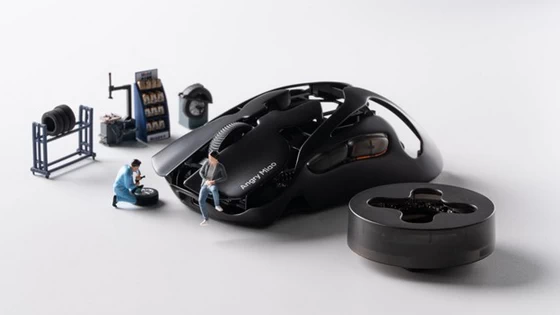
The Angry Miao AM Infinity hits these priorities directly: 47 g, PAW3950 sensor, tri-mode connectivity (wired, 2.4 GHz, Bluetooth), and hot-swappable batteries so you never stop mid-session to charge.
Conclusion
A gaming mouse moves it precisely, quickly, and consistently — with the build quality to match the kind of use regular mice aren’t designed for. The gap is real across sensor accuracy, polling rate, weight, and durability. For anyone playing regularly or competitively, a gaming mouse isn’t an upgrade for the sake of it — it’s the right tool for how you actually play.
FAQ
Can you use a regular mouse for gaming?
Yes, for casual and slow-paced games. For competitive titles, sensor accuracy and 125 Hz polling become real limitations.
Is higher DPI always better for gaming?
No. Most competitive players use 400–1600 DPI. Sensor accuracy at your preferred setting matters more than the maximum DPI on the spec sheet.
Do gaming mice work for office use?
Yes — and they’re often more comfortable for long sessions than a basic office mouse.
How long does a gaming mouse last?
Quality models are rated for 50–100 million clicks. With regular use, 3–5 years before meaningful degradation is typical.
Is an expensive gaming mouse worth it?
A $40–60 model covers most players’ needs. Spending more gets you wireless, lower weight, and higher polling rates — worth it for competitive play, less so for casual use.
Did this article help you? If so, please tell me in a comment what do you think about it.
Don’t miss any of our future video tutorials, follow us on Youtube. Like us on Facebook. Join our Best Deals Telegram Channel. Join our Android TV Box Firmware Updates Telegram Channel. Subscribe now to our newsletter. If you need Tech Reviewer or Youtube Influencer read this. Donate now here to support CGR Team!















