
Elecrow CrowView Note 15.6” Turns Your Phone into a Mobile Workstation
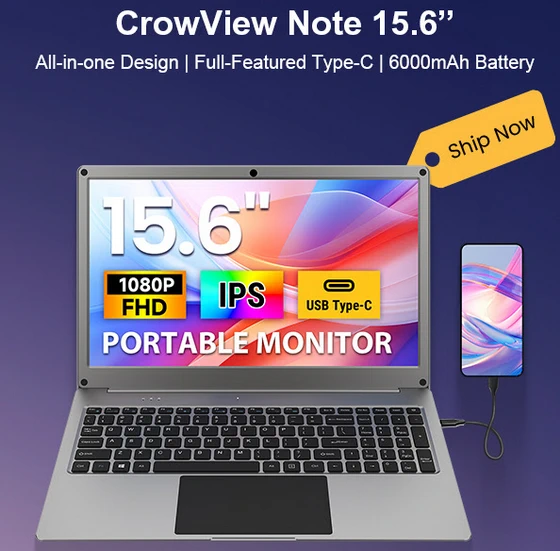
At first glance, the CrowView Note 15.6” immediately stands out thanks to its sleek integrated design. Instead of carrying multiple accessories, adapters, keyboards, and external monitors, everything is built directly into one compact solution. The high-resolution 15.6-inch Full HD IPS display, full keyboard, touchpad, speakers, and built-in battery work together seamlessly to deliver a clean, efficient desktop-like experience anywhere you go. Whether you are working from a café, attending meetings, traveling, or building projects on the move, the CrowView Note eliminates clutter and transforms your setup into a true portable office.
The large 1920×1080 IPS display provides vibrant colors, excellent sharpness, and wide 178-degree viewing angles that make everything from coding and document editing to multimedia playback and creative design feel immersive and comfortable. Its 180-degree flip capability adds even more flexibility, allowing users to quickly adapt the monitor for presentations, collaborative work, or compact workspace arrangements.
One of the biggest advantages of the CrowView Note is its remarkable compatibility. Through its full-featured USB Type-C connection, users can instantly connect smartphones, mini PCs, Raspberry Pi boards, Jetson Nano systems, Orange Pi devices, Rock Pi, LattePanda, gaming consoles, and many other hardware platforms. This transforms compatible smartphones into desktop-style workstations within seconds, bringing a laptop-like experience without carrying a traditional laptop. Samsung DeX users, in particular, will appreciate the full desktop mode support that turns Galaxy devices into powerful portable productivity machines.
The integrated 6000mAh battery adds another layer of convenience by powering both the monitor and connected devices. Supporting 5V/5A PD fast charging, the CrowView Note is capable of running demanding hardware like the Raspberry Pi 5 while also offering reverse charging functionality for smartphones and portable devices. With up to several hours of continuous usage, it is perfectly suited for remote work sessions, field testing, educational environments, and mobile development labs.
Beyond productivity, the CrowView Note is also a dream device for makers and developers. Its support for popular development platforms including Arduino IDE and LVGL opens exciting possibilities for embedded projects, prototyping, smart device control, and custom interface development. Rich expansion options such as GPIO, I2C/UART, SD card support, dual USB-C ports, and interchangeable wireless modules provide flexibility rarely seen in portable monitors.
Wireless connectivity is equally impressive, featuring modern Wi-Fi 6 and Bluetooth 5.3 support for fast, stable communication across multiple devices and ecosystems. Optional AI-focused features including facial recognition, object tracking, onboard microphones, and dual speakers further position the CrowView Note as a forward-looking platform for interactive applications and intelligent edge computing projects.
Unlike traditional portable monitors that simply extend a display, the CrowView Note creates a complete mobile computing ecosystem. It bridges the gap between smartphones, single-board computers, and desktop productivity while maintaining portability and simplicity. From developers building IoT projects to digital nomads seeking a lightweight workstation solution, this device offers an incredibly versatile experience that adapts to almost any workflow.
The new 15.6-inch version expands on the success of the earlier 14-inch model by offering a significantly larger workspace ideal for multitasking, video editing, programming, engineering applications, and professional creative work. With its all-in-one architecture, premium IPS display, powerful compatibility, and truly portable design, the CrowView Note 15.6” is one of the most exciting mobile productivity solutions currently available.
The CrowView Note 15.6″ portable monitor is now in stock and ready to transform the way you work, create, and connect on the go.
Did this article help you? If so, please tell me in a comment what do you think about it.
Don’t miss any of our future video tutorials, follow us on Youtube. Like us on Facebook. Join our Best Deals Telegram Channel. Join our Android TV Box Firmware Updates Telegram Channel. Subscribe now to our newsletter. If you need Tech Reviewer or Youtube Influencer read this. Donate now here to support CGR Team!















