
Elecrow PiTower Gen 2 Raspberry Pi 5 Mini PC Case
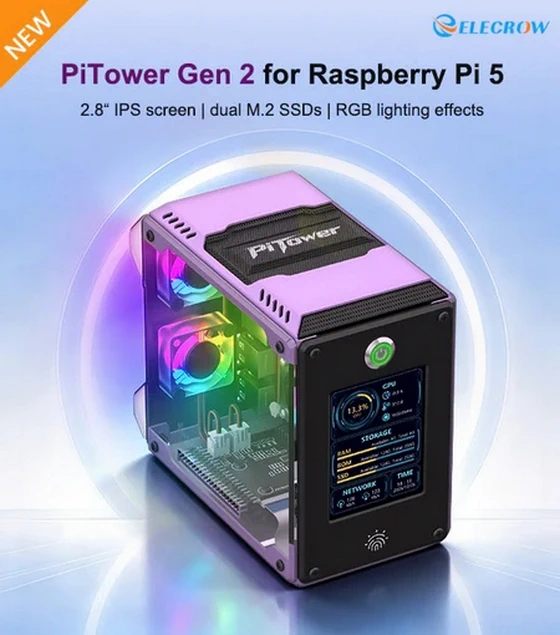
The Raspberry Pi 5 is already an impressively capable foundation for development, experimentation, home automation, lightweight desktop computing and countless maker projects, but Elecrow is taking the platform several steps further with the new PiTower Gen 2, an integrated Mini PC chassis designed to transform the familiar single-board computer into something that looks, feels and functions much more like a compact desktop system. Combining an aluminum alloy enclosure, transparent side panel, dedicated 2.8-inch system monitoring display, dual M.2 SSD expansion, programmable RGB illumination and a semi-pre-assembled internal structure, the PiTower Gen 2 brings together performance, storage, cooling and visual customization in a compact package created specifically around the Raspberry Pi 5. Compared with the original PiTower Gen 1, this second-generation model introduces several meaningful refinements rather than simply changing the external design. Elecrow has added customizable RGB lighting, improved the cooling arrangement with fan pads designed to reduce operating noise, expanded the storage possibilities with two M.2 slots and retained the open, hardware-focused appearance that makes the PiTower concept particularly appealing to enthusiasts who want their Raspberry Pi installation to look like a finished Mini PC without hiding the technology inside a conventional closed enclosure.
A Raspberry Pi 5 Case That Looks Like a Real Mini PC
One of the strongest characteristics of the PiTower Gen 2 is its presentation. Instead of treating the Raspberry Pi 5 as a bare development board sitting inside a functional enclosure, Elecrow has created a small tower chassis that gives the platform considerably more presence on a desk, workbench or home-office setup.
The enclosure combines a premium aluminum alloy structure with transparent acrylic side panels, creating what Elecrow describes as its “Seaview Room” design, allowing the internal hardware and RGB illumination to remain visible while the metal construction contributes to structural rigidity and thermal management. At just 134.5 × 127 × 76 mm, the PiTower Gen 2 remains compact enough to fit easily alongside a monitor, keyboard or electronics workspace, yet its vertical tower format provides enough internal space to accommodate the Raspberry Pi 5, cooling hardware, expansion storage and lighting system without making the finished build look overcrowded.
The transparent side panel is particularly well suited to the PiTower concept because Raspberry Pi systems are often as much about the building process as the final application. Seeing the board, cooling solution, cables and illuminated fans gives the finished system a distinctly enthusiast-oriented appearance, while the aluminum exterior helps elevate it beyond the look of a typical DIY enclosure.
2.8-Inch Display Keeps System Information Visible
The front panel immediately distinguishes the PiTower Gen 2 from most Raspberry Pi 5 cases through the inclusion of a dedicated 2.8-inch full-color TFT system monitoring display with a resolution of 320 × 240 pixels.
Rather than requiring users to open a monitoring application or terminal window every time they want to check basic system information, the secondary screen can display important operating data directly on the chassis, including CPU utilization, processor temperature, SSD usage, network status and the current time. For a Raspberry Pi being used as a server, development platform, home automation controller, NAS-style device or compact workstation, having these statistics continuously visible can be considerably more useful than a decorative display alone.
It also gives the PiTower Gen 2 the character of a much more sophisticated Mini PC, particularly when the Raspberry Pi is running workloads for long periods and temperature, storage capacity or processor utilization become useful indicators of what is happening inside the system.
Dual M.2 SSD Expansion Brings Serious Storage Flexibility
Storage is another area where the PiTower Gen 2 goes substantially beyond the experience offered by a basic Raspberry Pi installation. Instead of relying exclusively on a microSD card or a single external USB drive, the chassis incorporates dual M.2 SSD expansion slots, giving users considerably greater freedom when configuring high-speed local storage.
The system supports M.2 drives in 2230, 2242, 2260 and 2280 form factors, making it compatible with a broad range of SSD sizes, while support for NVMe and SATA storage options gives builders additional flexibility depending on their performance requirements, available hardware and intended application.
Having two M.2 storage positions opens the door to much more ambitious Raspberry Pi 5 configurations. One SSD could be dedicated to the operating system and applications while another handles project files, databases, media or backups, while users building home servers, development systems or compact storage appliances can take advantage of the additional capacity without surrounding the PiTower with external enclosures and loose USB cables.
For anyone attempting to move beyond the traditional microSD-based Raspberry Pi experience, this integrated storage architecture is arguably one of the most important upgrades offered by the PiTower Gen 2.
Cooling Designed Around Raspberry Pi 5 Performance
The additional performance of the Raspberry Pi 5 also means that effective thermal management has become increasingly important, particularly under sustained workloads. Elecrow addresses this through an aluminum alloy passive cooling design combined with an integrated cooling module, using the chassis itself as part of the overall thermal strategy while maintaining active airflow where necessary.
The second-generation design also incorporates fan pads intended to reduce fan vibration and operating noise, an apparently small detail that could make a noticeable difference when the PiTower Gen 2 is used continuously on a desk, in a bedroom, home office or other environment where persistent fan noise can become distracting.
The result is a chassis designed not simply to house the Raspberry Pi 5, but to provide a more controlled environment for running demanding applications, longer processing jobs and always-on services while maintaining the compact dimensions expected from the platform.
Programmable RGB Adds Personality to the Build
A transparent chassis almost inevitably invites some form of illumination, and Elecrow has taken advantage of the PiTower Gen 2’s open visual design by integrating a programmable RGB lighting system.
Users can choose between 11 preset lighting effects, allowing the appearance of the tower to be changed without requiring extensive configuration, while additional programming capabilities provide enthusiasts with the opportunity to develop their own RGB behavior and incorporate lighting into more customized projects.
The RGB implementation gives the PiTower Gen 2 a noticeably different character from traditional Raspberry Pi enclosures. It can remain relatively understated when being used as a productivity or development machine, or become a much more visually prominent part of a gaming, maker or technology-focused desktop environment.
Combined with the transparent side panel, the lighting highlights the internal construction of the system rather than simply illuminating the outside of the case, reinforcing the idea that the hardware itself is part of the PiTower’s design.
Semi-Pre-Assembled for an Easier Build
Although the PiTower Gen 2 clearly targets makers and Raspberry Pi enthusiasts, Elecrow has deliberately avoided making installation unnecessarily complicated. The chassis arrives in a semi-pre-assembled configuration, with important components including the cooling module, adapter board and associated cables already installed.
Assembly therefore largely revolves around positioning the Raspberry Pi 5 and securing the remaining components with screws rather than constructing the entire system from individual parts. This approach should make the PiTower considerably more approachable for users building their first Raspberry Pi-based Mini PC while still preserving enough hands-on assembly to retain the DIY character that makes projects like this enjoyable.
For experienced Raspberry Pi users, the simplified construction means less time spent dealing with cable routing and mechanical installation, while beginners gain a more accessible path toward building a system that would otherwise appear considerably more complex.
Full Access to the Raspberry Pi 5 Interfaces
Importantly, turning the Raspberry Pi 5 into a tower-style Mini PC does not mean sacrificing the connectivity that makes the board so versatile. The PiTower Gen 2 maintains access to the essential interfaces, with openings for USB Type-C power, HDMI video output, USB 3.0, USB 2.0 and GPIO connectivity.
Maintaining accessible GPIO is particularly important because it prevents the enclosure from turning the Raspberry Pi into a closed appliance. Sensors, modules, development boards and other peripherals can continue to form part of the project, allowing the PiTower Gen 2 to operate simultaneously as a polished Mini PC and a genuine Raspberry Pi development platform.
Users can therefore move between conventional desktop applications and hardware experimentation without dismantling the system every time another peripheral needs to be connected.
From Development Platform to Everyday Mini PC
What makes the PiTower Gen 2 especially interesting is the range of roles it could potentially fill. A Raspberry Pi 5 equipped with fast SSD storage, active monitoring, proper cooling and conventional display and peripheral connections can operate far beyond the traditional educational single-board computer environment.
For developers, the PiTower provides a compact Linux development workstation with immediately visible system statistics. For students, it offers a more complete platform for programming, electronics and computing experiments. For home users, it could become a lightweight desktop PC, home automation controller, media system or small server, while makers retain access to GPIO and the broader Raspberry Pi hardware ecosystem for custom projects.
The dual M.2 architecture also makes the system particularly attractive for applications involving larger datasets or frequent storage access, where relying solely on removable microSD storage would otherwise become a limitation.
A Much More Complete Raspberry Pi 5 Experience
The Elecrow PiTower Gen 2 represents an interesting evolution of the Raspberry Pi enclosure concept because virtually every major feature contributes to making the Raspberry Pi 5 feel more like a complete computer rather than simply placing the board inside a decorative case.
The aluminum alloy and transparent construction provides a solid, distinctive Mini PC appearance, the 2.8-inch display turns system information into something that can be monitored continuously, the dual M.2 SSD slots dramatically improve storage flexibility, the redesigned cooling system addresses the thermal demands of Raspberry Pi 5 workloads, and programmable RGB lighting adds the customization expected from a modern enthusiast build.
At the same time, the semi-pre-assembled design keeps installation accessible, while exposed Type-C, HDMI, USB and GPIO connectivity ensures that the fundamental flexibility of the Raspberry Pi platform remains intact.
For Raspberry Pi 5 owners who want to move beyond a simple board-and-case configuration and build something closer to a compact desktop workstation, development machine or visually impressive home server, the PiTower Gen 2 offers a particularly comprehensive combination of cooling, expansion, monitoring and design in one integrated chassis.
The Raspberry Pi 5 itself is not included, allowing users to bring their existing board or select the Raspberry Pi 5 configuration that best suits their project.
Did this article help you? If so, please tell me in a comment what do you think about it.
Don’t miss any of our future video tutorials, follow us on Youtube. Like us on Facebook. Join our Best Deals Telegram Channel. Join our Android TV Box Firmware Updates Telegram Channel. Subscribe now to our newsletter. If you need Tech Reviewer or Youtube Influencer read this. Donate now here to support CGR Team!















