
OPPO R17 Pro AR Measure – Beta test our convenient measuring APP here
The OPPO R17 Pro is equipped with a TOF camera (otherwise known as ‘time of flight’ camera). If you did not already know, this is one of the smartphones three rear sensors. The TOF sensor is capable of measuring depth information which can help with a multitude of applications.
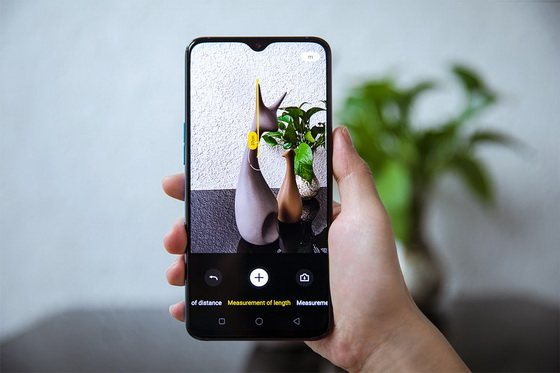
While cameras are conventionally known for taking photos, this technology lends itself to AR applications where you can use your smartphone as a viewfinder with extra information displayed on screen, perfect for measuring.
Utilizing the 3D TOF sensor we are proud to release a beta version of ‘AR Measure’ – a convenient measuring app. You can download the beta version of this APP. To download please click here.
OPPO R17 Pro users can download this APP and use for measuring length, distance, area and angles.
How to take measurements:
– Before you begin please make sure you have the latest version of Color OS installed on your OPPO R17 Pro.
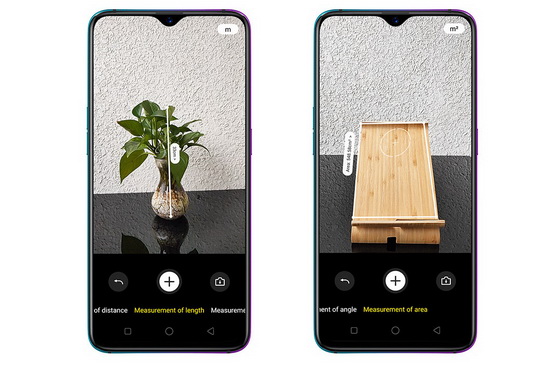
– Open AR Measure and find the object you would like to measure on the screen. Select ‘Measurement of length’.
– Align the starting measuring point inside the crosshair of the viewfinder. When you move your phone a line will be drawn, align this with your end point and you will have the distance displayed.
– To calculate whole areas of square shapes, select the ‘Measurement of area’ tool but rather than selecting two points of measurement select 4. The internal area will then be showed on the screen.
How to measure angles:
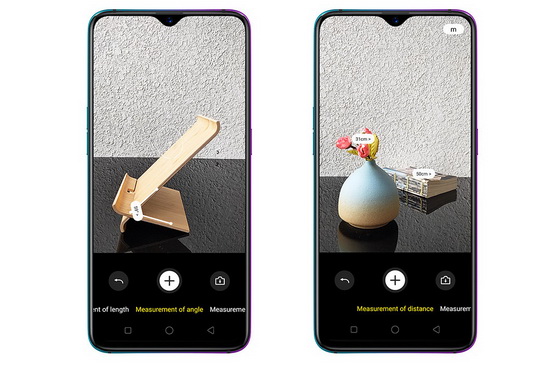
To measure angles, the process is also very simple. To do so create two lines that meet to a point along the point of the angle you would like to measure. The degrees are then displayed on the screen.
How to measure distance:
The AR Measure APP can also measure how far you are away from an object. To do so, select ‘Measurement of distance’ on the AR Measure app. The distance will then be displayed on screen.
Did this article help you? If so, please tell me in a comment what do you think about it.
Don’t miss any of our future video tutorials, follow us on Youtube. Like us on Facebook. Add us in your circles on Google+. Watch our photo albums on Flickr. Subscribe now to our newsletter.















