RKM MK36S Windows 10 Mini PC Bios Settings


You can buy Rikomagic RKM MK36S Windows 10 Mini PC from Gearbest.com for only $122.15 with free shipping world wide. You can also buy it from Aliexpress.com. 

MK36S-bios
The AMI BIOS of Rikomagic MK36S Mini PC is one of the most complete among those available on Windows Mini PCs. It really has dozens of options not available on other products. You will find also an Android section. Here you’ll find a Video & Photo Gallery with unboxing of RKM MK36S Mini PC and here is the first run of the device. High resolution photo album here.

If you need it, I have made a back-up og Rikomagic MK36S Windows 10 Mini PC. You can download it from here, here or here. (2,82 MB).

I advise everyone to make a copy of a working BIOS, if possible, before doing BIOS experiments. To do that you can simple use the provided afuwin-5.05.04 software from the links above. If you disabled USB in the BIOS, or if you did another mess in device BIOS, only overwriting NVRAM can reset BIOS settings. In this way, there is no need to open the case, to teardown the device to be able to reset the CMOS. All the actions are made from Windows environment, so your Mini PC has to be able to boot into Windows. All the following actions that are you will do next are entirely at your own risk.

BIOS details
Archive name: Rikomagic MK36S BIOS back-up
Archive size: 2,82 MB
Archive content:  afuwin-5.05.04 (afuwin32 & afuwin64) & afuwin.rom
BIOS Vendor: American Megatrends
Core version: 5.011
Compliancy: UEFI 2.4, PI 1.3
Project version: 1ARXP 0.38 X64
Build Date and Time: 11/12/2015 23:19:41  
For flashing NVRAM:
1. Download the above archive. It is better to extract the content to the disk C.
2. Open as administrator Afuwingui.exe \afuwin\32\AfuWin32\Afuwingui.exe.
3. Open original backuped bios. Uncheck default ‘Main BIOS Image’ and check only NVRAM box. Press Flash. And best of all, start a command prompt as administrator and type, for example: C:\AfuWin32\afuwin.exe BIOS.rom /N
4. Press exit and restart the PC. After boot go into the BIOS and reset settings to default.
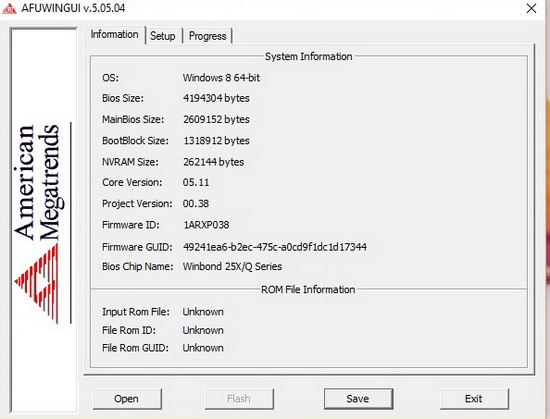
 

MK36S-bios

Did this article help you? If so, please tell me in a comment what do you think about it.

About Rikomagic We were pioneers of the Android Mini PC concept and were the first Android Mini PC provider. Based in Shenzhen, China, Rikomagic aims to revolutionize the digital media player market. Our Research and Development team has extensive expertise in consumer electronics products and the development of network media players. Our core strength remains focussed around Android PCs and Android Mini PCs, where we have a great deal of experience. Rikomagic has been at the forefront of the development of multimedia, internet connected devices which truly transform TVs into home entertainment centers. The combination of our forward-looking market research, proven technological expertise and acumen, innovation, and our mature and efficient development process has given us industry-wide recognition. We differentiate ourselves by the quality, value and sophistication of our products. Our customers trust the RKM brand to enhance their entertainment experience, and we always strive to exceed their expectations. 

Don’t miss any of our future video tutorials, follow us on Youtube. Like us on Facebook. Add us in your circles on Google+. Watch our photo albums on Flickr. Subscribe now to our newsletter.



  1. oliju says:

    how can i have accessto all this bios menus?
    I don’t have advanced and chipset

  2. Ruben says:

    Hello Chinagadgetsreviews,
    I found your site searching for this device RKM MK36S Bios settings. I have this device for a weather station Project, and I need to setup some “Boot on Power On” option on BIOS, because I need the device switch on if there are some power falliure. But the actual BIOS settings for this don’t have this option.
    Do you know if there are any possibility to enable this on this device?

    Thanks.
    Ruben

  3. Dirk says:

    I need “Boot on Power On” option on BIOS. The same problem as Ruben (above). Is there a BIOS Flash for this?

Post a comment


This firmware is for X98H TV Box with Allwiner H618 as CPU. BTW, you can now buy X98H Android TV Box from …

Oct 17, 2026

ANBERNIC is bringing a fresh reason to flip open your next gaming handheld, with the RG DDS pre-order promotion offering a $15 …

Oct 16, 2026

ASUS Republic of Gamers (ROG) is proud to announce that the ROG XBOX Ally X20 is today available for purchase. A handheld …

Oct 16, 2026

There is something immediately appealing about a communication device that brings messaging back to a physical keyboard, especially when it is designed …

Oct 16, 2026

REDMAGIC is preparing to reveal its next gaming smartphone, with the REDMAGIC 12 Pro announcement scheduled for November 3 at 13:00 CET. …

Oct 16, 2026

OUKITEL is giving the rugged smartphone category an unusual spark with the upcoming WP63, a device that combines a built-in outdoor igniter …

Oct 16, 2026

This firmware is for X96Q TV Box with Allwinner H313 as CPU. Download Android 10 stock firmware for X96Q TV Box from …

Oct 16, 2026

Best Deal Alert! You can buy Edifier R20BT USB Type-C Powered Speaker from Amazon.com or Edifier.com for a very good price. Hurry up, …

Oct 15, 2026

Good ideas rarely wait for you to open a notebook. They emerge during conversations, between meetings, or in the middle of a …

Oct 15, 2026

For dedicated music listeners, Moondrop is reimagining a classic. The new Starfield 3 departs from its predecessors’ single-driver setup and introduces an …

Oct 15, 2026

Moondrop is one of those brands in the industry that are widely known among audiophiles of all ages and budgets. From the …

Oct 15, 2026

This firmware is for X98Q TV Box with AMLogic S905W2 as CPU.  Download Android 11 Stock firmware for X98Q TV Box from …

Oct 15, 2026








