
5 Features You Might Not Know on the Galaxy Note20 and Note20 Ultra
5 Features You Might Not Know on the Samsung Galaxy Note20 and Note20 Ultra.
The latest additions to the Galaxy Note family, the Galaxy Note20 and Note20 Ultra, are packed with meaningful innovations that to help you maximize your day. From powerful productivity to premium entertainment, the Galaxy Note20 series has something for everyone.
While the stunning display, seamless syncing with Microsoft services, and upgraded S Pen have already made headlines, there’s still more to discover about Samsung’s most powerful Note series yet. Check out these five hidden tips and tricks that will help you get the most out of your experience with the Galaxy Note20 series.
Capture More of the Moment With Single Take
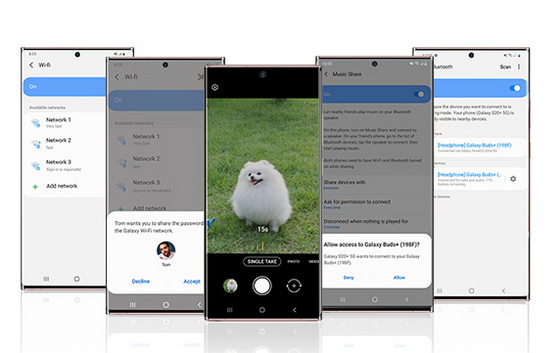
The Galaxy Note20 and Note20 Ultra’s camera introduces an improved Single Take experience. The AI-powered feature now allows you to capture up to 14 types of photos and videos simultaneously within five to 15 seconds of capture time. To use the feature, open the Camera app and tap Single Take mode from the menu options. Set your capture time by tapping the timer above the camera menu and sliding the timer bar to your desired setting. Then, tap the shutter button, pan around, and the camera will automatically capture the best clips. After finishing, tap the preview thumbnail and you will see optimized results for the scene you captured.
Make Your Personality Shine in Portraits
The upgraded Single Take mode on the Galaxy Note20 series isn’t just giving you more time to shoot – it’s also allowing you to do more with the results. Color Picking Portrait has been added to Single Take, allowing you to take studio-like portraits by choosing a background color to make your subject stand out.
Share Wi-Fi With Friends
We’ve all felt the frustration of repeatedly sharing the Wi-Fi password when having guests over. The Galaxy Note20 series removes that pain by allowing you to request Wi-Fi access information from near-field devices with people in your Contacts. Your friends can then share the password with you, making it easy to log in to new Wi-Fi networks.
Find the Highest Quality Wi-Fi Connection
When connecting to Wi-Fi in public spaces, the Galaxy Note20 series also makes it easy to find the fastest and most stable signal. When searching for Wi-Fi, the Galaxy Note20 series provides information about the login requirements and quality of the connection below the name of the network, so you can easily find the most stable, secure connection every time.
Share Your Favorite New Song With a Friend
Nothing brings friends together like a shared love of music. The Galaxy Note20 series makes sharing your latest favorite song easy with an upgraded Music Share experience. While previously the feature only allowed music to be played on devices connected to a shared friend’s phone, on the Galaxy Note20 series, you can listen to the Buds connected to your phone and the Galaxy Buds connected to your friend’s phone. Simply turn on Music Share, select your friend’s Buds, and both Buds will play the same music.
Take Control Over Video Watching With Bixby
The Galaxy Note20 series gives you more control over your video watching experience with Bixby voice control. While streaming your favorite show from your phone, you can seamlessly switch to the TV screen by telling Bixby: “Play this show on TV.” You can also switch back by saying “Play this show on mobile again” for a smooth, continuous viewing experience. If you missed a scene or want to skip ahead, voice control makes it easy by giving you the power to rewind, fast forward, pause, and play content. Voice control can also help you search for something to watch by telling Bixby to play the title of your favorite show.
Did this article help you? If so, please tell me in a comment what do you think about it.
Don’t miss any of our future video tutorials, follow us on Youtube. Like us on Facebook. Add us in your circles on Google+. Watch our photo albums on Flickr. Subscribe now to our newsletter.















