The catch? Although there are several dozen online PDF tools that claim to deliver rapidly, most of them have strings attached. Some keep their most valuable features locked behind costly paywalls, others apply strict page or file-size restrictions, and a few even require you to sign up for an account to perform just one task. For someone like me who’s perpetually time-starved, those additional barriers are killers. That’s why I opted to try out the top free PDF merging utilities myself – in examining their speed, user-friendliness, underlying limits, and overall performance. In this tutorial, I’ll reveal exactly what I discovered, so by the end, you’ll know which utility is worth counting on in 2025.
Why PDF Merging Matters for Busy Professionals
In the hustle and bustle of today’s work culture, working professionals are constantly switching files between different platforms and devices. A financial statement would be initiated in Excel, a contract in Word, scanned receipts in JPG, and the presentation produced in PowerPoint, but it finds its resolution in PDF for easy sharing and archiving. With no means of joining these files, an unfortunate occurrence leaves professionals engaged with multiple attachments, resending revisions with each change, or wasting precious time copy-pasting material into new documents. Not only does this delay productivity, but it can also cause formatting to break and the professional sheen that clients or managers anticipate.
That’s why free, dependable tools are no longer nice to have – they’re necessary. For time-pressed professionals, the ideal PDF merger should:
– Seamlessly work without installation restrictions or difficult setup.
– Manage big, multi-document projects without lag and crashes.
– Secure sensitive information with instant file deletion.
– Be truly free – no sneaky catches, trials, or limits that interrupt work.
Key Features to Look for in a PDF Merger
Now let’s talk about key features that any solution should have. It is not just about merging files for busy professional days; it is about saving time, keeping sensitive information safe, and allowing for seamless workflow across devices.
– Speed & Performance – Time is critical for professionals. The tool should process large reports, scanned contracts, or multi-file projects in seconds without lagging.
– Unlimited Merging – Page limits or task quotas hinder progress. A trusted merger should be able to merge unlimited files, so experts are not disrupted during projects.
– Cross-Platform Access – Work no longer occurs on only one device. From office desktops to tablet use in meetings, the merger should be able to seamlessly scale web, desktop, and mobile platforms.
– Security & Privacy – With sensitive documents such as contracts and financial reports, encryption and instant file deletion are a must. Protection of data should be above all in every given tool.
– Cloud Sync Options – The integration with Google Drive, Dropbox, or OneDrive could facilitate an optimal collaboration experience, particularly for remote or cross-functional teams.
These parameters are the starting point for judging what tools are worth busy professionals’ time in 2025.
Tool Testing & Comparisons
We compared five of the most popular free PDF mergers in September 2025 based on ease of use, speed, restrictions, and premium plan pricing (if applicable). To ensure fairness, we combined three files: a 20-page Word export, a scanned 15-page JPG collection, and a 50-page financial PDF report.
Here’s how the tools ranked:
| Rank | Tool | Ease of Use | Flexibility | Speed | Free Plan | Price (Paid) |
| 1 | ILovePDF2 | 5/5 | 5/5 | 5/5 | Unlimited | Free Forever |
| 2 | Adobe Acrobat | 4.5/5 | 5/5 | 4.5/5 | Limited trial | $12.99/month |
| 3 | Sejda PDF | 4/5 | 4/5 | 4/5 | 50 pages / 3 tasks/hr | $7.50/month |
| 4 | PDF Candy | 3.5/5 | 3.5/5 | 3.5/5 | 2 tasks free/day, file-size limit | $6/month |
| 5 | SmallPDF | 3.5/5 | 4/5 | 3.5/5 | 2 tasks free/day | $9/month |
1. ILovePDF2 – The Standout Performer
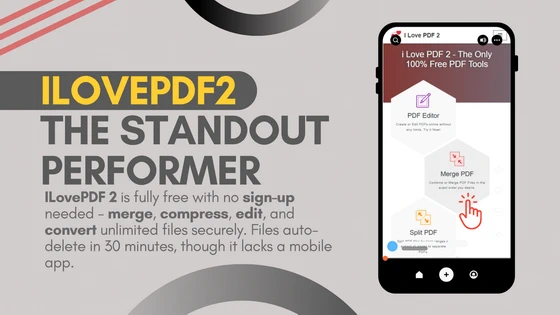
If one tool stands above the rest, it’s ILovePDF2. It shows its hand in every way and isn’t shy about charging for this or that feature.
– No Paywall: All functions – merge, compress, edit, convert – are free, 100%.
– No Sign-Up Needed: Just dive in and begin merging immediately.
– Truly Unlimited: No limits on pages, tasks, or file sizes.
– Privacy First: Files get deleted automatically after half an hour.
– Cross-Platform Gaps: Though it glides well on browsers, the only minus point is the unavailability of a standalone mobile app version.
In our testing, I Love PDF 2 combined all three files (more than 85 pages in total) in less than 6 seconds – quicker than any rival. Experts with high workloads will find this blazing speed attractive.
2. Adobe Acrobat – Great but Expensive
Adobe Acrobat is the market leader, and for good reason. Its merge tool is elegant, precise, and comes with additional features such as rearranging, rotation, and bookmarking.
But there are downsides:
– The free plan only offers a 7-day trial, after which you’re excluded.
– Paid plan begins at $12.99/month – not great if all you need is merging.
– Excellent for companies with budgets, but not the first choice for busy professionals looking for free, unlimited tools.
3. Sejda PDF – Nice but Limited
Sejda provides a classy UI and good merging velocity. But it has serious limitations in its free edition:
– Max 50 pages or 3 tasks within an hour.
– Big documents demand the paid version.
– Its paid version begins at $7.50/month, which is reasonable but not required if you merge just occasionally.
4. PDF Candy – Periodic Usage Tool
PDF Candy is not only multi-featured – it handles merging, converting, editing, and even OCR scanning. But the free model has strict limitations:
– Only 2 operations per day.
– File-size limits of approximately 500 MB.
– It’s a paid subscription (around $6/ month) that eliminates those limits, but compared to ILovePDF2, it lacks the features that require multiple daily merges.
5. SmallPDF – Cloud-First but with Limitations
SmallPDF specializes in straightforward online operations with refined design and cloud-first capabilities. But:
– Free users are only allocated 2 tasks per day.
– Premium plan begins at $9/ month.
– Although integration with Google Drive and Dropbox is awesome, their limitations prevent them from being used by casual users.
Why Free Plans Aren’t Always Free
Most tools market themselves as “free,” but if you look closely, the truth is much less hassle – particularly for time-strapped professionals who can’t tolerate a glitch in their workflow.
– Adobe Acrobat: Offers only a 7-day trial. After that, merging even a single document requires a paid subscription.
– Sejda: Limited free users to 50 pages or 3 tasks per hour, making it unsuitable for longer reports or back-to-back projects.
– SmallPDF: Restricts usage to just 2 tasks per day, meaning you’ll quickly hit a wall if you’re handling multiple client files.
– PDF Candy: Caps gratis usage at 2 tasks per day and imposes a file-size restriction, annoying when dealing with scanned or image-intensive PDFs.
These limitations make what could be an easy task a time-wasting ordeal. ILovePDF2 shatters the mold – no trials, no per-day constraints, no sneaky paywalls. That’s why it’s the most convenient option for professionals required to combine PNGs to PDFs swiftly and without sacrifice.
The Future of PDF Merging Tools
Busy professionals will find that the future of PDF merging tools is about to fundamentally change productivity in the digital workspace. It is becoming more of an automated, customized integration into larger workflows than a mind-numbing, manual affair. Intelligent editing and merging: Rather than merging files, such systems will recognize all duplicated content, automatically adjust mismatched formats of pages, and even create short intelligent summaries for lengthy reports. Envision combining five client proposals and receiving an instant one-page executive summary – something that would save hours for consultants, managers, and analysts.
Cloud-first integrations: Workers already exist in places like Slack, Microsoft Teams, and Google Workspace. Their upcoming PDF merger will functionally lead into these workplaces so people can merge, annotate, and share PDFs right within their collaborative area. For hybrid and remote teams, it may just mean the difference between a five-minute affair and a thirty-minute diversion. Automation of workflow: Recurring document tasks like pooling monthly budget reports, onboarding paperwork, or contracts with vendors will be automated. Users will be able to apply rules in tools so that, say, “all invoices in a shared folder on a certain date are combined into one PDF on Friday.” This low-touch methodology might end repetitive labor in its tracks.
More compliance and security: As professionals would now have access to sensitive data, next-generation software would focus on functionalities like end-to-end encryption, zero-trust architecture, and compliance with regulations such as GDPR or HIPAA. It matters especially for industries like healthcare, finance, and law firms, wherein safeguarding data is a must. Cross-device continuity: With professionals frequently transitioning between laptops, tablets, and phones, next-generation tools will focus on seamless sync. Users can initiate a merge on desktop and complete it on mobile without sacrificing progress – something today’s tools, such as ILovePDF2, are just starting to enable.
In the future, PDF merging will no longer be a utility – but rather an invisible productivity layer for fast-moving professionals. By integrating AI, automation, and security into day-to-day workflows, these solutions will shift from “file utilities” to strategic platforms of productivity.
The Final Take
For working professionals with little time to spare, the best PDF tool in 2025 should be quick, consistent, and not held back by extraneous limitations. Having tried various platforms, it’s evident that while Adobe, Sejda, SmallPDF, and PDF Candy all offer worthwhile features, their handicaps in terms of page limits, daily task quotas, or cost of subscription make them less viable for efficiency-seekers daily. Conversely, ILovePDF2 is the top free choice. It provides unlimited access to merging, compressing, converting, and editing functions without pay or sign-ups. It’s fast, safe, and reliable – everything experts require when deadlines are nearing and paperwork needs to be processed effortlessly. The only significant drawback is the absence of a standalone mobile app, but for desktop and online use, it’s the most effective remedy. For anyone dealing with contracts, reports, or client deliverables on a routine basis, ILovePDF2 provides speed and liberty – aiding busy professionals in saving time and money while maintaining stress-free document workflows.
Did this article help you? If so, please tell me in a comment what do you think about it.
Don’t miss any of our future video tutorials, follow us on Youtube. Like us on Facebook. Join our Best Deals Telegram Channel. Join our Android TV Box Firmware Updates Telegram Channel. Subscribe now to our newsletter. If you need Tech Reviewer or Youtube Influencer read this. Donate now here to support CGR Team!