Best Deal Alert! You can now buy Mobile Pixels Tetra Keyboard from Mobilepixels.us with 50% off, for only $199.99 (regular price: $399.99). Hurry up, limited time offer!

Meet Mobile Pixels Tetra Keyboard
The portable keyboard market has become increasingly crowded with compact mechanical boards, ultra-thin Bluetooth accessories, and foldable productivity tools that promise to transform mobile workflows. Yet very few products attempt to fundamentally rethink how a modern workspace should function. The Mobile Pixels Tetra Keyboard is one of those rare devices that arrives with genuinely ambitious ideas. Rather than simply offering another wireless keyboard with ergonomic aspirations, the Tetra combines a split ergonomic layout, modular magnetic construction, and an integrated 8-inch multi-touch display into a single ecosystem designed for multitasking professionals, digital nomads, developers, creators, and even gamers seeking a more adaptable setup. After spending extended time using the Tetra across work sessions, travel scenarios, media consumption, and general productivity tasks, it became clear that this is not merely a novelty accessory built around an attention-grabbing touchscreen. Instead, it is a carefully considered productivity platform that explores how ergonomic typing, modular hardware, and customizable software can coexist in a remarkably compact form factor.
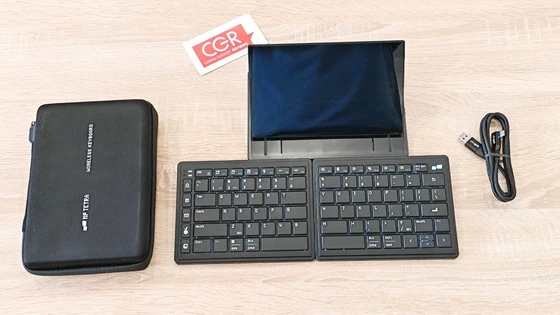
Mobile Pixels delivers an unboxing experience that immediately reinforces the premium and modular nature of the Tetra ecosystem. The packaging is clean, minimalistic, and modern, with a strong emphasis on portability and workflow customization rather than flashy marketing theatrics. Inside the box, the presentation feels orderly and purpose-driven. Included alongside the Tetra keyboard system are a USB-C cable with a USB-A adapter, a travel pouch, and the necessary user documentation. The first impression upon lifting the components out of the packaging is how surprisingly solid the entire setup feels considering its integrated display and modular construction. The magnetic attachment mechanism immediately becomes one of the standout details during setup. The components snap together with reassuring precision and alignment, giving the impression of a product that has been engineered carefully rather than assembled around a concept. Unlike many productivity accessories that require lengthy configuration procedures or complicated onboarding experiences, the Tetra feels approachable from the very beginning.
The Tetra’s defining characteristic is unquestionably its three-piece modular architecture. The keyboard consists of two independent keyboard halves and a central 8-inch touchscreen module that can operate together or separately depending on the user’s workflow preferences. What makes this design particularly impressive is that the modularity never feels like a gimmick. Every configuration serves a legitimate ergonomic or productivity-oriented purpose. In Split Mode, the two keyboard halves can be positioned freely to allow a more natural shoulder-width typing posture. This significantly reduces inward wrist angles and immediately creates a more relaxed typing experience during long sessions. Splice Mode magnetically combines all three components into a unified setup with the touchscreen positioned between the keyboard halves. This arrangement not only looks futuristic and visually striking, but also provides practical benefits by placing shortcuts, controls, and secondary applications directly within reach. Stacked Mode transforms the device into a more traditional compact keyboard by magnetically joining the two keyboard halves while allowing the display to function independently. This flexibility makes the Tetra feel adaptable in ways that traditional keyboards simply cannot replicate. The magnetic attachment system deserves considerable praise. The modules align smoothly and lock securely into place without wobble or instability. The magnets feel strong enough for confident travel use while remaining easy to separate when switching between configurations. Despite its lightweight construction and portable nature, the Tetra does not feel fragile. The chassis maintains impressive rigidity, and the soft-touch finish contributes to a refined tactile experience while resisting fingerprints reasonably well. The absence of hinges also eliminates one of the most common durability concerns associated with foldable keyboards. The included travel pouch complements the portable design philosophy nicely, while the stacked magnetic arrangement allows the keyboard to fit comfortably into backpacks and messenger bags without creating awkward bulk.
The ergonomic advantages of the split layout become apparent almost immediately during real-world usage. Unlike many so-called ergonomic keyboards that only introduce minor design adjustments, the Tetra provides genuine positional freedom. Typing with the keyboard halves positioned naturally at shoulder width creates a noticeably more relaxed posture for the wrists, elbows, and shoulders. During extended writing sessions, spreadsheet work, coding tasks, and general office productivity, the reduction in wrist strain becomes increasingly noticeable. Users transitioning from traditional laptop keyboards may require a short adaptation period, but the familiar 65% layout helps minimize the learning curve. The spacing feels intuitive, and muscle memory adjusts faster than expected. The scissor switches, offering approximately 1.3mm of key travel, are clearly tuned for productivity rather than enthusiast-level mechanical feedback. However, this proves to be an advantage for the audience the Tetra targets. The switches provide crisp actuation, quiet operation, minimal wobble, and fast rebound response, making the keyboard exceptionally well-suited for offices, shared workspaces, libraries, and travel environments. Typing speeds remained consistently high throughout long-term testing, and fatigue levels were noticeably lower compared to compact non-ergonomic keyboards used during similar workloads. The subtle backlighting also provides sufficient visibility in dim environments without becoming distracting or excessively draining battery life.
At first glance, the integrated touchscreen risks appearing like a marketing-driven novelty feature. In practice, however, it quickly becomes one of the most genuinely useful aspects of the entire system. The 8-inch multi-touch display, featuring a 1280×800 resolution and a practical 16:10 aspect ratio, works exceptionally well as a dedicated secondary productivity hub. Rather than attempting to function as a primary display, it excels when used for supporting tasks and persistent utility applications. During extended use, the display naturally evolved into a permanent location for communication apps, calendar widgets, Spotify controls, notes, reminders, system monitoring tools, and workflow shortcuts. Keeping secondary windows constantly visible without cluttering the main monitor creates a surprisingly efficient multitasking environment. Touch responsiveness feels fluid and accurate, while the display itself offers respectable brightness and viewing angles for productivity-focused indoor usage. The additional screen real estate may sound modest on paper, but in practice it meaningfully changes how workflows can be organized.
The Tetra supports Bluetooth connectivity for up to three devices simultaneously, which significantly enhances its practicality in modern multi-device environments. Switching between systems proved reliable during testing across Windows laptops, MacBooks, tablets, and smartphones. The ability to move seamlessly between devices without constant re-pairing frustrations greatly improves the overall user experience, particularly for professionals working across multiple operating systems throughout the day. Compatibility with Windows, macOS, and Ubuntu further broadens the keyboard’s appeal, especially among developers and productivity-focused users. Battery life also proved impressive during long-term use. Each keyboard half contains its own 1200mAh battery, and even with frequent touchscreen usage and Bluetooth connectivity enabled, the system comfortably handled multiple days of productivity before requiring recharging. The magnetic pogo-pin charging system is another elegant implementation that reinforces the cohesive nature of the overall design. When connected together, the modules charge cleanly and conveniently without unnecessary cable clutter.
One of the most impressive aspects of the Tetra is that its value becomes more apparent over time. Many productivity accessories create a strong first impression before gradually fading into irrelevance, but the Tetra evolves into a more useful tool as workflows become increasingly personalized. The touchscreen gradually transforms from an experimental feature into an essential workflow companion. The split layout consistently reduces typing fatigue during long editorial and productivity sessions. The modular arrangements adapt naturally depending on whether the environment involves desk work, travel, or limited café workspace. Perhaps the Tetra’s greatest achievement is that it encourages healthier ergonomic habits without forcing major sacrifices in portability or convenience. It successfully bridges the gap between ergonomic workstation equipment and travel-friendly productivity accessories in a way that few competitors currently attempt. Even gaming benefits from the split design. By allowing the right keyboard half to move aside, the Tetra creates more natural mouse positioning and reduces shoulder strain during extended gameplay sessions. While not designed specifically as a gaming keyboard, its ergonomic flexibility translates surprisingly well into gaming comfort.
Feel the satisfaction of precise typing with Tetra Keyboard’s tactile keystrokes. Each key press delivers the perfect amount of feedback, ensuring an unmatched typing experience.The Mobile Pixels Tetra Keyboard is one of the most creatively ambitious productivity peripherals released in recent years. It successfully combines ergonomic typing principles, modular hardware engineering, touchscreen multitasking, and portable wireless functionality into a cohesive ecosystem that feels far more mature and refined than its unconventional design initially suggests. Its greatest strength lies not in any single feature, but in how effectively those features complement one another. The ergonomic split layout improves comfort during long sessions, the touchscreen enhances multitasking efficiency, the customizable software expands productivity potential, and the modular magnetic construction makes the entire system genuinely practical for mobile use. The Tetra will not replace traditional mechanical keyboards for every user, nor is it attempting to. Instead, it targets professionals, creators, remote workers, and multitaskers seeking a more adaptable and ergonomic workflow solution without sacrificing portability. For users willing to embrace a different approach to desktop productivity, the Mobile Pixels Tetra Keyboard delivers a refreshingly forward-thinking experience that feels genuinely innovative rather than artificially experimental.
Mobile Pixels Tetra Keyboard Main Features
– Ergonomic Split Design: Tetra’s split keyboard layout encourages natural hand positioning, reducing wrist strain and improving posture; Whether you’re working long hours or gaming, this foldable keyboard is designed to keep you comfortable all day
– Integrated 8″ Multi-Touch Display: Work smarter with a vibrant 1280×800 touchscreen that serves as your control hub; Access shortcuts, manage tools, and display essential apps like calendars and chats, making multitasking easier and more efficient
– Three Modular Layouts for Every Task: Switch between split, splice, and stacked modes easily; Whether you need extra space, centralized tools, or a compact setup, Tetra ergonomic keyboard gives you unmatched flexibility in any environment
– Custom Hotkeys for Unleash Productivity: Supercharge your productivity with 32 customizable keys; Easily map shortcuts, launch apps, and create macros with Tetra app; Personalize icons, colors, and layouts to build a workflow that’s uniquely yours
– Compact, Durable, Travel-Ready: Tetra bluetooth keyboard’s portable design easily fits in your bag, perfect for life on the go; With Bluetooth support for up to three devices and a long-lasting battery, it’s the ultimate companion for work or play.
Mobile Pixels Tetra Keyboard Highlights
Ergonomic split layout for a comfortable typing experience
Integrated 8-inch 16:10 multi-touch display
Customizable hotkeys
Instantly activate commands with a single tap
User-friendly software
Long-lasting battery life
Connect up to 3 devices.
Mobile Pixels Tetra Keyboard using scenarios
– Digital Nomad Working From Cafés and Airports. The Tetra’s compact modular design makes it ideal for constantly changing workspaces. In crowded cafés or airport lounges, the Split Mode allows users to position the keyboard halves comfortably even on small tables, while the integrated 8-inch touchscreen can display Slack, emails, or calendars without occupying the main laptop screen. The lightweight magnetic construction also makes packing and setup extremely fast between destinations.
– Remote Professionals Managing Multiple Apps Simultaneously. For remote workers juggling Zoom calls, spreadsheets, project management tools, and messaging apps, the integrated touchscreen becomes a dedicated productivity dashboard. Users can keep Microsoft Teams, Spotify controls, reminders, or workflow shortcuts permanently visible while preserving their primary monitor entirely for active tasks.
– Developers and Programmers During Long Coding Sessions. The ergonomic split layout significantly improves comfort during extended coding marathons. Developers can reduce wrist tension by positioning the keyboard halves naturally at shoulder width, while the touchscreen serves as a persistent terminal monitor, documentation viewer, Git controls panel, or macro launcher for repetitive coding actions.
– Video Editors and Creative Professionals. Creative workflows benefit heavily from the Tetra Board App’s customizable hotkeys. Editors can assign shortcuts for timeline scrubbing, rendering, transitions, color grading tools, or layer controls directly to the touchscreen interface. Instead of memorizing dozens of keyboard combinations, commonly used functions become instantly accessible with a single tap.
– Hybrid Office Workers Switching Between Devices. The Tetra’s ability to connect to up to three devices simultaneously makes it perfect for users balancing work laptops, tablets, and smartphones throughout the day. Switching between a Windows workstation, MacBook, and tablet happens smoothly without constant Bluetooth re-pairing frustrations.
– Students Managing Research and Note-Taking. Students working on essays, presentations, or research projects can use the touchscreen to display citations, notes, calculators, or reference materials while maintaining full-screen focus on writing tasks. The compact setup also works exceptionally well in libraries and dorm rooms where desk space is limited.
Streamers and Content Creators. The touchscreen can function as a dedicated streaming command center. Users can create custom scene-switching panels, launch recording software, trigger overlays, mute microphones, or monitor chat activity directly from the Tetra display without cluttering their primary gaming monitor.
– Travelers Needing a Portable Secondary Display. Unlike traditional compact keyboards that only provide typing functionality, the Tetra effectively adds a secondary display to almost any mobile setup. During hotel stays, train rides, or temporary workstations, the integrated screen provides multitasking capabilities normally unavailable on portable setups.
– Writers and Journalists During Extended Writing Sessions. Long-form writing benefits greatly from the Tetra’s ergonomic comfort. Reduced wrist strain becomes noticeable after several hours of typing, while the quiet scissor switches make the keyboard suitable for shared environments like press rooms, libraries, or coworking spaces. The touchscreen can simultaneously host research tabs, outlines, or live communication apps.
– Gamers Seeking Better Ergonomic Mouse Positioning. Although not marketed as a gaming keyboard, the split layout creates surprisingly effective ergonomic advantages during gameplay. By moving the right keyboard half further aside, players gain more natural mouse positioning and reduced shoulder strain during extended gaming sessions, especially in FPS and strategy titles.
– Productivity Enthusiasts Building Custom Workflow Systems. Power users who rely on automation tools and macros can transform the touchscreen into a fully personalized workflow hub. Launching applications, opening folders, executing scripts, controlling smart home devices, or managing productivity routines becomes dramatically faster through customizable touch controls and hotkeys.
– Minimalist Desk Setup Users Seeking Cleaner Workspaces. The Tetra helps eliminate clutter by combining ergonomic typing, touchscreen controls, shortcuts, and secondary-display functionality into a single portable ecosystem. Users pursuing minimalist desk aesthetics can reduce reliance on external macro pads, tablets, or secondary monitors while maintaining a highly functional multitasking environment.
Mobile Pixels Tetra Keyboard Installation
Step 1. Powering on. Simply flip the switch located on the back of the keyboard to the solid square icon.
Step 2. Pairing. Long press the F1 key to pair with device 1, F2 with device 2 etc. Depending on your device’s OS, press Fn + 1 for Windows 11, Android key layout; press Fn + 2 for macOS key layout. *Or Fn + 3 for Windows 10.
Step 3. Charging. There are two ways to charge the keyboards: Connect the left and right keyboards via the pogo pins by docking the two halves together. Keyboard should charge via the USB-C port located on the left side of the keyboard, the under-glow light should start pulsing & connect the left and right keyboards to the display by docking the two halves to its sides. Keyboard should charge via the TETRA display. The under-glow light should start pulsing.
Step 4. Display Setup. The Display needs to be connected to USB-A or USB-C port that supports USB 3.1 standard. If host supports Thunderbolt or DisplayPort enabled USB-C. Device will be plug-and-play.
Step 5. Positioning. There are several recommended configurations of keyboards placement. You can dock the two halves together, dock them to the display or split them up to use it. Most importantly, place the two halves of the keyboard in a comfortable position in front of you. A good starting point is to align each half with your shoulders. Adjust the angle and distance between the keyboard halves to reduce strain on your wrists and arms. It may take some time to get used to typing on a split keyboard. Practice regularly to build muscle memory.
Step 6. Software and Drivers. To get the most out of your MP Tetra Keyboard, please download and install the Tetra Board software and necessary drivers for Windows and macOS.
Mobile Pixels Tetra Keyboard Specifications
Brand: Mobile Pixels
Model: Tetra
Size: 172 mm × 132 mm × 13.8 mm
Weight: 200g (Left), 196g (Right)
Key Travel: 1.3 ± 0.3 mm
Peak / Bottom-out Force Peak: 64 ± 12 gf / Bottom-out: 92 ± 10 gf
Keycap Type: ABS chamfered backlit keycap
Key Number: 42 (Left) + 43 (Right)
Switch Type: Scissor Switches
Battery: 1200 mAh on each keyboard
Charging Current: 134mA (Dock), 320mA (USB-C)
Mobile Pixels Tetra Display – Technical Specifications
Model: MP TETRA DISPLAY
Size: 207 mm × 136 mm × 19 mm
Weight: 498g
Display Type: IPS (LCD)
Refresh Rate: 60Hz
Response Time: 30ms
Resolution: 1280 × 800 RGB
Display Color: 16.7M
Color Gamut: 60% NTSC
Charging Current: 134mA (Dock), 320mA (USB-C)
Luminance: 300 nit
Power Consumption: 6.2W
MP TETRA Board software
MP TETRA Board is a content controller software that allows you to easily switch between different scenes, actions, and tools with the touch of a virtual button. The program has customizable keys that you can assign to various functions, such as adding text, launching applications, opening webpages, activating hotkeys, controlling your devices, and more. MP TETRA Board is designed to integrate with your most frequently used software, and in doing so, enhance their functionalities. The Tetra Board application is one of the strongest elements of the entire ecosystem. Peripheral software often suffers from poor optimization or overly complicated interfaces, but Mobile Pixels has clearly focused on accessibility and practicality here. The software allows users to create custom dashboards, assign macros, launch applications, open folders, configure shortcuts, and personalize layouts with custom icons and colors. The touchscreen can effectively become a dedicated command center tailored entirely to the user’s workflow. Creative professionals can map editing shortcuts, streamers can build scene-switching controls, and productivity-focused users can automate repetitive tasks with remarkable efficiency. Each board supports up to 32 customizable keys, and switching between profiles feels smooth and responsive. Importantly, the software balances functionality with usability. Advanced options are available for power users, but the interface remains approachable enough for casual users who simply want quick productivity enhancements without spending hours configuring layouts. Download it from here.
Package Content
1 x Mobile Pixels Tetra Keyboard Left keyboard half
1 x Mobile Pixels Tetra Keyboard Right keyboard half
1 x Mobile Pixels Tetra Keyboard Central display/tablet dock section
1 x USB Type-C Charging Cable (USB-A to USB-C)
2 x Tent & Tilt Magnetic Block
1 x Protective Carrying Case
1 x User Manual
1 × Packing Box
Unboxing Photo Album with Hi-Rez images here. Official webpage here. Here you can read more about Mobile Pixels brand.




About Mobile Pixels. Mobile Pixels Inc. was founded in 2018. Founder, Jack, was constantly frustrated by the lack of a secondary monitor that could help him work more efficiently. Feeling strangely nostalgic about the work monitor he used at his previous job, he decided to build a laptop monitor from a broken laptop. That is how our first product Mobile Pixels Duex was born. We combined the best technology in the market to create a lightweight portable monitor that increases your productivity and makes working efficient.
Did this article help you? If so, please tell me in a comment what do you think about it.
Don’t miss any of our future video tutorials, follow us on Youtube. Like us on Facebook. Join our Best Deals Telegram Channel. Join our Android TV Box Firmware Updates Telegram Channel. Subscribe now to our newsletter. If you need Tech Reviewer or Youtube Influencer read this. Donate now here to support CGR Team!