Best Deal Alert! You can now buy TickTime Cube Pomodoro Productivity Timer from Amazon.com / Amazon.de with 10% off using the coupon available on page. Hurry up, limited time offer!
Meet TickTime Cube Pomodoro Productivity Timer
The TickTime Cube is not your ordinary timer – it’s a game-changer in productivity management. Designed for individuals who thrive on structured work intervals, this smart cube integrates the Pomodoro technique, an instant stopwatch, and a customizable countdown feature into a sleek, modern design. With intuitive controls, a USB-C rechargeable battery, and multiple time settings, the TickTime Cube is ideal for students, professionals, gamers, and anyone looking to optimize their time management.
Right out of the box, the TickTime Cube impresses with its minimalist yet futuristic design. Made from durable ABS material, the cube measures just 43mm x 43mm x 43mm, making it ultra-compact and portable. Despite its small size, the cube feels sturdy and well-built. Available in various colors, it suits different aesthetic preferences. The dual LED display is clear and bright, showing the countdown timer with a modern touch. One of the coolest design aspects is the magnetic surface, which allows users to stick it onto metal surfaces like whiteboards, refrigerators, or even gym equipment for convenience.
The most innovative feature of the TickTime Cube is its flip-to-start functionality. Instead of manually setting a timer, users can simply place the cube on a desired side, and it will automatically start counting down. The cube supports preset countdowns like 3, 5, 10, 15, 25, and 30 minutes, making it perfect for short bursts of work, study sessions, or even workout intervals. For those who use the Pomodoro technique, the 25-minute work + 5-minute break cycle is built right into the TickTime Cube. This is fantastic for boosting productivity while preventing burnout, whether you’re studying, coding, or writing. In addition to its preset times, the TickTime Cube lets users manually set custom countdowns or use it as an instant stopwatch. This versatility makes it ideal for cooking, gaming, fitness, and meditation.
With a 550mAh lithium battery, the TickTime Cube provides up to 20 hours of continuous use per charge and an incredible 180-day standby time. It charges via USB-C, ensuring fast and efficient recharging. A small but useful feature, the built-in magnet lets you attach it to metal surfaces, making it great for kitchens, whiteboards, or gym equipment.
The TickTime Cube is a fantastic tool for anyone looking to improve productivity, time management, and focus. With its smart flip-to-start mechanism, built-in Pomodoro timer, and long battery life, it’s a must-have for students, professionals, and even fitness enthusiasts.
If you’re someone who struggles with distractions and wants a fun, engaging, and effective way to manage time, the TickTime Cube is absolutely worth it.
⭐ Our Rating: 9.5/10 – Highly Recommended!
TickTime Cube Pomodoro Productivity Timer Main Features
– Easy to use: turn over to start the countdown. The Pomodoro timer has 4 preset countdown times (1/3/5/10 minutes), which are activated by turning the timer with the number upwards. It also has an additional countdown of 60/15/25/45 minutes (long press the fingerprint icon next to the number). Change the way you manage your time and use every minute.
– Multiple timing modes: timer provides countdown, count-up and pomodoro modes. Apart from the 8 preset countdowns and the custom countdown, you can start the count-up mode by setting the timer from bottom to top, and stop it by turning the screen upwards. Pomodoro mode is activated by long pressing the fingerprint icon next to the number 5. Stay focused and productive. The timer range is 00:01 to 99:59.
– Pause & Continue, Mute – Vibration & adjustable tone alarm. Simply turn the desk timer to the front screen to stop the countdown. To resume the countdown, simply turn it over again. Of course, you can also pause or resume the timer by pressing the on/off button. Adjust the sound to the desired volume and choose from mute, vibration and adjustable tone alarm. More options, more comfort.
– Compact, magnetic and rechargeable: the size of the timer is 1.7 x 1.7 x 1.7 inches, fits in your palm and weighs only 1.9 ounces. The timer has a magnetic base that can be attached to the fridge or any metal surface, leaving your hands free while tracking the time. It is rechargeable, with a long-lasting lithium battery, saving you the extra cost of buying batteries and taking a step towards environmental protection.
– Suitable for different scenarios: the digital timer is a perfect tool for office, meetings, children, learning, reading, cooking and more. (Usage instructions: this timer cannot be used during charging and is not waterproof. Please charge the device for 12 hours before first use and 4 hours for further use. After the charging is complete, disconnect the charging cable and press the on/off button to turn on the timer)
TickTime Cube Pomodoro Productivity Timer Highlights
✔ Easy to use with flip-to-start technology
✔ Built-in Pomodoro timer for productivity
✔ Customizable countdown and stopwatch modes
✔ Multiple alert modes: sound, mute, vibration
✔ Long battery life (20 hours per charge, 180-day standby)
✔ USB-C charging for fast power-up
✔ Compact and portable design
✔ Magnetic surface for easy attachment
Real-life scenarios where TickTime Cube Pomodoro Productivity Timer can be quite useful
– Cooking & Meal Preparation. Set timers for baking, boiling, and meal prep. Keep track of multiple dishes at once.
– Office & Remote Work Productivity. Stay focused using the Pomodoro method (work 25 minutes, break 5 minutes). Manage emails, reports, and meetings efficiently. Reduce procrastination and improve task completion.
– Studying & Exam Preparation. Helps students focus in 25-minute study sessions with short breaks. Keeps track of revision time for different subjects. Silent mode allows use in libraries or quiet environments.
– Reading & Learning New Skills. Set a time limit for reading books, taking online courses, or language learning. Prevents fatigue by breaking sessions into manageable chunks.
– Parenting & Kids’ Time Management. Encourage kids to finish homework within a set time. Manage screen time by setting limits for gaming and social media. Use for household chores to keep kids engaged and motivated.
– Workout & Fitness Routines. Time HIIT workouts, yoga, or stretching sessions. Set countdowns for rest periods between exercises.
– Gaming & Screen Time Control. Manage playtime limits for kids and adults. Time gaming sessions to prevent overuse.
– Meditation & Mindfulness. Set a timer for meditation, breathing exercises, or deep work sessions. Helps maintain mental clarity without checking the clock.
– Creative Projects (Writing, Drawing, Music). Maintain focus while writing, painting, or composing music. Avoid burnout by setting timed creative sprints.
– Meeting & Presentation Timing. Set time limits for business meetings, presentations, and interviews. Prevent meetings from running too long.
TickTime Cube Pomodoro Productivity Timer Specs
Brand: TickTime
Model Name: Cube
Model number: TK1-Bl1
Type: Digital Timer
Design: Cube-shaped with auto-start feature when flipped
Display: LED screen
Display: 1.57×1.57in (4x4cm)
Timers: 1, 3, 5, and 10 minutes
Battery type: lithium
Battery capacity: 550 mAh
Charging port: USB Type-C
Min. Battery life: 25 hours
Max. Standby Time: 180 days
Charging current: 0.5A (Max)
Charging Time: 2-3 hours, PD charging supported
Alarm Type: Beep sound
Volume Levels: Adjustable
Silent Mode: Available for noise-free operation
Shell material: ABS
Weight: 55g
Size: 43 x 43 x 43 mm
Color Options: Black, White, Blue, Pink
Product code: X001S04PKZ
Package Content
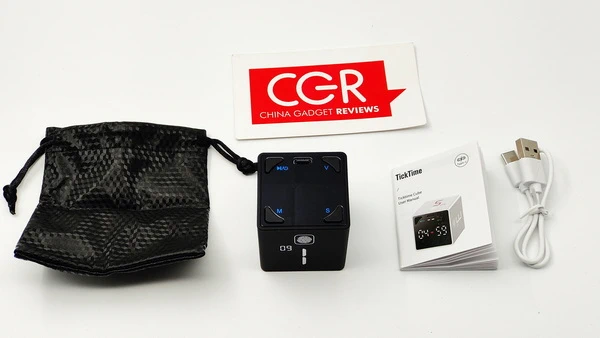
1 x TickTime Cube Pomodoro Productivity Timer
1 x USB Type-C Charging Cable
1 x Multi-language User Manual (EN / CN /DE)
1 x Storage Bag
1 x Packaging Box
Photo gallery full album here. Official page here.


Did this article help you? If so, please tell me in a comment what do you think about it.
Don’t miss any of our future video tutorials, follow us on Youtube. Like us on Facebook. Join our Best Deals Telegram Channel. Join our Android TV Box Firmware Updates Telegram Channel. Subscribe now to our newsletter. If you need Tech Reviewer or Youtube Influencer read this. Donate now here to support CGR Team!